‘Apple Frames’ is a comprehensive new shortcut custom-built by Federico Viticci from MacStories, that allows you to easily frame screenshots taken on every Apple device. The shortcut supports both portrait and landscape orientations on iOS devices and can frame both individual screenshots and groups of screenshots.
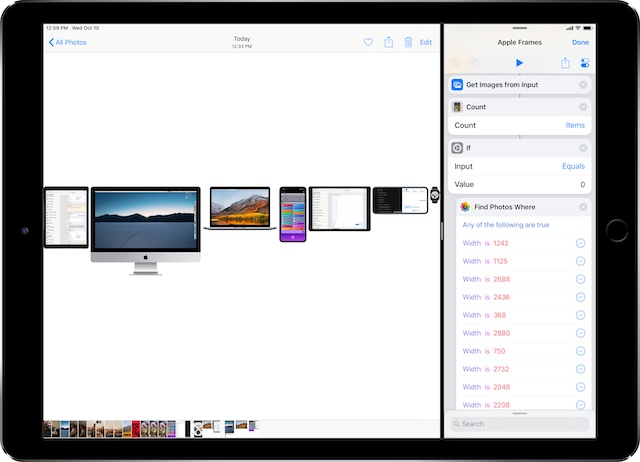
The Apple Frames shortcut can apply device frames to screenshots taken on the following devices:
- iPhone 6 and 6 Plus
- iPhone 7 and 7 Plus
- iPhone 8 and 8 Plus
- iPhone X
- iPhone XS and XS Max
- Apple Watch Series 4 (44mm model)
- iPad Pro (12.9″ model)
- MacBook Pro (Retina, 13″ model)
- iMac (5K model)
The shortcut can be run from the widget, action extension, or Siri, and will automatically open the Shortcuts app to avoid memory limitations inherent to extensions on iOS.
“I’ve heard from hundreds of readers who are using the shortcut for assembling marketing pages and newsletters, creating tutorials for family members or just sharing prettier screenshots online. I had fun creating these shortcuts and testing the limits of the Shortcuts app; I hope that my Apple Frames shortcut can turn out to be more useful and convenient than the original.”
You can download the shortcut at the following links.
Apple Frames
Add device frames to screenshots for iPhones (6, 7, 8, X, and XS generations in standard/Plus/Max sizes), iPad Pro (12.9″), Apple Watch S4 (44mm), MacBook Pro (Retina 13-inch), and iMac (5K).
Download shortcut
Apple Frames (iOS-only)
Add device frames to screenshots for iPhones (6, 7, 8, X, and XS generations in standard/Plus/Max sizes), iPad Pro (12.9″), and Apple Watch S4 (44mm).
Download shortcut



