
Google Arts & Culture Overhaul Lets You Chat With Dead Artists
Google Arts & Culture turns 15 with a major mobile app redesign featuring AI-powered conversational search and interactive historical tools.

Last month, Popcorn Time’s developers had revealed in an interview that they will release an iOS version of the app ‘very soon’ and today, that day has finally come. All jailbroken iPhone, iPod touch and iPad owners can now download the free Popcorn Time for iOS app in the Cydia store by simply adding a dedicated repo to their Cydia sources (via TechCrunch).
According to the developers, they tried to get the proper certificate from Apple to allow the application to be installed on iOS without jailbreaking the device. However, since that didn’t happen, iOS users now need to jailbreak their devices in order to install the app via the Cydia app store. Once the device is *jailbroken, simply add the following repo to the Cydia sources to download it:
http://popcorn-time.se/ios.html
*Jailbroken iPhone, iPod touch or iPad must be running iOS 7 or higher.
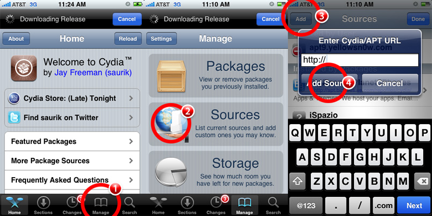
The source code for this project and the Windows and Android versions are also available on the developer’s website.
Want to see more of our stories on Google?

P.S. Want to keep this site truly independent? Support us by buying us a beer, treating us to a coffee, or shopping through Amazon here. Links in this post are affiliate links, so we earn a tiny commission at no charge to you. Thanks for supporting independent Canadian media!


Sadly, I kind of knew this would be the case…I don’t like to jailbreak because it will void the warranty (unless someone knows a way to get around that)
Yes, restore before taking for service, simple.
so, Apple can’t tell by looking at diagnostic data that it has been jailbroken and restored?
Restoring the phone in DFU mode clears all remnants of a jailbreak having happened.
thank you…learn something new every day 🙂
I sincerely have to thank you for explaining that…especially after seeing the way one other person replied (not referring to Chrisperroo)
Of course not, neither do they care.
This is only technically true at this point, due to the fact that, unless you’re actively looking for trouble, jailbreaking is very secure and thus wouldn’t cause you to need to take it in for service. If you did need to take it in then DFU restore it first, as Chrisperroo said.
Ya, uninstall the jailbreak before going to the apple store for service/repairs/replacement. Very simple. How can you not know this?
others have more eloquently, and properly I might add, illustrated the process before you. Very simple. How could you not read that?
This is a tech blog, not a presidential debate. No time for formalities. Just get with the program if your going to experiment.
I’ve actually brought mine in without removing the Jailbreak, and they replaced it no questions asked. Lol
You just need to do a restore, this will get rid of the JB. Apple can see that you have done multiple restores. but if your devices is going in for repair it makes sense that you are doing to restore it a few time so you don’t have to waste more time going into a store. Ive had antiphon since the 3g JB and used the warranty.
Thanks!
It does not void the warranty. Think about it. Once you install a new ios through iTunes it is good as new. Jailbreaking only modifies software hence once a new ios is installed there is no evidence the phone had ever been jailbroken.
Just tried out the app. Worked for a bit. Then my iPhone 5 crashed. App is still beta
It only made my phone hang for a few minutes, then just went into the lock screen. Otherwise everything else was fine.
Amazing, thanks !