
Apple Testing AI Writing Tools, New Shortcuts App for iOS 27
A new report details upcoming iOS 27 features, including an advanced AI grammar checker, automated shortcut generation, and custom wallpapers.
Available through the RBC Mobile App, a new ‘Split with Friends’ feature allows RBC clients to easily manage their group expenses by dividing the cost of an expense amongst several contacts, request the money, and track who has paid.
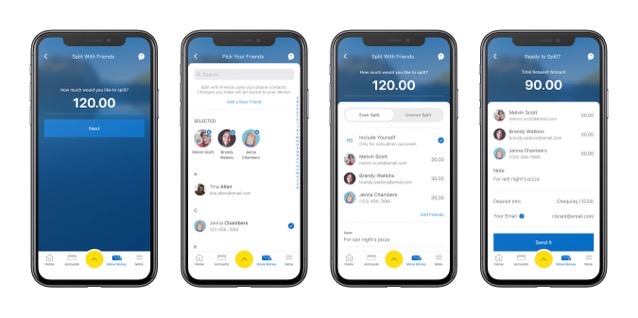
RBC clients can use Split with Friends in the RBC Mobile App with three easy steps:
Split with Friends was developed with feedback gained through RBC Launch, RBC’s beta innovation app that provides clients with the opportunity to try new digital capabilities and innovative features before they are launched into the RBC Mobile App.
“The addition of Split with Friends to our growing list of mobile payment solutions is an exciting one as it provides our clients with a fast, convenient and secure way to manage group expenses, alleviating a common point of friction,” said RBC SVP Peter Tilton.
“We’ve all experienced the hassle of splitting bills and sharing expenses on things like group trips and meals. This is another great example of the powerful benefits that clients can access when they bank with RBC,” stated RBC’s Sean Amato-Gauci.
Click here to download RBC Mobile for iOS in the App Store.
Want to see more of our stories on Google?

P.S. Want to keep this site truly independent? Support us by buying us a beer, treating us to a coffee, or shopping through Amazon here. Links in this post are affiliate links, so we earn a tiny commission at no charge to you. Thanks for supporting independent Canadian media!

