With the introduction of iOS 16, Apple has debuted another handy little feature that allows users to transfer an eSIM from one iPhone to another via Bluetooth while setting up cellular service, MacRumors is reporting.
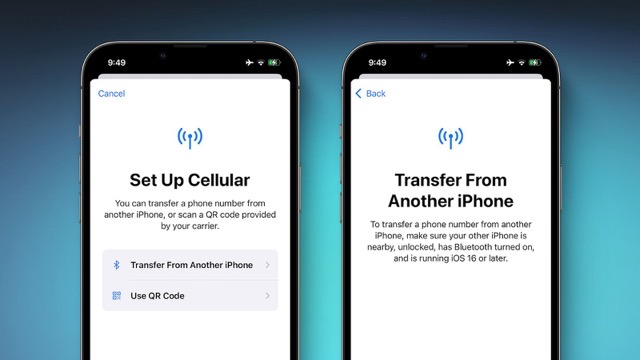
As shown in the image above, when you tap the ‘Set up eSIM’ option in the iOS 16 Settings app, a new option pops us that lets you transfer an eSIM and its associated phone number from another iPhone via Bluetooth.
Apple notes that to transfer an eSIM from another iPhone, you need to make sure the other iPhone is nearby, unlocked, has Bluetooth turned on and is running iOS 16 or later.
The feature appears to be available in multiple countries, including the United States and the United Kingdom, but it is only possible to complete Bluetooth transfers of eSIMs issued by carriers that support the feature. Given that iOS 16 was only announced a few days ago and is currently in beta, carrier support may be limited right now.
It is not yet known whether it is possible to transfer an eSIM from one iPhone to another in Canada yet but we’ll be sure to update you once we know more.



Of course it won’t be possible!
Why would our commie telcos want to lose out on the $10 per eSIM card fee (minimum) they charge everytime someone wants to move their eSIMs to a new iPhone?
Are you familiar with what the process is currently if you need to swap your eSIM between phones? I’m curious to know. When I’ve had to do it for my cellular watch with Rogers, it has been extremely glitchy every time and I have had to waste a lot of time on the phone with them.
I can’t post links here, but Google is your friend.
Huh? I switched from physical to eSIM and it was free. Did the same thing with my brother’s and mom’s—free.
My wife transferred eSIM from her old Xs to the new 13 Pro on Bell online for free. Pretty straightforward although the way that option is worded there is quite sneaky.
Let us know. Telus only supports one time use of its eSim QR codes. If Telus supported eSim activation more than once or transfer, we could take one step to preventing a lot of SIM card eWaste across the country!
Does anyone know, what is the process like currently if you have to switch your eSIM between iPhones (like say if swapped by Genius Bar)?
Do you have to call your carrier and perform a SIM swap? Is there a charge?
I know how it works for Bell. You can do I it yourself, no need to call them. Just log in into your account and choose Device Details / Manage My Device / Manage my SIM and device. There’s no charge.
Oh nice, thanks, that’s really helpful. With Rogers, not only do they charge you, but they insist on MAILING you a QR code in snail mail. They won’t just provide one via email, website, app etc. like normal carriers. It’s maddening.
It is really strange, that tendency to stick to the obsolete ways of the past for some reason when there are better, cheaper, faster, more convenient and more efficient new ways to accomplish the same thing. The strange becomes absurd when the tech companies are concerned. Look on the bright side, at least they didn’t ask you for a fax number 🙂
This would be very handy in some cases. When I was in the Caribbean during the winter I had an eSIM that I could have transferred to a family member that was staying a few more weeks.
That’s not how this is meant to work. The eSIM transfer option only works when you’re setting up a new iPhone and want to move an eSIM that was activated on an iPhone that you already owned.
To reiterate, you can’t just send your eSIM to someone else like sharing a photo with another person on an iPhone that belongs to them. It’s an option that shows up when you’re setting up a new iPhone.
Interesting. Are you sure? I don’t see that limitation mentioned in either article. The description at MacRumors makes it sound like you just have to go into your cell settings and have another iPhone nearby to receive it.
I’ll wager the “receiving” phone must be registered with the same Apple ID as the old phone.
Maybe.
From what the articles suggested, it sounds like it’s not limited to setting up a new phone. It can be accessed any time from cellular settings
An even better example than transferring a photo would be how you can transfer SIMS now. You just pop them out and put them into any other device. And back again later if you feel like it. Not being able to do this is a major downside to eSIMS right now. For example, I have a SIM I like to swap between an iPad and one of my kids’ phones depending on the need. Can’t do this with an eSIM now and looks like that won’t change with this development..
That’s not how this is meant to work. The eSIM transfer option only works when you’re setting up a new iPhone and want to move an eSIM that was activated on an iPhone that you already owned.
To reiterate, you can’t just send your eSIM to someone else like sharing a photo with another person on an iPhone that belongs to them. It’s an option that shows up when you’re setting up a new iPhone.