


Apple’s AirPort Utility App is Being Removed From the App Store
Apple warns that "functionality is not guaranteed" when using AirPort Utility on iOS 27 or later.
Microsoft launched their OneNote iPhone app in the US only back in January (yay for US iTunes accounts), but today it has been updated to extend to Canada (along with Australia, New Zealand, the UK, and Ireland). The app is ‘free’ for a limited time, and is worthwhile if you’re a Windows Live/Hotmail user.
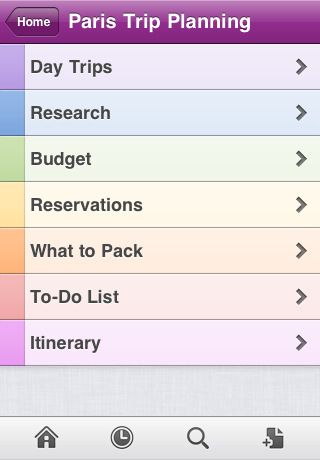
Microsoft OneNote Mobile is an easy-to-use note-taking application for capturing all of your ideas and to-dos on the go, brought to you by Microsoft Office.
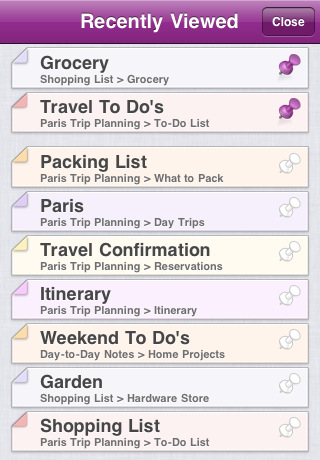
With OneNote Mobile, create searchable notes with text, pictures, bullets, and checkboxes. Then keep your notes in sync using free Windows Live SkyDrive cloud storage to access, edit and manage them from virtually anywhere, from your PC or almost any web browser.
â–ª iPhone or iPod touch must have iOS 4.2 or higher
â–ª A free Windows Live ID is required to use OneNote Mobile – use an existing one or let OneNote Mobile help you sign up
â–ª Web functionality uses the free OneNote Web App available on Windows Live SkyDrive, which requires a supported web browser
â–ª OneNote Mobile opens notebooks created in Microsoft OneNote 2010 or the OneNote Web App
â–ª Customizing section colors requires Microsoft OneNote 2010Access your notes online at http://office.live.com.
Â
Â
OneNote is a useful note-taking app since it syncs to the cloud and your Windows Live account. I haven’t had a chance to try it out since I abandoned my Hotmail address years ago.
Click here to download, it’s free for a limited time only. Let me know how you like it!
Want to see more of our stories on Google?

P.S. Want to keep this site truly independent? Support us by buying us a beer, treating us to a coffee, or shopping through Amazon here. Links in this post are affiliate links, so we earn a tiny commission at no charge to you. Thanks for supporting independent Canadian media!


Hi Gary, You don’t need a hotmail address anymore, you can register any email as a MS Windows Live address. And the app is pretty good, still prefer MobileNoter GUI – which also has an iPad version (but costs, and doesn’t currently support SkyDrive on iOS)… but free is a great price from MS.
The way I have mine set up is: I put my notebooks up on skydrive, and I have my pc at home access it, along with my pc at work. I use mobilenoter and with the wifi sync at my work to sync. Works very nice. Hopefully MS will create an iPad version, until then the mobilenoter for iPad is very nice.
The way I have mine set up is: I put my notebooks up on skydrive, and I have my pc at home access it, along with my pc at work. I use mobilenoter and with the wifi sync at my work to sync. Works very nice. Hopefully MS will create an iPad version, until then the mobilenoter for iPad is very nice.
The way I have mine set up is: I put my notebooks up on skydrive, and I have my pc at home access it, along with my pc at work. I use mobilenoter and with the wifi sync at my work to sync. Works very nice. Hopefully MS will create an iPad version, until then the mobilenoter for iPad is very nice.
The way I have mine set up is: I put my notebooks up on skydrive, and I have my pc at home access it, along with my pc at work. I use mobilenoter and with the wifi sync at my work to sync. Works very nice. Hopefully MS will create an iPad version, until then the mobilenoter for iPad is very nice.
I have never been so happy to see an app come out! Now I just need one on my galaxy tab and all will be perfect!
I have never been so happy to see an app come out! Now I just need one on my galaxy tab and all will be perfect!