
Apple’s AirPort Utility App is Being Removed From the App Store
Apple warns that "functionality is not guaranteed" when using AirPort Utility on iOS 27 or later.
Twitter is one of the fastest growing social networks out there. If you’re not sure what Twitter is, then start asking around! In a nutshell it’s about following a whole bunch of strangers (in other words stalking) and interacting with them. It sounds strange, but it’s highly addicting. Watch this:
There are some amazing Twitter apps for the iPhone. At first, I started out using Twhirl because I was using it on my computer. But then others started to come into play. Today, there are only two Twitter clients for the iPhone you should be using: Tweetie and TwitterFon. I’ve been using the latter prior to testing out the Tweetie. Both are incredible apps. Let’s take a closer look…
I’m going to review both Twitter apps for the iPhone, and emphasize the features among each app. However, the main difference you should note is that Tweetie costs $2.99 and TwitterFon is free. Let’s get this mini head-to-head comparison started!
Main screen: Tweetie and TwitterFon
As you can see here, no major differences except in Tweetie you can change the font size of the tweets if your eyes are bad.


Replying to tweets: Tweetie vs TwitterFon
Here, you can see the differences between both. What I liked about TwitterFon in this respect is that you can immediately retweet/DM, whereas with Tweetie you have to press the arrow on the left. Tweetie allows you to swipe your finger over a tweet to reply. But then again, Tweetie lets you email and post links within tweets.

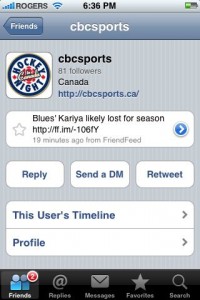
Tweetie: Vast Profile Options
One big advantage Tweetie has is that you can search users’ tweets, and find out who they are following and their followers. Tweetie also has Trends, Search, and Nearby (lets you find tweets nearby).

But WAIT! TwitterFon also has Search, Trends, and Nearby as well. It’s just a little hidden so you can’t see it.

I could go on and on about the features in both apps, but all you need to know is that Tweetie supports multiple Twitter accounts, save drafts, integration with Instapaper. Tweetie is $2.99 and a very powerful, iPhone Twitter app.
TwitterFon, on the other hand is free to download, but has an excellent layout, and is also loaded with features. What I do like about TwitterFon is that it shows the number of unread tweets, and retweeting is much easier, plus when it loads, it automatically scrolls to the latest tweet.
Either app will do the job, but if you’re looking for a well-rounded Twitter app that is pretty much cream of the crop, I would suggest Tweetie for $2.99. However, personally I am loving TwitterFon because I do find it loads a bit faster, plus I’ve been using it longer than Tweetie. I don’t know, there’s something about the app that I enjoy over Tweetie. I think I’ll continue to use both and eventually decide on one. I’ll keep you updated. 🙂
So, are you using Tweetie or TwitterFon?
Want to see more of our stories on Google?

P.S. Want to keep this site truly independent? Support us by buying us a beer, treating us to a coffee, or shopping through Amazon here. Links in this post are affiliate links, so we earn a tiny commission at no charge to you. Thanks for supporting independent Canadian media!


I have both. I personally like twitterfon more because it highlights new tweets!
Yes, I like how it scrolls to the bottom of new tweets.
I use Tweetie and like it pretty well. My one minor gripe is that it uses (via @username) notation for retweets (vs. the “RT @username:” style I prefer.
Still, I’m much happier with Tweetie than other Twitted apps I’ve tried (a list that unfortunately doesn’t include Twittedfon).
it seems the use of “RT” vs “via” is a design decision by the developer, he talks about it in his blog: http://blog.atebits.com/
I use TwitterFon. I have only just started using Twitter, and was reluctant to pay for an app like Tweetie. Maybe if I become more of a poweruser I will check it out for now. But TwitterFon does everything I need so far. I like being able to attach pics automatically with Twitpic using TwitterFon. I just wish there was an easier way to send URL links, as no cut and paste on the iphone of course.
Great post. Video is decent for explaining how it works lol
Dusty, you need to get on Twitter! 😉
I second this motion – Dusty.
Also – Great post iPhone Fan!!! For someone new-ish to twitter myself (and obviously becoming instantly addicted) I really needed someone to explain the differences to me. So far, my opinion is not yet solid on which App is best for me.
Sorry but I just dont have time to pay attention to twitter and all that other cool web stuff. I try to squeeze as much as I can now following the best blog, iPhoneincanada! :p
Twitterfon wins for me
I was using Twitterfon for a while, before winning a copy of Tweetie which I use now (thanks, iPhone Fan!!) They’re both very similar and this review is spot-on. I do prefer how Twitterfon shows the number of new/unseen tweets,replies and DMs, and also highlights those new ones. I also think it’s search history is handy, rather than having to manually mark “star” searches to be saved in Tweetie.
But Tweetie also has a couple great features I like: the ability to automatically shorten URLs in posts directly via bit.ly, and integration with Instapaper. Plus Tweetie’s UI is little nicer when you’re tracing back a conversation, with the little “in reply to…” links.
You’re welcome, glad you’re enjoying it!
This is completely unrelated and I’m sorry posting here…..but has anyone else that won the invisible shields that Gary gave away receive them in the mail yet? I’m still waiting for my mine, and it seems like its taking a painfully long time to get here…..
Patience…they were mailed out last week. I already received confirmation that some have been received. Just wait a few more days. 🙂
okey dokey, thanks
I don’t use either, actually. I use “Twinkle” and generally pretty happy with it. If i switch now, I’d lose track of some people who use Twinkle exclusively so I am sort of hooked.
It would be good to see a comparison of these Tweetie, Twitterfon, Twiterlator, Twitterific and Twinkle to see how they all compare.
Received mine a couple days ago
Great article and video for explaining how it works!
I really like Twittedfon, and love that it’s free but I wish it had support of multipul Twitted accounts.
I am using Tweetie now, and I like the functionality of it much better than some of the others, so use it for my main tweeting. I love the dark scheme, because I often read my tweets at night in bed. :p But there are features of some of the others I like:
Twitterfon: newest tweets are highlighted, and it automatically scrolls to the first unread tweet.
twittelator: I like the “Featured tweeters” section. Found Demi Moore and Ashton Kutcher that way!
I didn’t like twitterific at all. It’s the first one I d/l too. I was put off by tweeting on my iphone at the start because of this!
i just started using twitterfon and the one thing i’m seeing is that the list of tweets on my laptop and my iphone aren’t matching up. there are WAY more on my computer, then on my phone. am i missing something?
I like TwitterFon a lot more… seems better to me cuz, like you mentioned, it shows you the newest updates by highlighting them.
Tweetie actually does now scroll to what it believes is most important for you. I'm still not 100% positive on the circumstances but:
1) If you re-enter tweetie and the last tweet you read is still on its initial load list, scrolling will begin there (so everything above is new)
2) If you leave tweetie up, but go to screen saver for a long time, on returning and hitting 'load' again, you'll remain there so new tweets appear above (though there may be a gap between the latest you read and 'oldest new' tweet – 'load more' will continue loading and places/inserts the loaded tweets correctly in chronological order)
So, it doesn't highlight unread/new tweets, but if as long as your last received tweet is in the next 'load' list, you'll start scrolling from there up.
this is a review about an iphone app right?
uh, LANDSCAPE!!!
only twitterfon supports it for links. that's critical to the iphone experience.
this is a review about an iphone app right?
uh, LANDSCAPE!!!
only twitterfon supports it for links. that's critical to the iphone experience.
I have both. I personally like twitterfon more because it highlights new tweets!
I use Tweetie and like it pretty well. My one minor gripe is that it uses (via @username) notation for retweets (vs. the “RT @username:” style I prefer.
Still, I’m much happier with Tweetie than other Twitted apps I’ve tried (a list that unfortunately doesn’t include Twittedfon).
I use TwitterFon. I have only just started using Twitter, and was reluctant to pay for an app like Tweetie. Maybe if I become more of a poweruser I will check it out for now. But TwitterFon does everything I need so far. I like being able to attach pics automatically with Twitpic using TwitterFon. I just wish there was an easier way to send URL links, as no cut and paste on the iphone of course.
Great post. Video is decent for explaining how it works lol
Twitterfon wins for me
I was using Twitterfon for a while, before winning a copy of Tweetie which I use now (thanks, iPhone Fan!!) They’re both very similar and this review is spot-on. I do prefer how Twitterfon shows the number of new/unseen tweets,replies and DMs, and also highlights those new ones. I also think it’s search history is handy, rather than having to manually mark “star” searches to be saved in Tweetie.
But Tweetie also has a couple great features I like: the ability to automatically shorten URLs in posts directly via bit.ly, and integration with Instapaper. Plus Tweetie’s UI is little nicer when you’re tracing back a conversation, with the little “in reply to…” links.
it seems the use of “RT” vs “via” is a design decision by the developer, he talks about it in his blog: http://blog.atebits.com/
This is completely unrelated and I’m sorry posting here…..but has anyone else that won the invisible shields that Gary gave away receive them in the mail yet? I’m still waiting for my mine, and it seems like its taking a painfully long time to get here…..
Yes, I like how it scrolls to the bottom of new tweets.
Dusty, you need to get on Twitter! 😉
You’re welcome, glad you’re enjoying it!
Patience…they were mailed out last week. I already received confirmation that some have been received. Just wait a few more days. 🙂
okey dokey, thanks
I second this motion – Dusty.
Also – Great post iPhone Fan!!! For someone new-ish to twitter myself (and obviously becoming instantly addicted) I really needed someone to explain the differences to me. So far, my opinion is not yet solid on which App is best for me.
I don’t use either, actually. I use “Twinkle” and generally pretty happy with it. If i switch now, I’d lose track of some people who use Twinkle exclusively so I am sort of hooked.
It would be good to see a comparison of these Tweetie, Twitterfon, Twiterlator, Twitterific and Twinkle to see how they all compare.
Received mine a couple days ago
Sorry but I just dont have time to pay attention to twitter and all that other cool web stuff. I try to squeeze as much as I can now following the best blog, iPhoneincanada! :p
Great article and video for explaining how it works!
I really like Twittedfon, and love that it’s free but I wish it had support of multipul Twitted accounts.
I am using Tweetie now, and I like the functionality of it much better than some of the others, so use it for my main tweeting. I love the dark scheme, because I often read my tweets at night in bed. :p But there are features of some of the others I like:
Twitterfon: newest tweets are highlighted, and it automatically scrolls to the first unread tweet.
twittelator: I like the “Featured tweeters” section. Found Demi Moore and Ashton Kutcher that way!
I didn’t like twitterific at all. It’s the first one I d/l too. I was put off by tweeting on my iphone at the start because of this!
i just started using twitterfon and the one thing i’m seeing is that the list of tweets on my laptop and my iphone aren’t matching up. there are WAY more on my computer, then on my phone. am i missing something?
I like TwitterFon a lot more… seems better to me cuz, like you mentioned, it shows you the newest updates by highlighting them.