The following is a guest post by Boxla, a dedicated iPhone in Canada reader. Any questions can directed in the comments!
It has come to my attention that a lot of apps for the iPhone to be ultilized to their fullest extent require you to be able to use SSH on your iPhone. And to go even further, if you become very confident in using SSH you can also use it to put ringtones on your iPhone, or modify other files. I simply use SSH to change my carrier logo (top left where is says ROGERS, or FIDO, you can actually change it to a picture but I have yet to find the file name for “ROGERS” to replace), and put ringtones on my phone. Anyhow here is the tutorial.
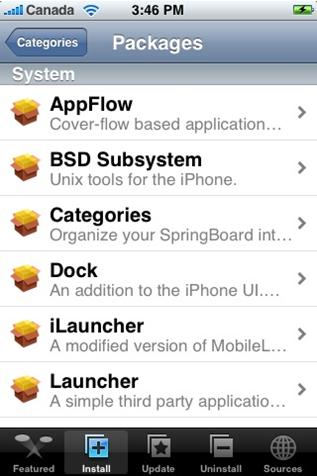
Step 1: Install BSD Subsystem (found in the Installer under “System”)

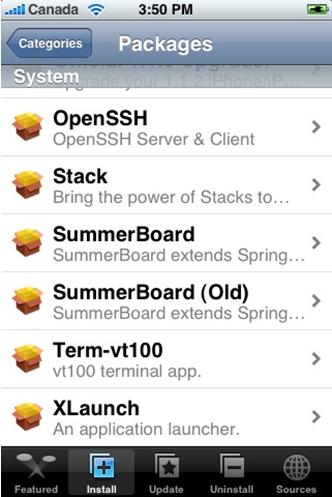
Step 2: Install Open SSH (if not already installed, also found in the installer under “System”)
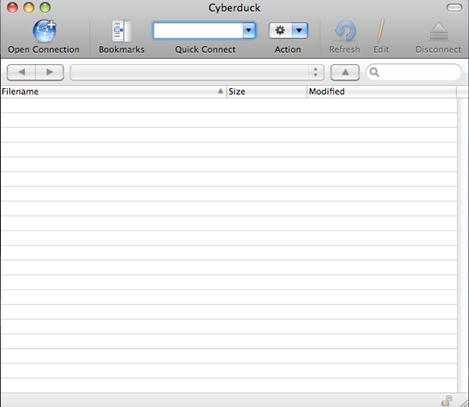
Step 3: Download a SFTP program. (I prefer Cyber duck myself linked here http://cyberduck.ch/ but I also use Mac, for windows user to popular tool is WinSCP linked here http://winscp.net/eng/download.php – download2)
Step 4: Open your new SFTP program. With Cyber duck you must click on Open connection in the top right of the window (WinSCP users I apologize I have never used the program and would be of no help from here, I have heard it is self explanatory though…)
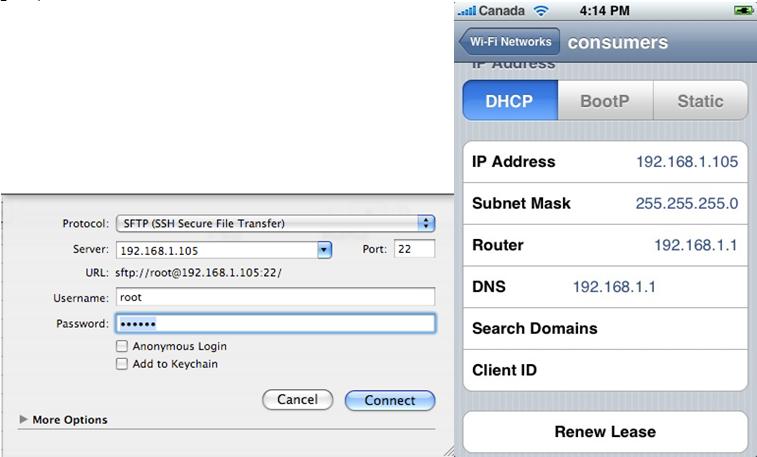
Step 5: A new window will pop up. Click the drop down menu and select SFTP. Then enter your phones IP address which can be found by going to Settings-?Wi-fi-? then clicking the blue button beside your Network. The your screen will look similar to this screenshot with your phones IP address.
Enter the user name as “root” and the password as “alpine” (unless you changed it in the past) then click connect
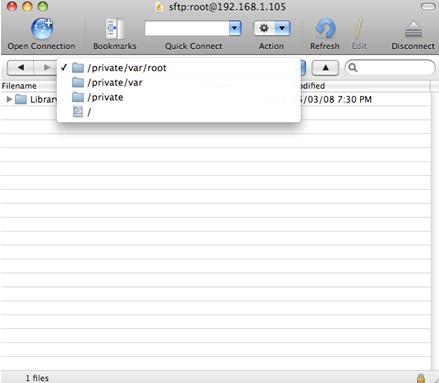
Step 6: You are now in your phones File hard drive. Click the drop down menu and click “/”. From there you can navigate around the phone.
Additional info: Additionally if you wish to install ringtones as I do. Click Library?Ringtones. This is where your ringtones are stored. Simply go to iTunes select a song you’d like to use by holding ctrl then clicking (simply right click on windows). Select convert to AAC.
After it is finished converting, drag the new file to your desktop. Rename it to an .m4r. Then drag it into the Ringtones directory on cyberduck or WinSCP. It will now appear in your ringtones on your phone (but not iTunes).
A warning. If you mess around using SSH you will do severe damage to you iPhone. Do not play around like you would with the installer or other apps. Simply doing a restore SHOULD help you but sometimes it might not. Myself nor iPhoneCanada.ca is not responsible if anything were to happen to your iPhone using this guide. Read the disclaimer of the website!
Thanks to Boxla for the guest post! I’m sure everyone here will find this guide helpful. I will have another post in more detail about how to transfer ringtones come up later. Watch for it!
Do you like write? Are you passionate about your iPhone? Send me a guest post to phone.in.canada AT gmail DOT com and it might be featured here! =)
If you enjoyed this post, please subscribe to my RSS feed, so you won’t miss any updates!



Hey Boxla, This is a good posting.. thanks for this tutorial.
I was reading that you want to customize the rogers icon, for that you can install the “customize” app. It seems to allow you to customize pretty much every icon and fromt he picture that I saw it seems to also allow you to customize the carrier picture.. if you try it let me know since I haven’t tried it myself.
You can read more about customize it at http://www.iphonehacks.com/2008/03/customizeiphone.html
It doesn’t seem to work to well with 1.1.4.. but cerealkiller documented a workaround
customize doesn’t work with 1.1.3 either.
Cool guide! 🙂
Excellent post Boxla… finally got rid of those useless default ringtones! Thanks 🙂
awesome work, thanks! now i got some dannii minogue and other techno/trance/dance ringtones.. 😛 haha.
any idea how to change the text message tone? where’s the directory for that? the search in cyberduck doesn’t seem to work.
Changing the text sounds is a bit different.
They sounds for text messages are located in /–>System–>Library–>Audio–>Ulsounds
The files are named sms-received1.caf (1 through 6). The only way I can figure out how to change them to what you want is to replace them with sounds files (also .caf files) named the same thing. My advice is to keep them on your computer in case you need them later THEN replace them.
PS. if you want to use a song or part of one or another sound. Right click it in itunes, click get info, then click the start and end time adjust accordingly. Then convert to AAC. Your AAC file actually only be the exact portion of the sound file. Then go back into get info of the sounds file and unclick those check boxes. Rename the sound file to sms-received1.caf and SFTP it your iphone in the Ulsounds folder.
PPS (SMS breakdown)
sms-received1.caf = tri tone
sms-recieved2.caf = chime
sms-recieved3.caf = glass
sms-recieved4.caf = horn
sms-recieved5.caf = bell
sms-recieved6.caf = electronic
thanks!
so if i do this, will the new sounds still have the same names? that could be a bit confusing.
any idea how to change that if it is?
sweet!!
does anyone know where to go to change the “new voicemail”, “lock sounds” etc?
Those sounds are located in the same folder as the sms notification sounds.
And T I dont think you should change the names because it is probably hidden in the code of the phone how it gets them from the directory according to their names.
Sound
I just did the upgrade to 114 from 111 and have added a few apps, which were working really well.
Now all of a sudden I have no sound, people can not hear me but I can’t hear them and I can not hear music playing, HELP HELP
I have turned it off a couple of times and that has not done it, I also add the 114 volume boost and then took it off. It seemed to happen right after I did this.
Oli
Hey Oli…I would consider a full restore via iTunes to 1.1.4 and then ZiPhone once again. Try that. Good luck!
i have a jailbroken iphone and ive deleted all the musis from it using an SSH program (filezilla). the problem is that the names of all my old songs are still in itunes. because i have a jailbroken phone, using a non-ATT sim card, i cant use itunes to re-sync my phone. how can i use SSH to delete these titles of songs that no longer exist on the phone?
i have an iphone that i’ve jailbroken now im trying to use SSH to delete the songs. i can’t use itunes because im not using an ATT sim card. the problem im having is that, after deleting the music, the song titles remain in my itunes. how can i use SSH to get rid of these titles?
i need help!
i used ssh to make an “iphone backup” folder….before backing up I had 8 gigs of memeroy used on my phone…now, after doing this ssh backing up thing, when i connect the iphone to my laptop, over 16 gigs of my memory is gone…how can i reverse this????
i need help!
i used ssh to make an “iphone backup” folder….before backing up I had 8 gigs of memeroy used on my phone…now, after doing this ssh backing up thing, when i connect the iphone to my laptop, over 16 gigs of my memory is gone…how can i reverse this????
Hey Boxla, This is a good posting.. thanks for this tutorial.
I was reading that you want to customize the rogers icon, for that you can install the “customize” app. It seems to allow you to customize pretty much every icon and fromt he picture that I saw it seems to also allow you to customize the carrier picture.. if you try it let me know since I haven’t tried it myself.
You can read more about customize it at http://www.iphonehacks.com/2008/03/customizeiphone.html
It doesn’t seem to work to well with 1.1.4.. but cerealkiller documented a workaround
Hey Boxla, This is a good posting.. thanks for this tutorial.
I was reading that you want to customize the rogers icon, for that you can install the “customize” app. It seems to allow you to customize pretty much every icon and fromt he picture that I saw it seems to also allow you to customize the carrier picture.. if you try it let me know since I haven’t tried it myself.
You can read more about customize it at http://www.iphonehacks.com/2008/03/customizeiphone.html
It doesn’t seem to work to well with 1.1.4.. but cerealkiller documented a workaround
Hey Boxla, This is a good posting.. thanks for this tutorial.
I was reading that you want to customize the rogers icon, for that you can install the “customize” app. It seems to allow you to customize pretty much every icon and fromt he picture that I saw it seems to also allow you to customize the carrier picture.. if you try it let me know since I haven’t tried it myself.
You can read more about customize it at http://www.iphonehacks.com/2008/03/customizeiphone.html
It doesn’t seem to work to well with 1.1.4.. but cerealkiller documented a workaround
Hey Boxla, This is a good posting.. thanks for this tutorial.
I was reading that you want to customize the rogers icon, for that you can install the “customize” app. It seems to allow you to customize pretty much every icon and fromt he picture that I saw it seems to also allow you to customize the carrier picture.. if you try it let me know since I haven’t tried it myself.
You can read more about customize it at http://www.iphonehacks.com/2008/03/customizeiphone.html
It doesn’t seem to work to well with 1.1.4.. but cerealkiller documented a workaround
Cool guide! 🙂
Cool guide! 🙂
Cool guide! 🙂
Excellent post Boxla… finally got rid of those useless default ringtones! Thanks 🙂
Excellent post Boxla… finally got rid of those useless default ringtones! Thanks 🙂
Excellent post Boxla… finally got rid of those useless default ringtones! Thanks 🙂
awesome work, thanks! now i got some dannii minogue and other techno/trance/dance ringtones.. 😛 haha.
any idea how to change the text message tone? where’s the directory for that? the search in cyberduck doesn’t seem to work.
awesome work, thanks! now i got some dannii minogue and other techno/trance/dance ringtones.. 😛 haha.
any idea how to change the text message tone? where’s the directory for that? the search in cyberduck doesn’t seem to work.
awesome work, thanks! now i got some dannii minogue and other techno/trance/dance ringtones.. 😛 haha.
any idea how to change the text message tone? where’s the directory for that? the search in cyberduck doesn’t seem to work.
customize doesn’t work with 1.1.3 either.
awesome work, thanks! now i got some dannii minogue and other techno/trance/dance ringtones.. 😛 haha.
any idea how to change the text message tone? where’s the directory for that? the search in cyberduck doesn’t seem to work.
customize doesn’t work with 1.1.3 either.
Changing the text sounds is a bit different.
They sounds for text messages are located in /–>System–>Library–>Audio–>Ulsounds
The files are named sms-received1.caf (1 through 6). The only way I can figure out how to change them to what you want is to replace them with sounds files (also .caf files) named the same thing. My advice is to keep them on your computer in case you need them later THEN replace them.
PS. if you want to use a song or part of one or another sound. Right click it in itunes, click get info, then click the start and end time adjust accordingly. Then convert to AAC. Your AAC file actually only be the exact portion of the sound file. Then go back into get info of the sounds file and unclick those check boxes. Rename the sound file to sms-received1.caf and SFTP it your iphone in the Ulsounds folder.
PPS (SMS breakdown)
sms-received1.caf = tri tone
sms-recieved2.caf = chime
sms-recieved3.caf = glass
sms-recieved4.caf = horn
sms-recieved5.caf = bell
sms-recieved6.caf = electronic
Changing the text sounds is a bit different.
They sounds for text messages are located in /–>System–>Library–>Audio–>Ulsounds
The files are named sms-received1.caf (1 through 6). The only way I can figure out how to change them to what you want is to replace them with sounds files (also .caf files) named the same thing. My advice is to keep them on your computer in case you need them later THEN replace them.
PS. if you want to use a song or part of one or another sound. Right click it in itunes, click get info, then click the start and end time adjust accordingly. Then convert to AAC. Your AAC file actually only be the exact portion of the sound file. Then go back into get info of the sounds file and unclick those check boxes. Rename the sound file to sms-received1.caf and SFTP it your iphone in the Ulsounds folder.
PPS (SMS breakdown)
sms-received1.caf = tri tone
sms-recieved2.caf = chime
sms-recieved3.caf = glass
sms-recieved4.caf = horn
sms-recieved5.caf = bell
sms-recieved6.caf = electronic
sweet!!
does anyone know where to go to change the “new voicemail”, “lock sounds” etc?
thanks!
so if i do this, will the new sounds still have the same names? that could be a bit confusing.
any idea how to change that if it is?
thanks!
so if i do this, will the new sounds still have the same names? that could be a bit confusing.
any idea how to change that if it is?
thanks!
so if i do this, will the new sounds still have the same names? that could be a bit confusing.
any idea how to change that if it is?
Sound
I just did the upgrade to 114 from 111 and have added a few apps, which were working really well.
Now all of a sudden I have no sound, people can not hear me but I can’t hear them and I can not hear music playing, HELP HELP
I have turned it off a couple of times and that has not done it, I also add the 114 volume boost and then took it off. It seemed to happen right after I did this.
Oli
Sound
I just did the upgrade to 114 from 111 and have added a few apps, which were working really well.
Now all of a sudden I have no sound, people can not hear me but I can’t hear them and I can not hear music playing, HELP HELP
I have turned it off a couple of times and that has not done it, I also add the 114 volume boost and then took it off. It seemed to happen right after I did this.
Oli
Sound
I just did the upgrade to 114 from 111 and have added a few apps, which were working really well.
Now all of a sudden I have no sound, people can not hear me but I can’t hear them and I can not hear music playing, HELP HELP
I have turned it off a couple of times and that has not done it, I also add the 114 volume boost and then took it off. It seemed to happen right after I did this.
Oli
Hey Oli…I would consider a full restore via iTunes to 1.1.4 and then ZiPhone once again. Try that. Good luck!
Hey Oli…I would consider a full restore via iTunes to 1.1.4 and then ZiPhone once again. Try that. Good luck!
Hey Oli…I would consider a full restore via iTunes to 1.1.4 and then ZiPhone once again. Try that. Good luck!
Those sounds are located in the same folder as the sms notification sounds.
And T I dont think you should change the names because it is probably hidden in the code of the phone how it gets them from the directory according to their names.
Those sounds are located in the same folder as the sms notification sounds.
And T I dont think you should change the names because it is probably hidden in the code of the phone how it gets them from the directory according to their names.
i have a jailbroken iphone and ive deleted all the musis from it using an SSH program (filezilla). the problem is that the names of all my old songs are still in itunes. because i have a jailbroken phone, using a non-ATT sim card, i cant use itunes to re-sync my phone. how can i use SSH to delete these titles of songs that no longer exist on the phone?
i have a jailbroken iphone and ive deleted all the musis from it using an SSH program (filezilla). the problem is that the names of all my old songs are still in itunes. because i have a jailbroken phone, using a non-ATT sim card, i cant use itunes to re-sync my phone. how can i use SSH to delete these titles of songs that no longer exist on the phone?
i have an iphone that i’ve jailbroken now im trying to use SSH to delete the songs. i can’t use itunes because im not using an ATT sim card. the problem im having is that, after deleting the music, the song titles remain in my itunes. how can i use SSH to get rid of these titles?
i have an iphone that i’ve jailbroken now im trying to use SSH to delete the songs. i can’t use itunes because im not using an ATT sim card. the problem im having is that, after deleting the music, the song titles remain in my itunes. how can i use SSH to get rid of these titles?
i have an iphone that i’ve jailbroken now im trying to use SSH to delete the songs. i can’t use itunes because im not using an ATT sim card. the problem im having is that, after deleting the music, the song titles remain in my itunes. how can i use SSH to get rid of these titles?
This is the best site for providing all kinds of service at iPod, iphone and Apple mobile