
You Can Now Jailbreak iOS 16.4.1 with Palera1n 2.0.0 Beta 6
Codenamed Bakepale, the latest v2.0.0 beta 6 update to jailbreak tool Palera1n has just been released, which fully supports iOS 16.4 - iOS 16.4.1 jailbreak.
Tired of seeing those large iPhone icons on the springboard? How about you would like to have the option to customize the icons to be smaller, or even really tiny? Well now you can! Thanks to Paul Griffin and his development of Shrink.
Shrink those icons down!
Shrink downscales your springboard icons so that you can fit more on one page!
Compatible with Winterboard, Iconoclasm, and InfiniDock!
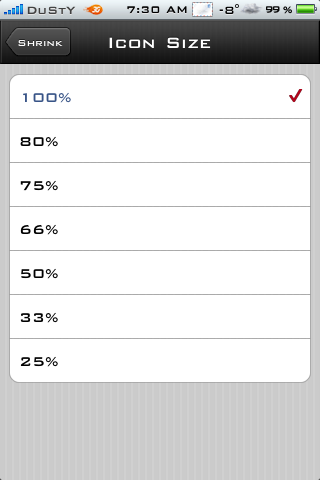
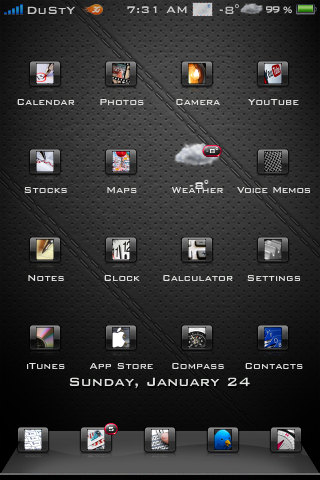
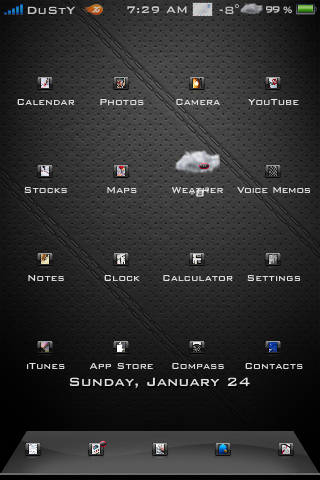
In order to install Shrink, your iPhone has to be Jailbroken. (This is another reason why you should Jailbreak your iPhone!) As you can see from the screenshot above, you have the option to Shrink the icons to various sizes. Once you purchased Shrink from the Cydia Store, you will notice that there is not an icon on the springboard. Go to Settings and then scroll down the list until you see Shrink. Here is where you are able to adjust the size of the icons.
The first screenshot I took, I shrunk the icons down to 50%. I am now able to add more icons onto pages or keep it as is. The second screenshot of icons was shrunk down to the smallest size you can go, that was 25% and I say thats pretty small! (You may need to bring out the bifocal goggles for this size)
You can install Five-Column Springboard which allows you to squeeze more icons onto a page. But with Shrink, its another real cool feature which helps clean up the springboard because with some custom design changes for icons, my springboard can look really junkie! And by using Shrink, I am able to fit the icons to my liking and yet my springboard does not look all junkie.
I recommend giving Shrink a try and so far I have had good luck with the app being compatible with many other 3rd party applications installed. Let me know how Shrink works out for you!
Shrink can be found in the Cydia Store for $0.99
You can read more of my news at my blog, iEvolution.ca, & follow me on twitter @twitter.com/iEvoluti0n
Want to see more of our stories on Google?

P.S. Want to keep this site truly independent? Support us by buying us a beer, treating us to a coffee, or shopping through Amazon here. Links in this post are affiliate links, so we earn a tiny commission at no charge to you. Thanks for supporting independent Canadian media!


Nice little application. But I have a question…How do you go back to original size and your original settings?
Thanks.
You just have to go back into Settings, and readjust to 100%, then respring.
This is cool, but I don't mind the big icons. If we could make them smaller, then fit more onto one page, that would be nice.
@Bojan Vojinovic
Rorypiper is right. Make sure you do not hit the home button after you have selected the size of icons. You need to always hit respring or your icons will not change 😉
@rorypiper
Thanks for helping.
omg if you don't know how to do that or have that as a question you have no right jailbreaking your phone at all…
There's nothing wrong with asking questions, there's only stupid
answers. Give the guy a break!
Gary
I have installed this app and reinstalled. I still do not get a Shrink option in settings. I have tried rebooting and respringing, but still no option in settings.
Thats weird… worked first time installing for me. You did purchase from Cydia Store?
I had to remove this app , purchased through Cydia Store
I installed got Sad Face and was in safe mode
removed reinstalled
same issue
@johncpiercy
I used to use the Theme 70px (see below) and the icons were to big for use with a 5 icon dock to i shrunk the icons by about 10 pixels each way. The way I did this was to just load the image up into photoshop Edit > Image Size then enter the new dimensions i wanted and save it again as a png and this worked fine for me!
I used to use the Theme 70px (see below) and the icons were to big for use with a 5 icon dock to i shrunk the icons by about 10 pixels each way. The way I did this was to just load the image up into photoshop Edit > Image Size then enter the new dimensions i wanted and save it again as a png and this worked fine for me!
I’m using IOS 4.1 and still have the problem i had with ISO 3.1.3 And 4.0 when downloading shrink.a message appears when i go to setting – shrink
” There was an error loading the preference bundle for Shrink”
i have infinidock, infiniboard and iconoclasm work well !!!!