Back in October, users started to notice Apple Pay badges appear within Apple Maps in Canada and Australia, a hint the mobile wallet was possibly ready to launch (which of course it did on November 17 in Canada and two days later down under). Eventually, these badges ‘disappeared’ (blank placeholders remained), but now they are showing up again.
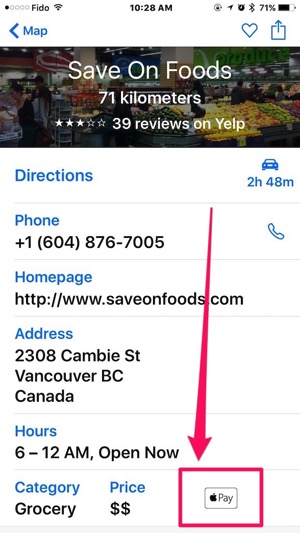
When you search for stores within Apple Maps and tap to see more information, the Apple Pay badges appears near the bottom of listings, as shown below in our queries for Whole Foods in Toronto and Save On Foods in Vancouver:
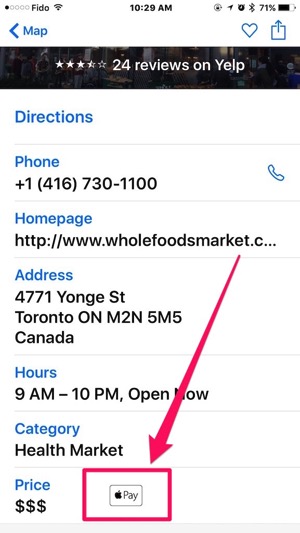

One of the early barriers of Apple Pay in Canada is not being able to find a store to try it out at, since retailers need to accept American Express and support contactless payments for the latter.
The addition of these Apple Pay badges will make things easier, but for now it seems limited to large chains. Let us know what stores you find within Apple Maps that are showing support for Apple Pay.
Thanks Jean-francois!



Getting the same badge at a few stores here in Newfoundland, too. Namely McDonald’s and Tim’s.
Is there any way to search or filter on places that take Apple Pay? I’d like to support places that have taken this step.
This would make things way easier.
I am sure that feature will be coming soon.
yesterday, paid with Apple Pay at Canadian Tire in Aurora, but it is not marked as accepting Apple Pay on a map. And didn’t find the way to ask Apple to add it.
Apple knows you used Apple Pay there now, give it a few weeks and it will liekly automatically show up.
Last night I as able to use Apple Pay in Canadian Tire in Victoria, the one on Douglas street. No Apple and marker on the map either.
Good to know. I have London Drugs and Canadian Tire on my list of places to try next.
I think all CT stores will work, I am also curious about London drugs, and I saw something somewhere to indicate that Save On Foods may also work, will try that one as well. I think the fingerprint sensor may be safer than the watch with it’s code, but I prefer to use the match, it’s easier and faster than taking out the iPhone. Amazing how lazy we (I) get.
Yeah I have also heard Save On works, will try soon. Their Apple Maps listing shows the Apple Pay badge.
The only thing preventing me from using my watch are taller than normal privacy panels, which can make it difficult to bring my wrist close enough to the reader.
That was not a problem at Tim’s or CT so far, but I have to try it elsewhere. Taking off the watch and unlocking it would be too much hassle, so the iPhone will do in such cases I guess.
LD definitely works perfectly with Apple Pay but Save On (and related Urban Fare & Price Smart) half work – they accept Apple Pay but for all Amex contactless they require a signature. No matter how low the value. Their machines are configured incorrectly somehow. It’s been this way for years. I wrote to their corp. offices about it but I have little hope. Until then it feels silly to use Apple Pay and then have the cashier ask you for a signature ….. pretty unimpressed.
Yeah, I was asked for my signature at Save On as well. I thought that was really weird.
I’ve tried it at my local London Drugs in Vancouver. Worked like a charm! The cashier asked what app it was, and I just said Apple Pay!
Works great at Winners. Just that at first it didn’t accept it when I tried it with Apple Watch. Second time it worked with the iPhone.
Sobey’s grocery store doesn’t accept contactless payment for Interac, nor for Amex. Sigh.
How accurate are these icons? I tried using Apple Pay at that Whole Foods multiple times since launch (most recently on Tuesday), and it didn’t work!
FreshCo in Vaughan has the Apple Pay symbol in Maps, but I haven’t tried it out yet.
I’m pretty sure this information is just being crowdsourced by Apple Maps, although I don’t know what the “critical mass” is that’s required for the badge to be added – I don’t think it shows up after only one or two uses of Apple Pay at a retailer.
The feature first appeared in the early iOS 9 betas, and I’ve been using Apple Pay at a local Shoppers’ Drug Mart since April, and it had the ?Pay badge beside it almost from the beginning. I also gradually saw it show up on other places I used Apple Pay at oner the summer, long before it was officially available in Canada. However a number of other local retailers) that I’ve frequently used Apple Pay at over the past several months have not gained these badges, so I’m wondering if it requires Apple Pay transactions to be made by more than one person, or to be made with more frequency.