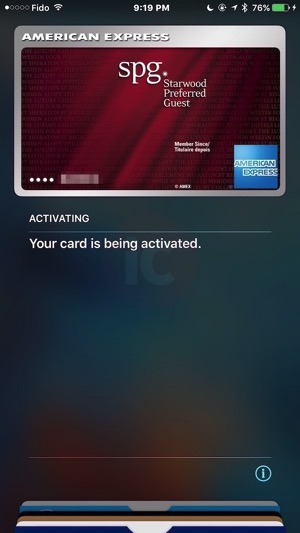
Apple Pay is now live in Canada with support for American Express cardholders, just as we reported earlier. Users can now add American Express issued cards (sorry Scotiabank Amex users) to the Wallet app, like we did below (Update: the option now appears for the Canada region, changing to USA not required):

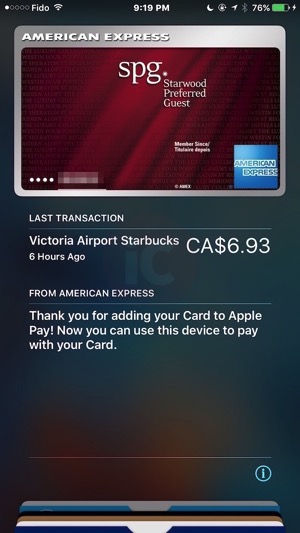
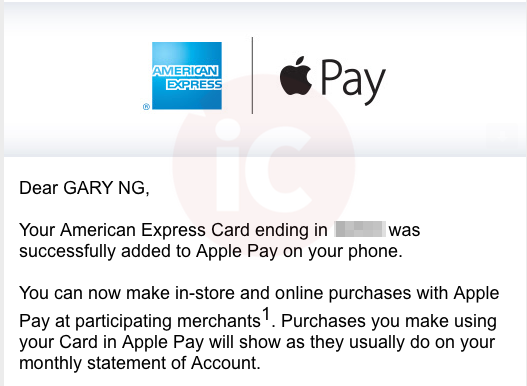
As you can see, it even shows your most recent transaction, which for us was at Starbucks this afternoon. American Express will also email you to verify your card was added to Apple Pay (that is if you are subscribed to email notifications):

How to setup your American Express with Apple Pay? Follow these instructions:
- Launch Apple’s Wallet app (formerly Passbook). Tap on the “+” in the top right hand corner, tap ‘next’, then take a picture of your card, or enter in card details manually. You’ll be asked to verify your card information.
- It’ll say “Adding Card”, will contact your card issuer, then suddenly you’ll get the “Apple Pay is not available in your country” message. Tap ‘Agree’ and continue (and again).
- From here, your card, if supported, will be added to Apple Pay. You may also be asked to call your card issuer to verify it, as seen below:

We were able to add one American Express card, but the card above required phone verification. The customer service rep told us this ‘soft launch’ means they cannot confirm cards right now. In other words, wait until tomorrow morning.
Once this is complete, you will see your American Express card within Wallet. How to use Apple Pay? At a supported tap-to-pay terminal, hold your iPhone near the terminal with your thumb on Touch ID and it’ll automatically turn on and authenticate. You do not need to launch the Wallet app.
For more info about your cards, go to Settings > Wallet & Apple Pay. You’ll be able to select your transaction defaults, plus view your most recent purchases.
Want to add your American Express to Apple Watch?
Launch the Apple Watch app on iPhone, go to Wallet & Apple Pay, then tap ‘Add’ on your existing AMEX card shown. You’ll be asked to enter the card’s security code, then it will be added to your Apple Watch, under the Wallet app. To use Apple Pay on Apple Watch, just double-tap the side button and voila!
Update Nov. 17, 5:36AM PST: Apple Pay has been pushed over the air and the Wallet app now shows the option to add a credit card, without changing your region to the USA. This post has been updated to reflect this.
Update 2: According to Rene Ritchie from iMore, the traditional $100 tap-to-pay limit seen from Canadian bank-issued credit cards does not apply to American Express. Big win! Apple also stated this fact in their updated Apple Pay support document for merchants.
If you’re looking for places to try Apple Pay, here is a list of merchants according to Apple, and here’s a list of stores from American Express.
…more to follow, refresh for updates





Curious to know how Amex in Canada confirms your identity? Did you have to call to add it? I know CapitalOne and Wells Fargo in the US have an app where you can login and confirm apple pay, TD Bank US on the other hand requires you to call them to confirm your identity. How is it with Amex in Canada?
It just added for me, was surprised as well.
I’m guessing it cross checks your info aswell.
Anyone able to use Apple Pay within the Starbucks app to reload your Starbucks card? I don’t have the option, it was listed prior to Apple Pay in Canada.
You have the option to get an sms or an email for verification
I added my simplycash amex with no problems and it activated instantly after inputing the sms verification code
Weird, I didn’t get asked for any verification.
So bizarre! I was given SMS or email verification options. Maybe it prefers those methods if they have those contact details, otherwise you have to call in?
I’m surprised it didn’t want to verify using the Amex app.
One card did not require verification, it just added. A second AMEX asked me to call in, but the rep wouldn’t verify it because they weren’t allowed to…yet.
Thanks for the update. Managed to add the AmEx card I received this morning.
It’s an awesome feeling 🙂
Added my AeroplanPlus Amex with no issue. It’s for real folks! 🙂
Thanks Gary! I just added my Air Miles Amex!
Awesome 🙂
Me 2 🙂
I’m curious who the retail launch partners are now.
Unlike the US, where they had to build the retail infrastructure pretty much from the ground up, there’s no real need to set up retail “partners” in that same manner here.
Any retailer that has NFC terminals (which is most) and accepts Amex (which, contrary to some ill informed people on here, is a lot) will be able to accept Apple Pay.
I’ve had my TD Bank US card on my phone for ages now, and every time I hold my phone near a terminal, it pops up for me to pay.
I understand but am still curious if they will. Just to add those stickers, and raise awareness.
Did anyone else notice that the last five digits of the actual card number are displayed? My US Visas and MasterCards display the last four digits of the device number instead. The former seems like a glitch.
I’d say it’s just the format for Amex.
Visa and MC do 4 groups of 4 digits so Apple Pay displays the last group., Amex does 3 groups of digits, four-six-five so it still displays the last group, which happens to be 5 digits.
I meant that Visa and MasterCard display the device number (rather than the actual card number).
In my experience, on the image you see in Wallet is the last 4 or 5 digits of your card. If you look at the receipt after you make a purchase, or if you click on the ‘i’ you’ll see the last 4/5 of the DAN
Thanks for replying. It makes sense I guess.
As expected, Scotiabank Amex not supported 🙁
Amex works with Apple Pay. But I tried adding a bunch of Canadian credit cards to see if they’d get added (out of curiosity) but unfortunately none work:
CapitalOne IHG, BMO, TD, National Bank of Canada, Chase Amazon
I tried the same thing. LOL I thought maybe Cap1 would sneak in there! 🙂
i just added my gold reward amex to iphone 6 and watch.. just had to change the region to US initially… added amex to both devices and changed the region back to canada.. card still exists, will try tomorrow morning..
fyi only AMEX issued Amex will work, Amex issued by banks wont work.. also i tried my scotiabank visa, but didnt work…
I really like that it also suggests to add the cards already stored in your Keychain (so cards you use in Safari for instance). So convenient and fast!!
To use apple pay on apple watch, make sure to change the region to USA in the watch app on your iphone
What retailers in Canada have the terminals to accept it? Is it the ones that already have the tap to pay?
Pretty much (assuming they accept Amex to begin with)
Can confirm this also works with corporate cards. Added both my personal SPG and corporate card this evening.
Apple Pay should now show in Wallet for Canada – https://smp-device-content.apple.com/static/region/v2/config.json
May take up to 24 hours for your iPhone to ping back for the updated supported regions file though
I had to reboot my iPhone and there was Apple Pay!
Thanks for sharing Beau!
Added my Aeroplan Platinum Amex card no problem. No upgrade to iOS 9.2, just opened wallet and added card. It took several minutes to finalize adding the card, then came up with “you can now use Apple Pay” message. No email or phone verification.
Didn’t need to switch regions to USA either.
Now I just have to go somewhere that accepts Amex and has wave to pay to see if it works. 😉
I didn’t have to change any of the region settings – just showed up in my wallet with the ability to add a card.
Article updated to reflect this. Last night it wasn’t available unless USA was selected. Thanks for the update folks.
It’s live in Canada… no need to change the region settings to US… it just works in Canada without changing setting…. Just go in the Wallet and you’ll see the option as this morning!!!
yup
YESSSSSSS!!!!!!
I didn’t even have to do that. As soon as I turned on my iPhone this morning it told me that I was ready for Apple Pay and walked me through the steps including verification via Amex. It was flawless.
Can’t wait to go to my local Metro store to see if they are capable since they already accept Amex.
My one card required no verification. But it says my last purchase was iTunes for $1.00. But it was a free purchase.
Important tip: if you want to pay easily without opening your wallet app, go to:
Settings > Wallet & Apple Pay and enable ‘Double-Click Home Button’
Now lock your phone and try it. Double click on your home button and amex will appear! the first time you do this you will get a popup box, click ok.
Then lock the phone again and now double click on your home button. Voila! instant payment is ready! No need to go inside the phone or open your wallet. 🙂
And most times if you are using your default card you can just place phone against terminal and it will automatically bring up the card.
Yup. Not sure why you would set up the double click when simply holding the phone against the terminal does the same thing.
It’s meant for multiple credit cards / points cards… You can choose a different card other than the default.
Again, you can do that without the settings change. Hold the phone to the terminal without your finger on touchID. When ApplePay UI comes up, swipe the cards at the bottom, selected another and use TouchID to complete. That is also what happens with your settings change. All your suggested settings change does is bring up wallet app when your phone isn’t close to a terminal. That’s it.
Is there a website that lists all current Apple Pay accepting merchants in Canada?
It would be anywhere you can tap Amex, but I have the same question though – where can you tap Amex?
Starbucks for sure!
But then you don’t get Star rewards/free coffee, so back to the original question :). The US Amex site shows where you can tap, but not Canadian site.
That is true, but I will forgo stars for convenience and to use Apple Pay!
You can also use starbucks app on wallet to get stars and pay with your phone
Go to the America Express Canada website and search for merchants.
Our most recent post lists retailers that accept American Express, but doesn’t confirm tap to pay at each store yet.
Gary, I just read that iMore article that you mentioned above. It’s great. Every Canadian bank executive should read it and then scratch their heads.
Banks are underestimating Apple Pay. Once this spreads, American Express will be laughing it up as the only supporter for now.
Waiting forever for my email verification. Anyone else have this issue?
No, mine went OK. Try manually getting mail.
No dice. I called AMEX and the rep tried to manually set it up with no success. Not getting any email notifications at all. Tried switching to my gmail address and not receiving an email to verify the email change. Not sure what is going on with them, but he filed a ticket and they said they would call me back when they have a solution.
Sorry to hear about that . I hope this is an exception as no one else has reported this problem so far. Did all your other setup steps work Ok?
Just got a callback from another rep. After the usual confirmation questions, she had it up and running in no time. I was impressed by how quickly they resolved this! Still not sure what happened to the original verification email though.
Just finished my phone verification for a different Amex card. Once she said it went through, the update within Wallet happened in real-time.
Just activated my Amex card for Apple Pay. One thing that nobody has mentioned yet, is that I have the Amex card for the iTunes Store. When I asked to ad my card, it fetched that card from the store. I didn’t even need to do anything, except enter the security code on the front of the card. And to finish, it took all of 2 minutes to get my email from Amex to end the process.
I should have mentioned that was the case for my card when I added it. So cool.
Just added it to my Apple Watch. Email from Amex for the code was even faster this time. I’ll tell you, Amex was ready for this. They are on the ball. Now, just got to go out and try it somewhere.
I have a US iTunes account and have my phone set to US region. I was able to add my Canadian Amex without changing anything.
Here’s hoping the banks hop on board soon.
Yay!!!! I’m so thrilled… I love my Amex card. Best customer service ever.
Agreed!
Sorry for asking a question that may have already been answered… does paying with the phone/watch work at regular terminals, or do they have to be special Apple terminals?
As long as the terminal supports tap-to-pay (i.e. from a company like Moneris), and the merchant supports American Express, Apple Pay will work.
Tried this morning at Tim Hortons, no luck. I probably don’t know what I’m doing though.
Ok, I think I figured out the problem. I had to restart my phone and my watch in order for the double-click actually to work. I tried to get to it through the wallet, and it just wasn’t doing anything. Now off to buy more donuts.
Hey Gary, iPhone in Canada was featured on TV https://www.youtube.com/watch?v=VwRwIcaM9h0
Sweet! Thanks for letting us know 🙂
Good job on getting this right 🙂 Much appreciated!
Cheers 🙂
Where are those who said the banks wouldn’t dare sit this one out?
Added a simplycash Amex that used to be a Costco Amex no problem.
Just for fun I tried my scotiabank debit card. Gave me a link for a bank in the US.
Despite disabling in-card tap for Amex (I’ve tried in the last), I just successfully used Apple Pay at 7 Eleven! Totally thought it wouldn’t go through.
Nice!
Hmm…that is very interesting indeed. Does make it seem other cards in the works
I tried out Apple Pay at KFC and on my phone, it registered that the
payment went through; however, on the terminal, it was still awaiting
payment. The screen on the terminal still said “Swipe or Insert Card”.
The cashier said that the payment didn’t go through and I still needed to swipe or insert my card
Thats odd, what if it made you pay twice?!
I had the same thing happen to my twice today and I didn’t get charged twice. It happened at Pizzaville and Metro. Even though the cashier said they take Amex and tap to pay, the transaction beeped when I tapped and then it asked for me to swipe. That means it didn’t go through. I guess some terminals aren’t fully ready.
Interesting to know.
I actually wrote to Metro head office and they confirmed that although they accept Amex, you can’t tap it hence no Apple Pay. They couldn’t tell me when this would be changed.
I checked my transaction record and it only charged me once. But I was paranoid at first about getting charged twice.
I guess Bailey and I had the exact same experience.
Happened at Longos (Toronto, ACC) too. It means the terminal accepts AMEX but not via tap. You only get charged once.
It appears that you still need an iphone 6 even if you have the apple watch. I’m on the line with amex and they are confirming that…booo.
Should work with iPhone 5S + Apple Watch.
Hm… just tried at LCBO and Apple Pay was recognized but the transaction didn’t go through.
Was the amount of the transaction more than 100$? I heard that LCBO established a limit on the transactions made by tap-to-pay.
Nope, for $28…
I have tried three times at different LCBOs and same thing, it was recognized but the transaction doesn’t go through…
Apple Pay works at Noodles & Company (TD Centre, Toronto). Cashier was wowed!
Does anyone know if it work with AMEX pre-pay? Just want to try it out. ????
Not it won’t unfortunately and neither will corporate cards.
Anyone know realistically how long it takes to get the Amex card? Applied Monday am?
One our our readers on Twitter applied on a Sunday, and his application was processed three business days later, and on Thursday he was told it was being mailed out. That was before the Nov. 17 launch onslaught though…but it seems they are processing them quickly.
Applied the 17th got approved instantly, got the card the 20th. But it also depends on where you live in Canada, if you live in a big city or in the middle of nowhere.
Applied the 17th got approved instantly, got the card the 20th. But it also depends on where you live in Canada, if you live in a big city or in the middle of nowhere.
Apple Pay not working at IKEA, despite accepting AmEx (express pay) and contactless payments. Tried it in Ottawa. Looks like the terminals are just not ready yet.
Gary, your sources still say end of month for Banks announcement ?
Haven’t heard any updates from them since.
No such “animal” as ApplePay live in Canada!!! It is been live here since day one of ApplePay! Now we can put canadian credit card as a payment method. With most of US Banks Visa and Master you can pay in any Canadian store with wave pay equipment
Loving Apple Pay, but have been disappointed in two instances.. Despite Metro taking Amex cards and their terminals taking Visa and MasterCard contactless payments, Amex won’t work by tapping.
Secondly, it seems Petro-Canada won’t accept contactless Amex cards at the pump.
It seems that there are so few places that accept it which is disappointing considering how many places have tap to pay enabled.
Places that worked:
– Tim Hortons
Places that didn’t work:
– Subway
– Harvey’s
Apps:
– Ritual (an app that lets you order food before you get to the restaurant in Toronto) has enabled Apple Pay the other day
I got the message telling me that Apple Pay couldn’t add my card to Wallet. With that I also got an email stating the same thing and to call Amex CS.
Called Amex but was on hold for way too long and gave up. Will try later…
Any news?
Called Amex again and was with the help of the CSR was able to get it working on my phone 🙂
Any news on the banks? I am thinking of cancelling a credit card and replacing it with an American Express card. My card got compromised when I was visiting Brooklyn 2 months ago and did not enjoy the experience – I like the safety features in Apply Pay.
Everytime I call a bank and ask when will they be supporting Apple Pay? The agents kind of like they have no idea what i’m talking about and my reaction is “you’re kidding right you haven’t heard of Apple Pay” Then they put me on hold and later tell me that for now we have no news about Apple Pay support. Really sad that we’re being held back like this because of these greedy banks
Works fine at Tim’s, Apple Store, Shoppers, Ultramar and Canadian Tire. I find the watch easier to use. Hopefully more stores that take Amex will support ?Pay.
Agreed about the watch. I think having the watch adds that much more to the experience. You don’t have to reach into your pocket at all for your device or your wallet, just turn your arm and tap.
I was still asked to sign a receipt after successfully paying with Apple Pay through my iPhone 6 Plus at Ultramar. What the heck?
This happened to me at Ultramar also. And only once at Canadian tire.
Same with me at a Petro-Canada.
From what I’ve heard, this happens a lot in the US. Thankfully it’s rare so far in Canada because it doesn’t make any sense. In fact it’s two steps backwards.
I’ve had success with Apple Pay on the Watch at McDonald’s, Five Guys, Tim Hortons, Apple Store, Petro-Canada, Jean-Coutu and a non-chain restaurant. It’s incredibly convenient with the Watch (I wouldn’t find it as useful if I had to pull out my phone). Love the confused look on some cashiers’ faces. On the other hand, when it doesn’t work for some reason it makes you look like an idiot. I was expecting issues with Amex acceptance but it’s not too bad in the Montréal area.
You’re right about the Apple Watch. It’s so convenient just to put it over the terminal than pull out your iPhone. The other day I was at Mcdonals and my kid was using my iPhone so I just used my Apple Watch. It’s crazy how fast it works. I really hope Canadian banks support Apple Pay soon. If not then let’s hope more places start accepting Amex.
I agree about the watch. It ismuch faster. However with winter clothing on it makes it a little bit more awkward. 😉
I haven’t had issues using ApplePay with the watch through my winter jacket’s sleeve.
Hey bouquet,
Which five guys did you go to? I’ve been to one on the west island, downtown st Catherine and dix-30. None of them had tap to pay activated though the pos was capable. Haven’t been in a bit but I don’t think it’s changed in those locations.
The more recent one in Blainville has tap enabled.
Just got off the phone with a sales person from Global payment inc. I asked if they have any info about Apple Pay supported by Canadian banks? I was told that Apple Pay for Canadian banks is coming soon but doesnt know exactly when. I asked the question twice just to make sure the sales lady heard me right. Anyway just wanted to share the good news. I hope this is true and not a misinformed employee.
Holy crap I just had the most frustrating experience at Toys R Us. Had made some purchases in Pickering and the guy thought it was the coolest thing. Went to the Whitby store today because we wanted to return one of the items and get something else. The cashier needed to “make sure card numbers match”. She didn’t understand what the DAN was and wanted to see the physical card (which of course they won’t match). She called the manager over, who still didn’t fully understand but I kept telling them just activate the NFC and they’d see.. Finally got them to do it.
Then I go to check out like 10 minutes later with the same cashier and when I tell her “credit” and am holding my phone thinking she knew about it now, she goes “no we can only accept cards”. I tried to explain to her that we just went through this, and she picks up the phone to call the manager AGAIN. If there wasn’t a lineup behind me I wouldn’t have left without using phone. Why are retail people so damn clueless when it comes to new technologies?
I really wish these people would at least get 5 minutes training on ?Pay, how hard would that be.
Exactly! I doubt it would take more than 5 minutes. Well, maybe for this group of individuals it might take longer.. lol. Not only for just Apple Pay, but mobile payments in general.. I mean, RBC allows debit/visa payments on most Android phones now. I can’t be the first one there who has tried to pay with a mobile device.. Ugh
Every time I shop at Toys R Us I wonder why I shop at Toys R Us. Horrible experiences on a regular basis. But when someone gives you a baby gift card and you need to buy a car seat, you don’t have any choice.
It’s a lack of training. Cashiers don’t get updated when new things come out. Managers are often left in the dark, too. An updated policy or new price or what-have-you is pushed in from corporate and employees are just expected to wing it.