When this blog was launched last December, it catered to people who had unlocked first gen iPhones. Well, now that the iPhone has officially launched in Canada, a new breed of visitors now visit the site–newly minted iPhone 3G owners. There are some pretty neat tricks and tips that some of the non-hardcore iPhone users might not know about, or have forgetten. I’m going to discuss them today. Ready? Let’s go!
Top 5 iPhone 3G Tricks & Tips for Newbies
1. Safari tricks: return to home + page down.
a)In Safari, instead of scrolling down you can double tap quickly just above the “+” icon and this will bring you down a page.
b)To return to the top of the page, single tap the time at the top and you’ll jump back to the top of the page.
2. Google Maps: zoom in, zoom out.
Instead of pinching out to zoom out, if you tap the screen with two fingers, the page will zoom out. Voila!
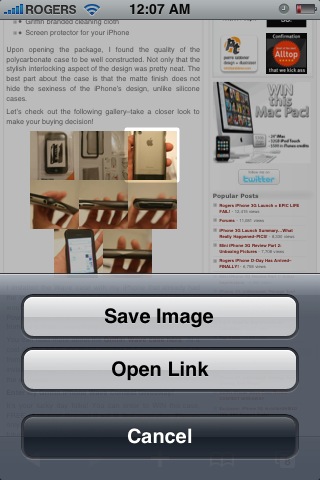
3. Save photos in Mail or Safari: You can save any photo emailed to you, or an image on a webpage. Just hold your finger down and the following prompt will appear (I think you can handle the next step):
4. One step slide for typing capital letters or numbers: Instead of pressing the “shift” or “.?123” buttons and letting go to capitalize a letter or get a number, here’s a cool short cut. Tap the “shift”/”.?123″ button and hold your finger down, then slide to the appropriate letter or number and let go. BAM! You just saved yourself a key press! Try it out! This will increase your typing efficiency big time!
5. Surf Safari in landscape mode–in bed: A lot of people use their iPhones in bed (don’t lie, I do it too–so sad). Anyways, if you want to surf the web in Safari in landscape mode while lying on your side it can be a problem. The iPhone’s accelerometer will automatically rotate the browser whenever you turn the iPhone on its side.
To fix this problem, turn your iPhone into landscape mode–then rotate the iPhone so the Home button will be pointing towards your ceiling. This will hold Safari in landscape while you’re surfing the web in bed on your side–allowing you to keep Disconnect Anxiety at bay.
Bonus tip: Like to take self portraits with the camera? Here’s a handy tip: first hold your finger down on the shutter button and keep it there. Next, strike a pose while holding the camera at a distance–then release your finger–BAM…a photo will be taken! This method helps reduce the shake that usually occurs when you press the shutter, resulting in blurry images.
I know you might already know some of these tricks. However a lot of people don’t so this is why I’m posting them. Want to learn more tricks that I’ve been using since my first generation iPhone? Read up on my previous post, the Top iPhone Tips and Tricks You Didn’t Know About.
What are your favorite iPhone tips? Let’s hear ’em!!!
**Looking for an iPhone 3G case? Go get an invisibleSHIELD, the strongest protection for your iPhone backed by a 30 day moneyback guarantee, lifetime replacement warranty, and FREE shipping! Use coupon code iphoneinca for 10% off your purchase!Order today!**
Today kicks off the 2024 NHL playoffs as 16 teams battle it out for the Stanley Cup, with playoff hockey marking the best time of the year for fans, especially since we have four Canadian teams in the postseason this year. How to watch and stream the 2024 NHL playoffs in Canada? You’ll be able...
Today is the day where a once-in-a-lifetime event will take place with a total solar eclipse, where the moon will pass by in front of the sun and cast its shadow (umbra) on Earth. In order to see the total solar eclipse live, you’ll need to be in a location where the path of totality...
Last month, when we wrote about Ontario debuting its One Fare program, we noted that PRESTO Apple Wallet support was still missing in action on the TTC. But despite the lack of official PRESTO card support in Apple Wallet on the iPhone, it’s still possible to use the latter to tap to pay—without unlocking your...