The 3rd party iPhone developers out there never cease to amaze me. First, a fix for my SMS voicemail notifications, and now an application to let me send MMS (multimedia messaging service) picture messages on my iPhone on Rogers via EDGE. How to setup MMS picture messaging on the iPhone with Rogers? It’s a very simple process and you’ll be sending MMS messages on your iPhone in Canada in no time!
Install the MMS app via Installer
- Open Installer…and go to “Sources”
- Click “Edit” and then “Add”. Type in “http://modmyifone.com/installer.xml” and click OK and then Done
- Go to Install and click on the ModMyiFone.com directory. Click on “MMS” and install it.
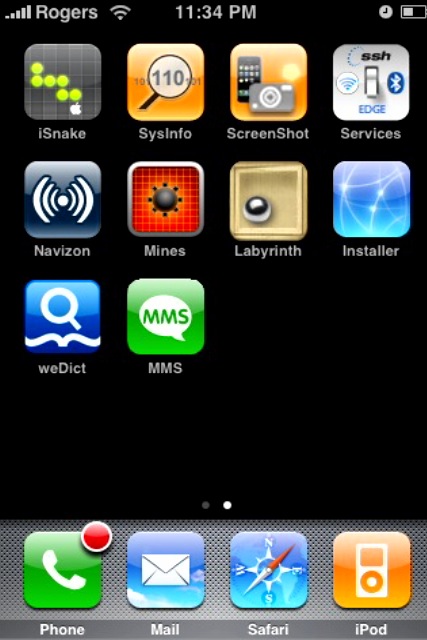
- After your iPhone does a quick reset, you should now see the MMS icon on your Springboard
Enter Rogers MMS Settings within the MMS app
- Launch the MMS app via your Springboard
- Click on “Settings”
- Enter the following info:
Configure EDGE Settings for Rogers
- Click on Settings –> General –> Network –> EDGE
- Now enter the following settings:
APN: media.com
User: media
Pass: mda01
- Once finished, click back on “Network” to exit
How to Send a MMS Picture Message
This program is pretty simple to use. The first thing you need to do is disable WiFi and enable EDGE before you attempt to send out an MMS. Also, as of this moment you can only send MMS messages and cannot receive. I’m sure this will be fixed in the future.
- Launch the MMS app. Click on “New MMS”
- Enter a Title if you wish. Select a “To:” recipient and then select a “File:” to send.
- Click “Send”…that’s it!!! A log of all your sent MMS messages will be displayed afterwards.
That’s it! Pretty easy, huh? Here are a couple screenshots of the newly added MMS icon on your Springboard, and another shot of the MMS settings screen:

If you enjoyed this post, please subscribe to my RSS feed, so you won’t miss any updates!




Whenever i tried to send a mms pic its saying: mms server reported an error what should i do to fix it?
Did you install the MMS application above? Did you turn off WiFi before sending the MMS? Did you double check your EDGE settings?
Can the iPhone receive MMS?
I was wondering, by doing this, will I be charged for using the EDGE network for every MMS I send? and Can I browse the internet now that my iphone is EDGE enabled? Thanks
i am with fido. can i send mms
i have the $20 essentials pack from rogers which includes 1000 mms messaging. i currently have a treo – and have not had any charge issues sending or receiving with this plan. with my new iphone – will i be charged if i send mms?
Did you ever end up getting charged for sending mms?
For me http://modmyifone.com/installer.xml is already installed but I have no modmyifone directory or MMS entry. Is there something I’m missing?
hey when i use the internet settings you gave the internet doesnt work only the mms. But when i put other internet settings that i found and plug them in the mms doesnt work. Whats going on ? Am I doing something wrong ?
If I set up this mms app. How do I choose how I want to go on the internet between edge and wifi. And in the abscence of wifi will the phone automatically connect via edge if i (for example) hit the safari or mail button?
Thanks
You people are actually using iPhones for internet outside of wifi in Canada?!?! Last time I heard, Rogers charges $50/mb, thats WAY too much
Actually, Rogers caved and had a 6 GIG a month data plan for $30. Much better then the $70 per month it used to be!
The catch, however, is that you have to get in on this deal before the end of August. Because at the end of August people are back to having to pay the full rates. Ye-owch.
I don’t think I’ll ever hit that 6 gigs of data. So far, I’ve had my iphone for 5 days and using it almost CONSTANTLY on the 3G network, I’ve only racked up 10 MBs of data back and forth.
rogers is pretty expensive if you use 3G/edge i got ripped pretty hard so keep an eye on how much you use lol and i’ve my5 and for some reason they charged me 100 bucks for the contact which was added on my MY5 list how is that possible? they dont even have the number on which i made a call or received lol so watch it buddy. and um do i need 3G or edge or whatever u guys call it for sending and/or recieving picture texts?
I have added the modmyifone/installer to my sources but I can’t find the mms info. Can someone help?
Does anyone have an answer to this?
Hi everyone,
how exactly do I go to the installer? where exactly is that? thank you 🙂
I have added the modmyifone/installer to my sources but I can’t find the mms info. Can someone help?
did apple made that installer app? or just some random guy coded lol
f*** yuu ALLL
Whenever i tried to send a mms pic its saying: mms server reported an error what should i do to fix it?
Did you install the MMS application above? Did you turn off WiFi before sending the MMS? Did you double check your EDGE settings?
I was wondering, by doing this, will I be charged for using the EDGE network for every MMS I send? and Can I browse the internet now that my iphone is EDGE enabled? Thanks
i am with fido. can i send mms
i have the $20 essentials pack from rogers which includes 1000 mms messaging. i currently have a treo – and have not had any charge issues sending or receiving with this plan. with my new iphone – will i be charged if i send mms?
For me http://modmyifone.com/installer.xml is already installed but I have no modmyifone directory or MMS entry. Is there something I’m missing?
Did you ever end up getting charged for sending mms?
hey when i use the internet settings you gave the internet doesnt work only the mms. But when i put other internet settings that i found and plug them in the mms doesnt work. Whats going on ? Am I doing something wrong ?
If I set up this mms app. How do I choose how I want to go on the internet between edge and wifi. And in the abscence of wifi will the phone automatically connect via edge if i (for example) hit the safari or mail button?
Thanks
You people are actually using iPhones for internet outside of wifi in Canada?!?! Last time I heard, Rogers charges $50/mb, thats WAY too much
Actually, Rogers caved and had a 6 GIG a month data plan for $30. Much better then the $70 per month it used to be!
The catch, however, is that you have to get in on this deal before the end of August. Because at the end of August people are back to having to pay the full rates. Ye-owch.
I don’t think I’ll ever hit that 6 gigs of data. So far, I’ve had my iphone for 5 days and using it almost CONSTANTLY on the 3G network, I’ve only racked up 10 MBs of data back and forth.
I have added the modmyifone/installer to my sources but I can’t find the mms info. Can someone help?
Hi everyone,
how exactly do I go to the installer? where exactly is that? thank you 🙂
I have added the modmyifone/installer to my sources but I canÂ’t find the mms info. Can someone help?
Does anyone have an answer to this?
Can the iPhone receive MMS?
rogers is pretty expensive if you use 3G/edge i got ripped pretty hard so keep an eye on how much you use lol and i’ve my5 and for some reason they charged me 100 bucks for the contact which was added on my MY5 list how is that possible? they dont even have the number on which i made a call or received lol so watch it buddy. and um do i need 3G or edge or whatever u guys call it for sending and/or recieving picture texts?
did apple made that installer app? or just some random guy coded lol