There are some rabid iPhone fans out there, but I know there are also rabid, foaming from the mouth iPhoneinCanada.ca fans too (I hope). Anyways, I got inspired by Ruffdeezy’s previous post about adding a homescreen bookmark for his website. I thought that was a fantastic idea so I called up our top notch designer/illustrator Pierre Tabbiner for some help.
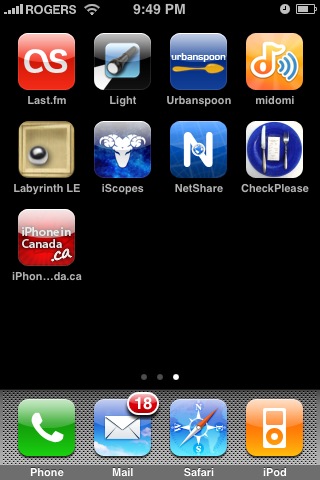
What he came up with was just super cool. Now, you crazy fans you, add iPhoneinCanada.ca as a bookmark to your home screen and you’ll see this slick looking image instead of the default screenshot:
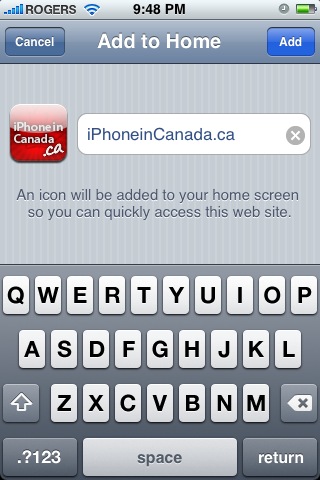
How to Add our Bookmark to your iPhone Home Screen
1. Visit http://www.iphoneincanada.ca on your iPhone or iPod Touch
2. Click on the “+” icon along the bottom of Safari. Click “Add to Home Screen”.
3. Voila! The icon you see above should be on your Home Screen. What I love about the PNG icon is that it blends in nicely with the other iPhone icons!
Thanks to Pierre for his trusty work, and if anybody is looking for design/logo work I would highly recommend him. Tell him I sent ya and he’ll hook up a deal (or try to at least!). Enjoy your holiday Monday (BC day) everyone. I’m going to take it easy, and so should you (if you’re in BC)! Ciao!
Winner of our invisibleSHIELD 3G Contest/Giveaway!
Here is the winner of the invisibleSHIELD 3G giveaway! Watch the video to find out who won! Thanks to everyone who entered! 🙂 Watch for another contest coming up in the future!
**Looking for an iPhone 3G case? Go get an invisibleSHIELD, the strongest protection for your iPhone backed by a 30 day moneyback guarantee, lifetime replacement warranty, and FREE shipping! Use coupon code iphoneinca for 15% off your purchase! Order today!**
If you enjoyed this post, please subscribe to my RSS feed, so you won’t miss any updates! You can also subscribe via email and have daily updates sent to your Inbox! Want more? Find out what I’m doing right now! Follow me on Twitter!
Want to see more of our stories on Google?
P.S. Want to keep this site truly independent? Support us by buying us a beer, treating us to a coffee, or shopping through Amazon here. Links in this post are affiliate links, so we earn a tiny commission at no charge to you. Thanks for supporting independent Canadian media!
Momin: Usually the YouTube vids take a while to be processed to be playable on the iPhone. Try again in a hour or two 😉 The suspense…is it killing yet?
Momin
18 years ago
lol the suspense is there but I guess I’ll have to wait 🙂
iPhone Fan, X1Zero: I’m talking about when you make an iPhone home screen icon for your site. The iPhone will automatically round the corners for you, no need to do it yourself.
Joost
18 years ago
Now that we have an icon, we should make an iphone version of the site. 🙂
Bud Colby
18 years ago
Tried it at 2 a.m. This morning, iPhone on WiFi, spin, spin, spin….. 5 min. no video. Tried again just now, spin, spin, spin, on and on, video won’t work on my iPhone. Will have to use desktop.
Bud Colby
18 years ago
@ iPhone Fan. Have watched many YouTube videos on my iPhone, and. Ever had to wait like that, there has to be a problem, sorry.
Weird, I just tried the YouTube on my iPhone and it doesn’t work either. Guess it has to do with YouTube…try your PC. 😉
Bud Colby
18 years ago
Now, as for the icon, it did just as you said it would. One problem though, touch it and it opens Safari, but instead of just opening the page alone, it keeps whatever last page, and opens iPhone in Canada in a second page. Am I alone, or is that what happens to everyone?
I have firmware 1.1.5 and when i click the bookmark button the plus sign all i get is Add Bookmarks and cancel I don’t get a Add To Home Screen how come i want to add sites to my home screen
Momin: Usually the YouTube vids take a while to be processed to be playable on the iPhone. Try again in a hour or two 😉 The suspense…is it killing yet?
Momin
18 years ago
lol the suspense is there but I guess I’ll have to wait 🙂
Momin
18 years ago
lol the suspense is there but I guess I’ll have to wait 🙂
iPhone Fan, X1Zero: I’m talking about when you make an iPhone home screen icon for your site. The iPhone will automatically round the corners for you, no need to do it yourself.
Joost
18 years ago
Now that we have an icon, we should make an iphone version of the site. 🙂
Bud Colby
18 years ago
Tried it at 2 a.m. This morning, iPhone on WiFi, spin, spin, spin….. 5 min. no video. Tried again just now, spin, spin, spin, on and on, video won’t work on my iPhone. Will have to use desktop.
Bud Colby
18 years ago
@ iPhone Fan. Have watched many YouTube videos on my iPhone, and. Ever had to wait like that, there has to be a problem, sorry.
Weird, I just tried the YouTube on my iPhone and it doesn’t work either. Guess it has to do with YouTube…try your PC. 😉
Bud Colby
18 years ago
Now, as for the icon, it did just as you said it would. One problem though, touch it and it opens Safari, but instead of just opening the page alone, it keeps whatever last page, and opens iPhone in Canada in a second page. Am I alone, or is that what happens to everyone?
I have firmware 1.1.5 and when i click the bookmark button the plus sign all i get is Add Bookmarks and cancel I don’t get a Add To Home Screen how come i want to add sites to my home screen
I have firmware 1.1.5 and when i click the bookmark button the plus sign all i get is Add Bookmarks and cancel I don’t get a Add To Home Screen how come i want to add sites to my home screen
Looks like Bell, Rogers and Telus are down to their last written word on those new phone fees. The Canadian Radio-television and Telecommunications Commission (CRTC) has given the three carriers until September 10, 2026 to file final replies in the show-cause case over device, SIM and shipping charges that landed after the national ban on...
Looks like Phil Schiller is not just easing into a quieter Apple Fellow schedule. Mark Gurman says he also wanted out of the next fight over App Store money. In Sunday's Power On newsletter for Bloomberg, Gurman reports that Schiller is 66 and clearly wanted something closer to retirement, with more time for family and...




You know, you don’t actually have to round the corners yourself, the iPhone takes care of all of that.
I know that, I didn’t round the corners. I don’t do graphic design so Pierre is the man for the job! 🙂
Video isn’t working! Who won?!?
Matt: You’re referring to the iphone home screen icons or…?
Momin: Vid’s working for me, try again!
@Matt,
Matt, what are you talking about “rounding the corners”?
oh well it isn’t working on my iPhone 🙁
Momin: Usually the YouTube vids take a while to be processed to be playable on the iPhone. Try again in a hour or two 😉 The suspense…is it killing yet?
lol the suspense is there but I guess I’ll have to wait 🙂
Nice man, I have the exact same ikea garbage can.
The iPhone will automatically round the corners and add the glossy look to the image.
iPhone Fan, X1Zero: I’m talking about when you make an iPhone home screen icon for your site. The iPhone will automatically round the corners for you, no need to do it yourself.
Now that we have an icon, we should make an iphone version of the site. 🙂
Tried it at 2 a.m. This morning, iPhone on WiFi, spin, spin, spin….. 5 min. no video. Tried again just now, spin, spin, spin, on and on, video won’t work on my iPhone. Will have to use desktop.
@ iPhone Fan. Have watched many YouTube videos on my iPhone, and. Ever had to wait like that, there has to be a problem, sorry.
Weird, I just tried the YouTube on my iPhone and it doesn’t work either. Guess it has to do with YouTube…try your PC. 😉
Now, as for the icon, it did just as you said it would. One problem though, touch it and it opens Safari, but instead of just opening the page alone, it keeps whatever last page, and opens iPhone in Canada in a second page. Am I alone, or is that what happens to everyone?
When you make a youtube movie, it doesn’t get formatted for the iPhone for like a day.
I have firmware 1.1.5 and when i click the bookmark button the plus sign all i get is Add Bookmarks and cancel I don’t get a Add To Home Screen how come i want to add sites to my home screen
I have an iPod Touch not an iPod Phone
You know, you don’t actually have to round the corners yourself, the iPhone takes care of all of that.
You know, you don’t actually have to round the corners yourself, the iPhone takes care of all of that.
I know that, I didn’t round the corners. I don’t do graphic design so Pierre is the man for the job! 🙂
I know that, I didn’t round the corners. I don’t do graphic design so Pierre is the man for the job! 🙂
Video isn’t working! Who won?!?
Video isn’t working! Who won?!?
Matt: You’re referring to the iphone home screen icons or…?
Momin: Vid’s working for me, try again!
Matt: You’re referring to the iphone home screen icons or…?
Momin: Vid’s working for me, try again!
@Matt,
Matt, what are you talking about “rounding the corners”?
@Matt,
Matt, what are you talking about “rounding the corners”?
oh well it isn’t working on my iPhone 🙁
Momin: Usually the YouTube vids take a while to be processed to be playable on the iPhone. Try again in a hour or two 😉 The suspense…is it killing yet?
lol the suspense is there but I guess I’ll have to wait 🙂
lol the suspense is there but I guess I’ll have to wait 🙂
Nice man, I have the exact same ikea garbage can.
The iPhone will automatically round the corners and add the glossy look to the image.
iPhone Fan, X1Zero: I’m talking about when you make an iPhone home screen icon for your site. The iPhone will automatically round the corners for you, no need to do it yourself.
Now that we have an icon, we should make an iphone version of the site. 🙂
Tried it at 2 a.m. This morning, iPhone on WiFi, spin, spin, spin….. 5 min. no video. Tried again just now, spin, spin, spin, on and on, video won’t work on my iPhone. Will have to use desktop.
@ iPhone Fan. Have watched many YouTube videos on my iPhone, and. Ever had to wait like that, there has to be a problem, sorry.
Weird, I just tried the YouTube on my iPhone and it doesn’t work either. Guess it has to do with YouTube…try your PC. 😉
Weird, I just tried the YouTube on my iPhone and it doesn’t work either. Guess it has to do with YouTube…try your PC. 😉
Now, as for the icon, it did just as you said it would. One problem though, touch it and it opens Safari, but instead of just opening the page alone, it keeps whatever last page, and opens iPhone in Canada in a second page. Am I alone, or is that what happens to everyone?
When you make a youtube movie, it doesn’t get formatted for the iPhone for like a day.
When you make a youtube movie, it doesn’t get formatted for the iPhone for like a day.
I have firmware 1.1.5 and when i click the bookmark button the plus sign all i get is Add Bookmarks and cancel I don’t get a Add To Home Screen how come i want to add sites to my home screen
I have firmware 1.1.5 and when i click the bookmark button the plus sign all i get is Add Bookmarks and cancel I don’t get a Add To Home Screen how come i want to add sites to my home screen
I have an iPod Touch not an iPod Phone
I have an iPod Touch not an iPod Phone