
Apple’s AirPort Utility App is Being Removed From the App Store
Apple warns that "functionality is not guaranteed" when using AirPort Utility on iOS 27 or later.
With each iPhone firmware update, Apple usually addresses some bug fixes and also adds new features too. One of the features I’m looking forward to is the ability to type emails in landscape mode. Why? Obviously it’s a Cade of my thumbs being too fat so in landscape mode my accuracy increases ten fold!
I might not need to wait for this feature to come because there is a free app in the App Store that has solved this issue. It’s called Firemail and it enables you to write emails in landscape mode!
How it works is like this: first, launch Mail app as normal and click “reply” to and email. Then, press the Home button and launch Firemail. Once the app has launched, type your email in the Firemail screen as usual. Once finished, click on the reply icon which will give you an option to send your text to your original email reply in Mail!
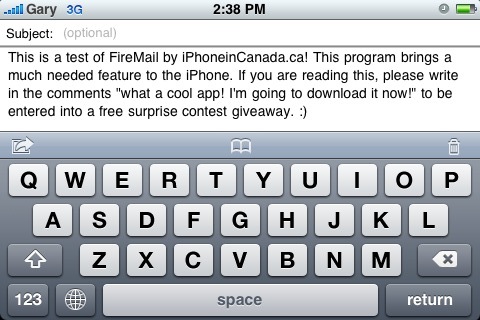
Of course this extra step is going to take a few extra moments when you’re sending emails, but typing in landscape mode is awesome if you’re typing out long emails on the iPhone or if you also have hideously fat thumbs like myself. My typing speed/accuracy in regular portrait mode is pretty good thanks to the iPhone’s awesome auto correct. However, Firemail turns up the heat now whenever I’m responding to emails!
Firemail is currently free via the iPhone App Store. Go get it if you’ve been dying to type emails in landscape mode. The only downside is if the app crashes there is no way to recover your email! Let me know if Firemail comes in handy for you!
**Looking for an iPhone 3G case? Go get an invisibleSHIELD, the strongest protection for your iPhone backed by a 30 day moneyback guarantee, lifetime replacement warranty, and FREE shipping! Use coupon code iphoneinca for 20% off your purchase! Order today!**
If you enjoyed this post, please subscribe to my RSS feed, so you won’t miss any updates! You can also subscribe via email and have daily updates sent to your Inbox! Want more? Find out what I’m doing right now! Follow me on Twitter!
Want to see more of our stories on Google?

P.S. Want to keep this site truly independent? Support us by buying us a beer, treating us to a coffee, or shopping through Amazon here. Links in this post are affiliate links, so we earn a tiny commission at no charge to you. Thanks for supporting independent Canadian media!


Love this landscape email option. It’ll be great to have the option the reply to “Reply with Firemail” option as a button in the email roll up layer to reduce that step. e.g. existing option includes: Reply, Forward, Cancel – Add Reply with Firemail between Reply and Forward as a button too.
It is good to have these applications and I will be getting it for sure however it is annoying why Apply can’t just add this feature to regular mail on an update. I mean now they even have all the code they need from the third party application. Haha just copy/paste it…
Will it works with emailing a photo? If so, how?
It should since Firemail just sends whatever text you type to Mail. Give it a shot! 😉
Here is what I did. Select a picture from photo, select Email Photo… Hit home and run firemail, type and select send “Send to MobileMail” but the MobileMail does not contain the attached photo…
Anyone get it to work?
What a cool app! I’m going to download it now!
what a cool app,I going to download it now.
Love this landscape email option. It’ll be great to have the option the reply to “Reply with Firemail” option as a button in the email roll up layer to reduce that step. e.g. existing option includes: Reply, Forward, Cancel – Add Reply with Firemail between Reply and Forward as a button too.
It is good to have these applications and I will be getting it for sure however it is annoying why Apply can’t just add this feature to regular mail on an update. I mean now they even have all the code they need from the third party application. Haha just copy/paste it…
Will it works with emailing a photo? If so, how?
What a cool app! I’m going to download it now!
It should since Firemail just sends whatever text you type to Mail. Give it a shot! 😉
Here is what I did. Select a picture from photo, select Email Photo… Hit home and run firemail, type and select send “Send to MobileMail” but the MobileMail does not contain the attached photo…
Anyone get it to work?
Here is what I did. Select a picture from photo, select Email Photo… Hit home and run firemail, type and select send “Send to MobileMail” but the MobileMail does not contain the attached photo…
Anyone get it to work?
Here is what I did. Select a picture from photo, select Email Photo… Hit home and run firemail, type and select send “Send to MobileMail” but the MobileMail does not contain the attached photo…
Anyone get it to work?
what a cool app,I going to download it now.
what a cool app,I going to download it now.
what a cool app,I going to download it now.