
Apple’s AirPort Utility App is Being Removed From the App Store
Apple warns that "functionality is not guaranteed" when using AirPort Utility on iOS 27 or later.
The iPhone’s list of features are quite impressive, but of course it’s hard to impress everyone. Some of our most wanted features might never come, but you can expect new features in the upcoming 2.2 firmware (including the ability to download podcasts directly onto the iPhone). For those who have longed for voice dialing the wait is over with this new app called Say Who.
Say Who is a free download via the App Store and was released a few days ago. When I was contacted by the developers of Say Who to review their app I was a bit skeptical because voice-dialing is one of those features that helped sell phones, but we would never use. After trying the app out I’m happy to say this app works exactly as advertised.
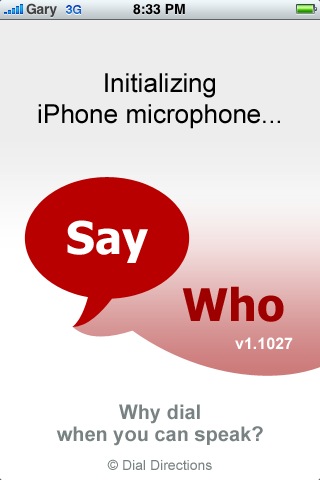
Normally with voice activated dialing you need to train your voice for the system to learn it to function properly. With Say Who, there NO training necessary! When I found this out, I was curious to see how well it would work. To use the app is simple. Just launch it, wait for the microphone to activate, then hold down your finger on the screen and say any contact name or number. Say Who will then reveal the closest (or exact) matches and auto dial the number (you can turn this off).
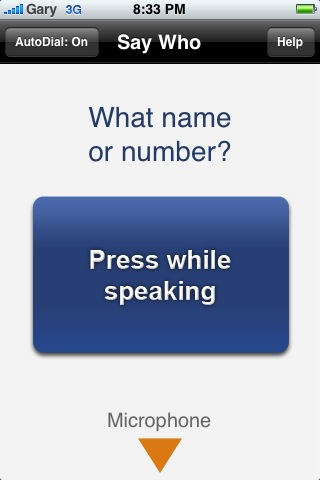
I would say about 90% of the time Say Who was pretty accurate in deciphering my voice. I even tried a couple variations of high pitched and low pitched Terminator voices and it still worked. Nice job on the developers for getting this right. I’m not sure how often I would use voice dialing, but if your hands are tied while driving this app might come in handy for you (just like how JiggleU would).
Voice dialing is here on the iPhone for those who want it. Give this app a try and see for yourself how well it works! Let me know if you like it or not!
Winners of the GelaSkins Saturday Giveaway
A big thanks to everyone who entered our GelaSkins giveaway! Congrats to the following…
…Doobie for winning the 3G GelaSkin and
…edge777 for the winning the first gen GelaSkin!
Send me a PM via the forums with your address so I can mail them your way! Look forward to another contest this Saturday folks! 🙂
**Looking for an iPhone 3G case? Go get an invisibleSHIELD, the strongest protection for your iPhone backed by a 30 day moneyback guarantee, lifetime replacement warranty, and FREE shipping! Use coupon code iphoneinca for 20% off your purchase! Order today!**
If you enjoyed this post, please subscribe to my RSS feed, so you won’t miss any updates! You can also subscribe via email and have daily updates sent to your Inbox! Want more? Find out what I’m doing right now! Follow me on Twitter!
Want to see more of our stories on Google?

P.S. Want to keep this site truly independent? Support us by buying us a beer, treating us to a coffee, or shopping through Amazon here. Links in this post are affiliate links, so we earn a tiny commission at no charge to you. Thanks for supporting independent Canadian media!


FIRST~~!!!
You win a prize…err…thumbs UP!
Thanks for the excellent, detailed review on this one iPhoneFan! As always, your work and opinions are highly appreciated 🙂
..
This will be my last post until after my vacation. Everyone have a great couple of weeks and I look forward to catching up again once I return from my cruises! Take care and I wish you all amazing weather here at home while I’m basking in the Caribbean sun! 😀
Thanks for always leaving insightful, positive comments for everyone here including myself! Enjoy your vacation!!
This came out a couple of weeks ago, I got it in October. Either way it’s pretty useful.
There’s one problem though. You still have to launch the application and then hold the button before speaking. It’ll take the same number of clicks to open up your contacts and choose one of your favourites to call.
In a perfect world, Apple would allow background applications and this application would stay in the background activating by voice command. As it is now, it seems kind of useless.
I’ve tried the other voice apps and this works the best of them all. It’s great for driving when your hands are tied up but any other time as mentioned it is debatable whether choosing contacts from favorites is faster.
I also downloaded this a while ago but have never used it to call anyone, just tested it out and it works well. I think the update was released a few days ago but I haven’t tried using it since. It’s on my 3rd page (lower on my priority list… Haha!)
For me, I personally like using the speed dial applications where you just click on the app and it will automatically call whoever you set the app to. The downside is that it will only call one person till you change the settings. But if you think about it, there should only be one person anyways that you most absolutely need to have on speed dial if you catch my drift (Girlfriend, Boyfriend, Mom, etc…)
So I decided to do a little investigation for the best free speed dial app. I downloaded 4 apps: “TouchDial”, “1-TouchCall”, “Speed Dial”, and “myFavors”. TouchDial is reliable but upon exit goes to the contact list, 1-TouchCall is the same as TouchDial, Speed Dial exits to the homescreen but is sometimes unreliable ie: you click on the app and nothing happens. This leaves to my personal favourite out of the 4 apps: myFavors. When you click on myFavors, it goes to a screen that says myFavours for a sec, then it calls your contact, upon exit, it goes back to the myFavours screen and then returns to the homescreen.
If you’re looking for a great way to quickly call one person with just a touch of a button, get myFavors. It’s the one that I use.
@Tim Hope you have a good vacation!
Wow, thanks for the breakdown on all those apps, Peacock!
Many thanks for the mention! We’re hard at work to improve Say Who, and welcome feedback saywho@dialdirections.com
This app is fantastic. I pretty much don’t use the contacts app at all anymore for looking up numbers to dial. If we could only activate and use it solely through a Bluetooth headset, without touching the phone, it would be a perfect 10!
Sounds interesting… Might have to give it a try.
Cheers!
FIRST~~!!!
FIRST~~!!!
Thanks for the excellent, detailed review on this one iPhoneFan! As always, your work and opinions are highly appreciated 🙂
..
This will be my last post until after my vacation. Everyone have a great couple of weeks and I look forward to catching up again once I return from my cruises! Take care and I wish you all amazing weather here at home while I’m basking in the Caribbean sun! 😀
This came out a couple of weeks ago, I got it in October. Either way it’s pretty useful.
This came out a couple of weeks ago, I got it in October. Either way it’s pretty useful.
There’s one problem though. You still have to launch the application and then hold the button before speaking. It’ll take the same number of clicks to open up your contacts and choose one of your favourites to call.
In a perfect world, Apple would allow background applications and this application would stay in the background activating by voice command. As it is now, it seems kind of useless.
There’s one problem though. You still have to launch the application and then hold the button before speaking. It’ll take the same number of clicks to open up your contacts and choose one of your favourites to call.
In a perfect world, Apple would allow background applications and this application would stay in the background activating by voice command. As it is now, it seems kind of useless.
I’ve tried the other voice apps and this works the best of them all. It’s great for driving when your hands are tied up but any other time as mentioned it is debatable whether choosing contacts from favorites is faster.
I’ve tried the other voice apps and this works the best of them all. It’s great for driving when your hands are tied up but any other time as mentioned it is debatable whether choosing contacts from favorites is faster.
I also downloaded this a while ago but have never used it to call anyone, just tested it out and it works well. I think the update was released a few days ago but I haven’t tried using it since. It’s on my 3rd page (lower on my priority list… Haha!)
For me, I personally like using the speed dial applications where you just click on the app and it will automatically call whoever you set the app to. The downside is that it will only call one person till you change the settings. But if you think about it, there should only be one person anyways that you most absolutely need to have on speed dial if you catch my drift (Girlfriend, Boyfriend, Mom, etc…)
So I decided to do a little investigation for the best free speed dial app. I downloaded 4 apps: “TouchDial”, “1-TouchCall”, “Speed Dial”, and “myFavors”. TouchDial is reliable but upon exit goes to the contact list, 1-TouchCall is the same as TouchDial, Speed Dial exits to the homescreen but is sometimes unreliable ie: you click on the app and nothing happens. This leaves to my personal favourite out of the 4 apps: myFavors. When you click on myFavors, it goes to a screen that says myFavours for a sec, then it calls your contact, upon exit, it goes back to the myFavours screen and then returns to the homescreen.
If you’re looking for a great way to quickly call one person with just a touch of a button, get myFavors. It’s the one that I use.
@Tim Hope you have a good vacation!
I also downloaded this a while ago but have never used it to call anyone, just tested it out and it works well. I think the update was released a few days ago but I haven’t tried using it since. It’s on my 3rd page (lower on my priority list… Haha!)
For me, I personally like using the speed dial applications where you just click on the app and it will automatically call whoever you set the app to. The downside is that it will only call one person till you change the settings. But if you think about it, there should only be one person anyways that you most absolutely need to have on speed dial if you catch my drift (Girlfriend, Boyfriend, Mom, etc…)
So I decided to do a little investigation for the best free speed dial app. I downloaded 4 apps: “TouchDial”, “1-TouchCall”, “Speed Dial”, and “myFavors”. TouchDial is reliable but upon exit goes to the contact list, 1-TouchCall is the same as TouchDial, Speed Dial exits to the homescreen but is sometimes unreliable ie: you click on the app and nothing happens. This leaves to my personal favourite out of the 4 apps: myFavors. When you click on myFavors, it goes to a screen that says myFavours for a sec, then it calls your contact, upon exit, it goes back to the myFavours screen and then returns to the homescreen.
If you’re looking for a great way to quickly call one person with just a touch of a button, get myFavors. It’s the one that I use.
@Tim Hope you have a good vacation!
Thanks for always leaving insightful, positive comments for everyone here including myself! Enjoy your vacation!!
Wow, thanks for the breakdown on all those apps, Peacock!
You win a prize…err…thumbs UP!
Many thanks for the mention! We’re hard at work to improve Say Who, and welcome feedback saywho@dialdirections.com
This app is fantastic. I pretty much don’t use the contacts app at all anymore for looking up numbers to dial. If we could only activate and use it solely through a Bluetooth headset, without touching the phone, it would be a perfect 10!
This app is fantastic. I pretty much don’t use the contacts app at all anymore for looking up numbers to dial. If we could only activate and use it solely through a Bluetooth headset, without touching the phone, it would be a perfect 10!
Sounds interesting… Might have to give it a try.
Cheers!
Sounds interesting… Might have to give it a try.
Cheers!