
You Can Now Jailbreak iOS 16.4.1 with Palera1n 2.0.0 Beta 6
Codenamed Bakepale, the latest v2.0.0 beta 6 update to jailbreak tool Palera1n has just been released, which fully supports iOS 16.4 - iOS 16.4.1 jailbreak.
Alright folks, here’s the tutorial some of you have been waiting for on how to unlock your iPhone 3G! This is relatively a painless process but I’ll try to make it as simple as possible. Earlier we mentioned how yellowsn0w will unlock firmware 2.2 and the latest 02.28.00 baseband!
How to Unlock your iPhone 3G using the iPhone Dev Team’s Unlock, yellowsn0w
If your iPhone 3G is already jailbroken, jump to step 3 (you already knew that):
1. Update your iPhone 3G to 2.2 firmware via iTunes (to ensure you’ll be on baseband 02.28.00).
2. Jailbreak using QuickPwn 2.2 (updated with 2.2 download links).
3. Launch Cydia –> click on Manage –> click on Sources –> click Edit –> click Add –> enter the following Cydia repository URL found here –> Click on Return to Cydia.
4. Click on Search. Type in “yellowsn0w”. Install yellowsn0w (it should be version 0.9.1, it was updated fairly quickly). Let it finish installing, exit Cydia.
5. Reboot your iPhone with foreign SIM installed…10 seconds later after reboot you should get a signal. If you don’t, try taking the SIM tray out then reinserting again.
6. That’s it! Your iPhone 3G is unlocked!
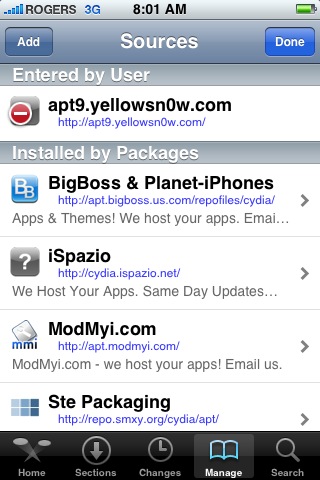
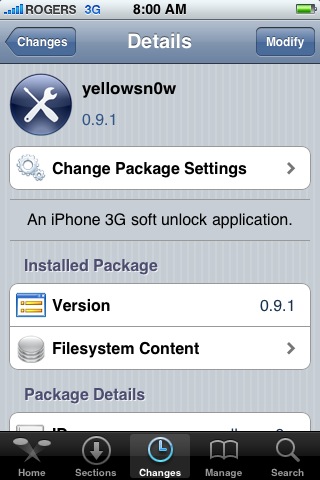
I installed yellowsn0w was able to pop in my du SIM card I was using in Dubai on my iPhone 2G. At first I quickly saw the “SIM Failure” message pop up then disappear quickly. The du SIM was able to pick up a signal! Success!
If you had success or some problems, let us know, but more important, let the Dev Team know by posting comments on their blog here. It’s imperative for them to get feedback in order to improve yellowsn0w to work for all carriers from around the world!
Big props to the entire iPhone Dev Team for their hard work. The entire globe is thanking them right about now!
**Looking for an iPhone 3G case? Go get an invisibleSHIELD, the strongest protection for your iPhone backed by a 30 day moneyback guarantee, lifetime replacement warranty, and FREE shipping! Use coupon code iphoneinca for 20% off your purchase! Order today!**
If you enjoyed this post, please subscribe to my RSS feed, so you won’t miss any updates! You can also subscribe via email and have daily updates sent to your Inbox! Want more? Find out what I’m doing right now! Follow me on Twitter!
Want to see more of our stories on Google?

P.S. Want to keep this site truly independent? Support us by buying us a beer, treating us to a coffee, or shopping through Amazon here. Links in this post are affiliate links, so we earn a tiny commission at no charge to you. Thanks for supporting independent Canadian media!


Cool cool! I have no need to unlock my iPhone as my 2G iPhone is going strong! (Plus unlocked… lol)
Good luck to everyone and cheers for a unlock release!
Hey all,
I have successfully unlocked a Fido iPhone 3G.
I can get the phone to use the Rogers SIM, but there are still some bugs with the yellowsn0w app.
I can receive calls however I am unable to make calls from the iPhone. When I try to do so, it loses the signal and unregisters the SIM. Eventually it re-registers the SIM and again I am left to where I started.
I have let the Dev Team know about this bug. If someone has something else to share, please do so here!
Happy new year!
Are you using the latest version of yellowsn0w 0.9.1?
Same thing happening to me now. Can receive call, but when I try to make a call, it lost its signal.
I unlocked it no problem, it was extremely easy. Thank you dev team.
yellowsn0w delivers! Good job!
Hi
Iam sangay from bhutan ihave a 3g 16gb iphone with jambo sim is it ok or not
djaj: have the same problem, I can receive calls, but can’t make any outgoing calls. Rogers here.
Yes, I am using the latest release of yellowsn0w… 0.9.1.
Still no luck!
Oh well, still a step ahead from last night..haha…
Any help is much appreciated!
Grrr,
I really don’t wanna jailbreak my phone =(
Why not, with quickpwn its so easy, and if you’re worried about warranty just make sure to restore your phone before you bring it in.
Mine didn’t work. 🙁
I installed 0.9.1. reboot with my Fido in a Roger iPhone and it does not show me any signal. Question is do I need to have a Roger SIM card while installing YellowSn0w?
does the unlock void the phone’s warranty? is it reverseable like the jailbreak is?
any tinkering with the iPhone will void the warranty but it is reversible.
So if I restore in itunes before I bring it into apple for repair… Can they tell it had been jailbroken or unlocked?
I updated to the newest 2.2 and ran quickpwn 2.2. After i finish running quickpwn, it shows that it was successful, but Cydia does not come up. I have rebooted several times, and no change. If I restore, what will it restore to? I had a jailbroken phone before, so will it restore to that point, or to a otb iphone? Anybody else have this problem??
the people that say it works are shills
Why is that?
I installed yellowsn0w and I have the same issues as everyone else. I lose my signal when making calls. I’ve uninstalled it for now though.
Using Rogers SIM in Calgary, AB.
Okay after some initial testing I am getting the same problem with my Rogers SIM. Uninstalled and will wait for an update.
Double check your “Modem Firmware” as 02.28.00 and not 02.28.01 via Settings -> General -> About
rogers iphone. 02.28.00 baseband 2.2 firmware.
ran yellowsn0w, turned off phone, put a fido sim, no signal
so no luck
I’m having the same issues. I have an ATT iphone that I’m trying to unlock with yellowsn0w. Followed instructions to a tee, restored to factory setting and redid it again. When I put my Rogers SIM card in, nothing…
same issue here. it seemed to work but my signal would drop every minuter for 10 seconds. tried the posts on dev teams blog. still no go. so i restored back. i’m sure they’ll have a fix soon. thanks for the work dev team!
sorry but your signal would drop every minute for 10 seconds? …lol?
Mine dropped every minute for 10 seconds as well. I’ve uninstalled it and waiting for an update.
Rogers SIM in Calgary, AB
Same problem here as everyone else. I’ve since removed the app and will await an update. Calls come in but get dropped shortly thereafter. Most outgoing calls fail.
hey all,
thanks for posting your “adventures” with yellowsn0w here… i’ve tried pretty much every fix/tip on the dev team blog and yet again i am at the same point as this morning..
no out going calls yet…
hopefully there’s a fix soon…thanks to dev team for their efforts.
Question: is it important to put in the Unlocked SIM?
e.g If i have Rogers SIM, should must put in Fido SIM to unlock or I can just unlock on Rogers SIM?
Please help here. Thank you
Wonder about the same thing.
Installed version 0.9.4. Still can’t make out-calling call. Drop signal when try to make a call.
I can not jailbreak, it goes through all the right steps then i never get to see the Cydia icon? Any ideas?
Successfully jailbroke my iPhone 3g (Version 2.2 and Modem Firmware 02.28.00) that I bought in the U.K. locked to O2 carrier and installed yellowsn0w 0.91 using Cydia but no luck when I changed my O2 SIM for my Rogers SIM. Just got an error “Invalid SIM” – no signal strength or carriers name. I’ve tried the usual tricks e.g. Airplane mode, rebooting, resetting Network etc that the forums are suggesting.
I guess I’ll uninstall yellowsn0w, and continue using my O2 SIM with its expensive roaming charges and wait for a fix from the MuscleNerd and his friends. However I’d like to thank the team for the work they’ve done so far, obviously some people have got the unlock to work. Carry on the good work – “if at first you don’t succeed, …”
I have since found that using OS 10.5.6 requires a modification to enable it get into DFU mode when first using QuickPwn. See http://www.hackint0sh.org/news/401 for further details. My iPhone can now receive calls but NOT send them, at least the Rogers SIM is now recognized with full strength signal bars in the menubar
if you dont see cydia after jailbreak.
Hello all. This happened to my brother and I fixed it without installing anything. I read you must enable your Restriction in Settings > General > Restrictions, then disable them. And voila, all your icons are back.
Any ideas about my question that Is it must to put in the different SIM than original SIM, e.g I have Rogers and I must have to put in the Fido SIM to unlock the phone.
Anyone with Rogers or Fido in Canada successful making calls with the unlock?
not me. lol
me neither =P, Fido iPhone attempting to use SpeakOut in Vancouver. When I put my Fido SIM card back in with yellowsn0w (0.9.4 via Cydia) still installed, I cannot make calls out either even though it’s locked to Fido. However, I can receive calls (with both SIMs). I’m just guessing we need to wait for another update. I trust the AMAZING Dev Team will find a fix quickly =).
Worked for me in 2.5G GSM network. Done the following steps.
1. Restore to 2.2 in itunes (without SIM).
2. jailbreak by QuickPwn 2.2 to add Cydia and Installer (without SIM).
3. installed Terminal and SBSettings without upgrading Cydia (without SIM by wifi).
4. installed yellowsn0w 0.9.4 from cydia adding source http://apt9.yellowsn0w.com
5. insert 3rd party SIM and rebooted from SBSettings.
6. find 5 dots and no carrier logo for several mins after rebooted. (got null/null in carrier)
7. went to terminal and type following commands
a) yellowsn0w -c
b) yellowsn0w -l (done it several times, when it works it takes longer like 1 min. and got null/2.9 in carrier & ICCID loaded)
8. rebooted again from SBSettings.
9. after reboot find the phone searching for network and it got signal at last. both carrier and ICCID loaded. now carrier shows Carrier/2.9.
After that voice call (both MO/MT), SMS & Edge working fine. Got no 3G service yet so will check 3G later. Hope 3G will also work. Unlock is ok and also works after reboot.
Main parameters to check in the about screen Carrier & ICCID. if both loaded perfectly then it should work. if not loaded then re-install yellowsn0w from Cydia or Installer and try those terminal commands until those parameters are loaded.
Great job done Dev-Team. And best of luck to the users.
Hello fellow Canadians,
Success! with Yellosn0w 0.9.5 for me.
Unlocked a fido locked iphone 3G and used a Rogers SIM to make and receive calls.
Steps used:
1) Remove yellowsn0w 0.9.4
2) Restart using Bossprefs
3) Installed 0.9.5 kept SIM in the phone.
4) Reset Network settings which automatically rebooted the phone.
5) Waited a bit to open Home screen, after which I saw that it was connected to Rogers.
Hope this helps!
Thanks Dev-Team.
Which sim card did you leave in the phone to install 0.9.5. The 3rd party or its original one??
I left the 3rd Party SIM in the phone, which for me was a Rogers SIM.
Success! Thank you Dev-Team!
Guys download 0.9.5, they have fixed the problem with outgoing calls. Everything is working now with my Rogers SIM card. Thanks Dev-Team
I can confirm now…version 0.9.5 works
I’m officially on Fido with my Iphone…but have an other Iphone (not a 3G a version 1 ) with a Prepaid Card on Rogers.
Ran version 0.9.5 on the Fido Iphone , put the Sim Card from the Prepaid Rogers Iphone and now I can make call on the Fido Iphone
ROGERS and Fido
yellowsn0w working like a charm incoming/outgoing 3g wifi and all the applications
Iphone 3G locked to Rido, jailbroken, unlocked with yellowsn0w 0.9.5. with 0.9.4, I used to be able to get signal, but outgoing calls would result in dropped signal from Rogers. After updating to 0.9.5, the phone gives me an “Invalid Sim” error and never connects. Tied resetting network settings, and enabled/disabled airplane mode…same result
And ideas?
I have a Fido phone which I want to unlock to put a Roger Sim card. It does not work for me too.
Works ok now. So all good with unlocking phone from Roger or Fido!
Will this unlock works for iPhone 2G?
I believe you can already unlock the iPhone 2G on 2.2 already via Quickpwn 2.2, yellowsn0w was designed to unlock the iPhone 3G.
I imagine it’s so easy that no tutorial is required 🙂
Fido locked phone now works on Rogers SIM!!! Just reboot with the SIM you want to use and upon power up, it searching for the network. To speed things up, I simply turn off and on airplane mode (in SBSettings, for me) and it locks up to the carrier right away!
Awesome work, DEV-TEAM!
Sucess!!!
I’ve unlock a P Vodafone iPhone 3G (Portugal), now works on P TMN.
Thanks dev-team!!!!
Glad this has been working for you guys. Keep the updates coming!
i tried everything i read on the internet, and even upgraded to 0.9.6 still get outgoing call fail, incoming calls work fine. any good advices, thanks
0.9.6 on iphone 3G 2.2 works fine unlocking from T-Mobile to VIP and TELE2 in Croatia
Help needed! I’m trying to unlock my iphone 3G (fido; Ver.2.2/02.28.00) before taking off on a trip overseas, downloaded Quickpwn 2.2 but stock in 2nd step. QuickPwn just won’t show IPSW so I can move on with rest of the steps before running yellowsnow. Help needed!
Help wanted!
I’m trying to unlock my fido iphone 3g (Ver. 2.2/02.28.00) so I can use 3rd party SIM when I’m outside of Canada. However, keep getting stock during step 2 in QuickPwn 2.2, it just won’t display IPSW so I can proceed with rest of the jailbreak. I REALLY WANT TO RUN YELLOWSNOW!!! Fido/Rogers are charging enough $$$ as is and I last thing I want to see is a huge roaming bill. PLEASE HELP!!!
I would try doing a clean restore to 2.2 firmware, then running QuickPwn 2.2. Make sure you download 2.2 firmware and put it in a folder on your desktop.
thanks iPhone fan, but here’s a silly question. How do I go about doing that?
Plug in your iPhone and launch iTunes. Sync so everything will be backed up, then click “Restore”. This will reset your iPhone to factory settings so it will be like a brand new iPhone.
Next, download QuickPwn 2.2 along with the 2.2 iPhone 3G firmware. Links can be found on my post “How to Jailbreak your iPhone 3G with QuickPwn.” (one of the popular posts along the sidebar).
Launch QuickPwn and follow the steps. You should be fine.
Thanks iPhone Fan, you are a rockstar! Kudos to Dev team!
No problem with incoming & outgoing calls (I’m on fido) running QuickPwn 2.2 & Yellowsn0w 0.9.6
Hi ppl:
I have installed Yellowsn0w 0.96 on my Fido iphone 3G. When I put in Rogers SIM, it didn’t show “Invalid SIM”, but i see “NO SERVICE”.
Is it maybe my Rogers SIM is not activated? I dont hv Activated Rogers SIM to try out.
Approve can use phone calls, txting.
How about Data part, can that have the access after unlock?
i did everything i could, even started fresh from 2.2 then jailbreak then gogo cydia and install yellosn0w but everytime i restart i get SIM Locked, please any help here?? THANKS
Having problems unlocking my friend phone. He gave me 3G phone and I don’t know if it was previously hacked but I used pwnage 2.2.5 and firmware iPhone1,2_2.2_5G77_Restore.ipsw. It created the custom ipsw and then I restored this with itunes. I then tried yellowsn0w by installing it with Cydia and I still could not see a network. I thought it was down to the fact that I had put in a non 3-g sim. But I put my own 3G sim in the phonen and still can’t see the network. So I then restored again to the 2.2 firmware through iTunes. I then used Pwnage to install iPhone1,2_2.2.1_5H11_Restore.ipsw. It again created the custom restore so I restored this again through iTunes. Installed yellowsn0w again but I still can’t see a network????? The baseband is still at 02 28 00.
Any idea’s how I can get the service provider.
Carrier doesn’t how up in settings. I just get ….. at the signal bar on the top left.
Anyone have issues with this. I am able to jail break the phone and run yellowsn0w 0.9.8 but if it locks up or if i restart or shut the phone down. when i get back in the phone doesn’t work, so i have to reinstall with a sim that comes with the phone and then stick the fido card in, and it is ok. basically anytime i have to shut or restart the phone it seems to be locked again. I have a rogers iphone 16gb, 3g, brand new, with fido sim. Just kind of a pain to do it all over if I restart. I have run into situations where the phone was out of battery, so I have no choice.
I’ve tried using this guide to unlock my iPhone 3G but now I can’t get any signal on T-Mobile, anyone else had this problem or know how to fix?
anyone knows if iphone 3G with 2.2.1 has been unlocked yet????
Is this video means it has??
http://video.google.ca/videosearch?q=unlock+iphone+2.2.1&oe=utf-8&rls=org.mozilla:en-US:official&client=firefox-a&um=1&ie=UTF-8&ei=cL_sSYqUNY70tQODxPXsAQ&sa=X&oi=video_result_group&resnum=4&ct=title#
Hey, I followed up with all the instructions and after I rebooted (turned off and then turned on) I still acquired no signal. What to do? Please suggest ASAP.
Hi,
I have tried all the steps mentioned i still get invalid SIM, i have a fido Iphone and want to now use a Rogers SIM. please help
I have the 3G internet stick. How can I unlock? Will yellowsn0w work for this application too?
I have the 3G internet stick. How can I unlock? Will yellowsn0w work for this application too?