
You Can Now Jailbreak iOS 16.4.1 with Palera1n 2.0.0 Beta 6
Codenamed Bakepale, the latest v2.0.0 beta 6 update to jailbreak tool Palera1n has just been released, which fully supports iOS 16.4 - iOS 16.4.1 jailbreak.
Yesterday a new 3rd party application was released in Cydia from iSpazio. The app is called Clippy and after some initial testing it’s one of the best temporary working copy and paste solutions for the iPhone.
How to Install Clippy (Copy and Paste) On your iPhone
1. Your iPhone must be jailbroken. Read up and follow my guide here for jailbreaking with QuickPwn.
2. Go to Cydia, search for Clippy and install it.
After that, the copy and paste will be available only in apps that use the keyboard. For example, in Mail, Safari, Notes, etc. All you have to do is tap the “123” key. Take a look at the following screenshots from my experience in testing out Clippy in Notes:

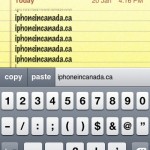
Clippy actually works pretty well for copy and paste, but of course there are limitations such as only being able to use it when the keyboard is present. If you need copy and paste for your iPhone desperately I would get Clippy in a heartbeat!
[iSpazio]
Want to see more of our stories on Google?

P.S. Want to keep this site truly independent? Support us by buying us a beer, treating us to a coffee, or shopping through Amazon here. Links in this post are affiliate links, so we earn a tiny commission at no charge to you. Thanks for supporting independent Canadian media!


Since getting my replacement iPhone, I’ve yet to jailbreak it. Emoji was kept from the last backup of my old phone and stayed after the restore! I use it quite a bit.
This is definitely an interesting solution… Come on, Apple, pick these guys up and implement something like this into the official iPhone firmware. Don’t make me switch to a Pre!!! 🙂
When I ran into troubles with Installer a while back that forced me to restore, I kept my iPhone in stock form. Only until the release of yellowsn0w did I re-jailbreak.
But yeah, the Pre pretty much is made by Apple, LOL. Their entire team consists of former Apple employees/engineers!
Does anybody know if Fido iPhones work on Rogers network with a Rogers SIM?
They won’t work unless you “unlock” your iPhone first. Read here: https://www.iphoneincanada.ca/3rd-party-applications/yellowsn0w-096-released-it-works-this-time/
Doesn’t work with Magic Pad. However it’s still in the works and with further updates this could be the answer to some of our prayers!
Installed and love this app. 🙂
Its a great start and can’t wait for updates 😉
I can’t find Clippy on Cydia! Anyone has any ideas on how to get this app?
hi! u have to go to iSpazio repositorie & upgrade it, that’s all, you go to All Packages and select some clippy (delete, preview, etc)
hello from caracas
Since getting my replacement iPhone, I’ve yet to jailbreak it. Emoji was kept from the last backup of my old phone and stayed after the restore! I use it quite a bit.
This is definitely an interesting solution… Come on, Apple, pick these guys up and implement something like this into the official iPhone firmware. Don’t make me switch to a Pre!!! 🙂
When I ran into troubles with Installer a while back that forced me to restore, I kept my iPhone in stock form. Only until the release of yellowsn0w did I re-jailbreak.
But yeah, the Pre pretty much is made by Apple, LOL. Their entire team consists of former Apple employees/engineers!
Does anybody know if Fido iPhones work on Rogers network with a Rogers SIM?
They won’t work unless you “unlock” your iPhone first. Read here: https://www.iphoneincanada.ca/3rd-party-applications/yellowsn0w-096-released-it-works-this-time/
Doesn’t work with Magic Pad. However it’s still in the works and with further updates this could be the answer to some of our prayers!
Installed and love this app. 🙂
Its a great start and can’t wait for updates 😉
I can’t find Clippy on Cydia! Anyone has any ideas on how to get this app?
hi! u have to go to iSpazio repositorie & upgrade it, that’s all, you go to All Packages and select some clippy (delete, preview, etc)
hello from caracas