The iPhone’s touchscreen keyboard is one of the best in the business. Compare it to similar touchscreens and you’ll quickly realize they don’t even come close (yes, I’m talking to YOU, Blackberry Storm). The iPhone keyboard cannot be mastered in one day. Give it a week and you’ll be typing like a pro in no time!
How to Type 40WPM on your iPhone Keyboard
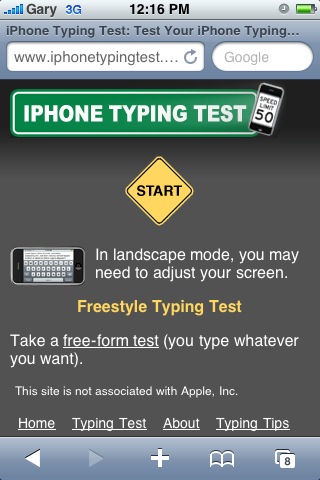
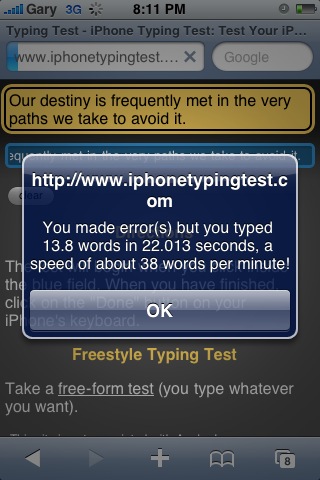
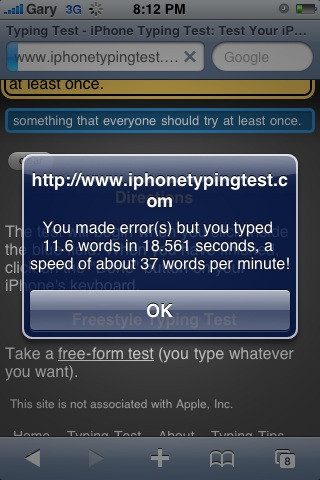
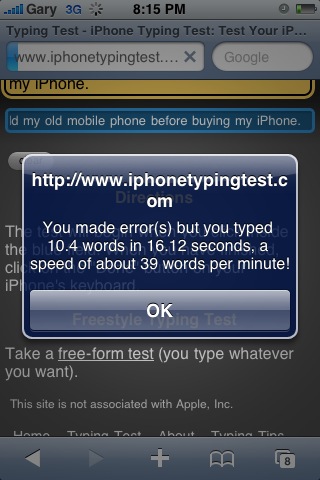
Recently I tested out my typing speed on the iPhone using the website iPhoneTypingTest. The test is very simple. Click in the area, and a phrase will appear. Type it and once you click ‘done’ your speed will appear. I tried this out a few times and I was able to get just under 40 words per minute. Here are my screenshots:
That is a decent speed considering not many people can even type 40WPM on their computer keyboards (anyone here still use the two-index-finger jab? That’s always nice and classy in the office!). Here are a few of my personal tips on how to type effectively and quickly on your iPhone keyboard. Still an iPhone newbie? These have worked for me and they might work for you!
– Relax your fingers and try not to think about pressing the individual letters. Press within the vicinity of letters and let the Auto-Correct work its magic for you. As they say, “use the force” and don’t look for mistakes. Just type!
– Don’t press down with force but rather use a light feathery touch when trying to go full speed.
– To capitalize or type numbers, use the “hold and slide” shortcut. Hold down your finger on the ‘123’ key and slide to any number, then let go. Do the same for capitalizing and punctuation.
– Don’t bother typing apostrophes: whenever I need to type words like ‘don’t’, ‘won’t’, ‘can’t’, etc…I just type ‘dont’, ‘wont’, and ‘cant’. The iPhone’s Auto-Correct will do the rest for you, saving time. Type ‘weree’ to get ‘we’re’ to appear.
– To insert a period, double tap on the spacebar.
– Fix errors quickly by holding down your finger until the magnifying glass appears, drag to move the cursor, then let go.
I’ve used these tips to type faster than people on Blackberries. People always cry about how they don’t like the touchscreen keyboard. Well, the fact of the matter is you can’t learn the iPhone keyboard in 10 minutes. It will require at least a week. The same goes for someone trying to get used to typing on a Blackberry. However, there’s one difference between the two phones: the iPhone is awesome. 😉
Rely on the iPhone’s Auto-Correct Like Your Life Depended On It
The Auto-Correct on the iPhone is just amazing and I have no idea how sometimes it can guess the most horrific spelling of words. By utilizing this effectiveness, it will save you copious amounts of time pressing backspace and correcting yourself over and over and over.
The most important iPhone typing tip I can offer you is to just take your time and be patient. Rely on the iPhone’s Auto-Correct to do the work for you. If you’re typing slang, the iPhone will add it to its dictionary but it might require a few typos for that to happen.
By following the above tips and practicing, you can easily achieve 40WPM or higher by typing on your iPhone keyboard! How’s your typing speed/accuracy so far? Any tips you want to share?



I ran 50+WPM once or twice, ‘with errors’ even tho there wasn’t any. There are small glitches on the site and after while, you can recognize the line they give you, but its a neat little test.
I’m not gonna tweet again till I get my paper done so you won’t see any ‘proof’ until then I think.
@anothersamchan tho – shameless plugging.
You are shameful. Go do your work.
Cool cool. I still think the touchscreen is a pain in the a$$ to type sometimes 😛 lol I do miss having the keypad feature.
No way I can type 40WPM when I have Sausage type Fingers
LOL Same issue here 😛 I know many ppl have problems cuz of them sausage fingers.
LOL. It’s easy just try it out!
The problem isn’t when I’m typing emails or other long texts where the auto-correct takes over. It’s when typing URLs or your name/address/phone number into forms that the keyboard gets frustrating because either the auto-correct isn’t on (URLs) or it just works badly (names, addresses). My wife’s name is Randi and no matter where I press on the keyboard to put in the “i”, it puts in an “o” because in it’s dictionary, there is no word in the English language that has an “i” after “rand”.
I heard if you type the same word three times, it’ll add it to the dictionary.
Interesting thing though is that the predictive dictionary does not change so when I’m typing Randi, it still always gives me Rando but then the auto-correct will change it.
I can get up to about 35+ wpm, although the test seems to make the keyboard lag more than normal. the tips you mention (e.g. hold&slide, don’t type the apostrophes, etc) help a lot to type fast. after a while you can learn to trust the autocorrect feature.
for those of you who need more typing practice, here’s a site with an iPhone typing tutor:
http://www.typingweb.com/mobile/iphone/index.php
I got 53 WPM on the regular test and 62 when typing my own sentence. The iPhone keyboard is awesome and just takes some getting used to. It isn’t perfect when, as some people have mentioned, typing names and such but it’s better in my opinion than having a physical keyboard because it is only there when you need it and it adjusts to the task at hand. 🙂
Great website!
Thank you!
Try adding swear words or for that fellow who’s wifes name is Randi….. into a contact name, the iPhone adds all names, which appear in the contact feilds into to the dictionary. For example I have all the swear words that I use and words that the iPhone always autocorrects in a contact name, but with no number, so now that when I type them the iPhone thinks it’s a contact name.
The iPhoneTypingTest website is really cool one, i use it a lot with my kids.
The others are OK, most are online lately.
Boris
Thanks for the blog loaded with so many information. Stopping by your blog helped me to get what I was looking for.
regards
charcoal grill
I ran 50+WPM once or twice, ‘with errors’ even tho there wasn’t any. There are small glitches on the site and after while, you can recognize the line they give you, but its a neat little test.
I’m not gonna tweet again till I get my paper done so you won’t see any ‘proof’ until then I think.
@anothersamchan tho – shameless plugging.
Cool cool. I still think the touchscreen is a pain in the a$$ to type sometimes 😛 lol I do miss having the keypad feature.
Cool cool. I still think the touchscreen is a pain in the a$$ to type sometimes 😛 lol I do miss having the keypad feature.
Cool cool. I still think the touchscreen is a pain in the a$$ to type sometimes 😛 lol I do miss having the keypad feature.
Cool cool. I still think the touchscreen is a pain in the a$$ to type sometimes 😛 lol I do miss having the keypad feature.
No way I can type 40WPM when I have Sausage type Fingers
No way I can type 40WPM when I have Sausage type Fingers
No way I can type 40WPM when I have Sausage type Fingers
No way I can type 40WPM when I have Sausage type Fingers
No way I can type 40WPM when I have Sausage type Fingers
The problem isn’t when I’m typing emails or other long texts where the auto-correct takes over. It’s when typing URLs or your name/address/phone number into forms that the keyboard gets frustrating because either the auto-correct isn’t on (URLs) or it just works badly (names, addresses). My wife’s name is Randi and no matter where I press on the keyboard to put in the “i”, it puts in an “o” because in it’s dictionary, there is no word in the English language that has an “i” after “rand”.
The problem isn’t when I’m typing emails or other long texts where the auto-correct takes over. It’s when typing URLs or your name/address/phone number into forms that the keyboard gets frustrating because either the auto-correct isn’t on (URLs) or it just works badly (names, addresses). My wife’s name is Randi and no matter where I press on the keyboard to put in the “i”, it puts in an “o” because in it’s dictionary, there is no word in the English language that has an “i” after “rand”.
The problem isn’t when I’m typing emails or other long texts where the auto-correct takes over. It’s when typing URLs or your name/address/phone number into forms that the keyboard gets frustrating because either the auto-correct isn’t on (URLs) or it just works badly (names, addresses). My wife’s name is Randi and no matter where I press on the keyboard to put in the “i”, it puts in an “o” because in it’s dictionary, there is no word in the English language that has an “i” after “rand”.
The problem isn’t when I’m typing emails or other long texts where the auto-correct takes over. It’s when typing URLs or your name/address/phone number into forms that the keyboard gets frustrating because either the auto-correct isn’t on (URLs) or it just works badly (names, addresses). My wife’s name is Randi and no matter where I press on the keyboard to put in the “i”, it puts in an “o” because in it’s dictionary, there is no word in the English language that has an “i” after “rand”.
I can get up to about 35+ wpm, although the test seems to make the keyboard lag more than normal. the tips you mention (e.g. hold&slide, don’t type the apostrophes, etc) help a lot to type fast. after a while you can learn to trust the autocorrect feature.
for those of you who need more typing practice, here’s a site with an iPhone typing tutor:
http://www.typingweb.com/mobile/iphone/index.php
I can get up to about 35+ wpm, although the test seems to make the keyboard lag more than normal. the tips you mention (e.g. hold&slide, don’t type the apostrophes, etc) help a lot to type fast. after a while you can learn to trust the autocorrect feature.
for those of you who need more typing practice, here’s a site with an iPhone typing tutor:
http://www.typingweb.com/mobile/iphone/index.php
I can get up to about 35+ wpm, although the test seems to make the keyboard lag more than normal. the tips you mention (e.g. hold&slide, don’t type the apostrophes, etc) help a lot to type fast. after a while you can learn to trust the autocorrect feature.
for those of you who need more typing practice, here’s a site with an iPhone typing tutor:
http://www.typingweb.com/mobile/iphone/index.php
LOL Same issue here 😛 I know many ppl have problems cuz of them sausage fingers.
LOL Same issue here 😛 I know many ppl have problems cuz of them sausage fingers.
I heard if you type the same word three times, it’ll add it to the dictionary.
I got 53 WPM on the regular test and 62 when typing my own sentence. The iPhone keyboard is awesome and just takes some getting used to. It isn’t perfect when, as some people have mentioned, typing names and such but it’s better in my opinion than having a physical keyboard because it is only there when you need it and it adjusts to the task at hand. 🙂
Interesting thing though is that the predictive dictionary does not change so when I’m typing Randi, it still always gives me Rando but then the auto-correct will change it.
Great website!
You are shameful. Go do your work.
You are shameful. Go do your work.
LOL. It’s easy just try it out!
LOL. It’s easy just try it out!
Thank you!
Thank you!
Try adding swear words or for that fellow who’s wifes name is Randi….. into a contact name, the iPhone adds all names, which appear in the contact feilds into to the dictionary. For example I have all the swear words that I use and words that the iPhone always autocorrects in a contact name, but with no number, so now that when I type them the iPhone thinks it’s a contact name.
Try adding swear words or for that fellow who’s wifes name is Randi….. into a contact name, the iPhone adds all names, which appear in the contact feilds into to the dictionary. For example I have all the swear words that I use and words that the iPhone always autocorrects in a contact name, but with no number, so now that when I type them the iPhone thinks it’s a contact name.
Hmph. I’m at 35mpw!