When this blog was launched last December, it catered to people who had unlocked first gen iPhones. Well, now that the iPhone has officially launched in Canada, a new breed of visitors now visit the site–newly minted iPhone 3G owners. There are some pretty neat tricks and tips that some of the non-hardcore iPhone users might not know about, or have forgetten. I’m going to discuss them today. Ready? Let’s go!
Top 5 iPhone 3G Tricks & Tips for Newbies
1. Safari tricks: return to home + page down.
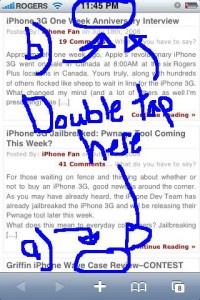
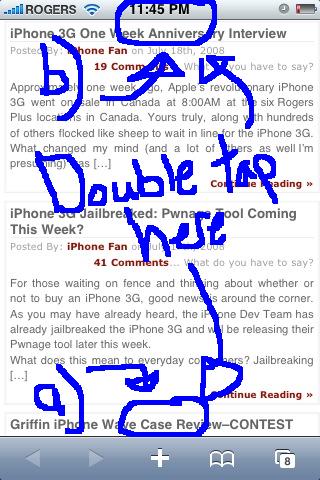
a)In Safari, instead of scrolling down you can double tap quickly just above the “+” icon and this will bring you down a page.
b)To return to the top of the page, single tap the time at the top and you’ll jump back to the top of the page.
2. Google Maps: zoom in, zoom out.
Instead of pinching out to zoom out, if you tap the screen with two fingers, the page will zoom out. Voila!
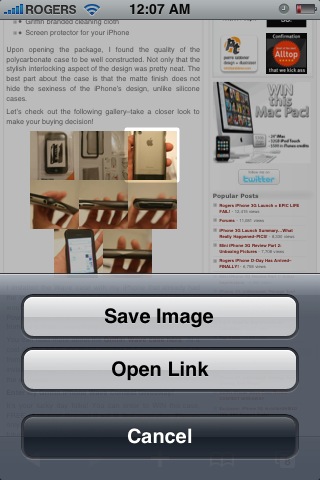
3. Save photos in Mail or Safari: You can save any photo emailed to you, or an image on a webpage. Just hold your finger down and the following prompt will appear (I think you can handle the next step):

4. One step slide for typing capital letters or numbers: Instead of pressing the “shift” or “.?123” buttons and letting go to capitalize a letter or get a number, here’s a cool short cut. Tap the “shift”/”.?123″ button and hold your finger down, then slide to the appropriate letter or number and let go. BAM! You just saved yourself a key press! Try it out! This will increase your typing efficiency big time!
5. Surf Safari in landscape mode–in bed: A lot of people use their iPhones in bed (don’t lie, I do it too–so sad). Anyways, if you want to surf the web in Safari in landscape mode while lying on your side it can be a problem. The iPhone’s accelerometer will automatically rotate the browser whenever you turn the iPhone on its side.
To fix this problem, turn your iPhone into landscape mode–then rotate the iPhone so the Home button will be pointing towards your ceiling. This will hold Safari in landscape while you’re surfing the web in bed on your side–allowing you to keep Disconnect Anxiety at bay.
Bonus tip: Like to take self portraits with the camera? Here’s a handy tip: first hold your finger down on the shutter button and keep it there. Next, strike a pose while holding the camera at a distance–then release your finger–BAM…a photo will be taken! This method helps reduce the shake that usually occurs when you press the shutter, resulting in blurry images.
I know you might already know some of these tricks. However a lot of people don’t so this is why I’m posting them. Want to learn more tricks that I’ve been using since my first generation iPhone? Read up on my previous post, the Top iPhone Tips and Tricks You Didn’t Know About.
What are your favorite iPhone tips? Let’s hear ’em!!!
PS – Don’t forget to enter my FREE Griffin Wave case giveaway/contest!
**Looking for an iPhone 3G case? Go get an invisibleSHIELD, the strongest protection for your iPhone backed by a 30 day moneyback guarantee, lifetime replacement warranty, and FREE shipping! Use coupon code iphoneinca for 10% off your purchase!Order today!**



Here is a link to page that will tell you how to get 40% more volume from your iphone speaker-If you decide to try it, let me know how it works out!
http://www.engadget.com/2008/01/18/iphone-speaker-too-quiet-stab-it-with-needles/#comments
In Safari web browser, in the website URL field, you can now hold down the .com button to get a selection of other domain name endings for your url: .net .edu and .org. By tapping on one of the endings, it will append it to complete your URL. Another new keyboard trick is that you should also get .net .edu or .org domain name endings along with .com by holding down the period (.) button in the compose email screen.
Love number 5, in fact doing that right now:)
Anybody ever use this Juice pack? One comeing for 3G soon I’m told. I was wondering if it is safe to use.
http://www.mophie.com/products/juice-pack/?pod=iPhone
I got my mophie juice pack 3g on preorder already and it will be shipping out October 1st
http://whenwillapple.com/saywhy/2008/09/03/mophie-juice-pack-3g-shipping-october-1st/
double tapping the bottom of Safari does not page down for me. And you don’t have to double tap the top of Safari, You just have to tap once on the status bar at the top, this is a feature from way before 2.0. Thanks for the camera tip, great idea. Also didn’t know about the double finger tap for Maps to zoom out, this will help when driving 🙂
gotta love that first DIY pic you got haha. it made me laugh.
iGeorge, i tried that speaker thing. it works somewhat but not that much, but hey it’s a good idea for sure.
it’s the accelerometer sensor that will cause the screen to rotate form portrait to landscape and viceversa, not the proximity sensor.
iGeorge: I tried the speaker trick on my first gen and it worked significantly for me!
https://www.iphoneincanada.ca/tips-tricks/170/
Douglas: Try a super fast double tap. It works for me. Thanks for the note about the single tap, I’ve been double tapping all this time! LOL
Tina: haha…I know, the pic is uber ghetto!
Alex: That’s what I meant to say. Edited, thanks.
Thanks! Super Fast Double Tap did work, that’s weird. Speaker poking does work for 1st Gen iPhones. We did it during a Video Podcast and it did work! Episode 5 – http://www.appleiphoneschool.com/2008/02/19/iphone-101-episode-5/ about 6 minutes in…
iPhone Fan,
You live in the Vancouver area, right?
I was wondering if you had an extra Invisible Shield to sell to me? I cannot use my credit card online…
Please email me
Thanks
I’ve been having a few issues with my new iphone, maybe someone can help. I dont know if this is common, but the phone lags a little bit sometimes and some programs are not responsive, especially when I want to view photos it would not scroll down at first until a few seconds later, and if I want to choose a photo sometimes I have to press on it twice or three times. Same thing with my contacts, it will not respond to my initial touch but after a few seconds later, or I’ll have to keep tapping to get a response. Is this a common problem? Do all iphones lagg, or should I just contact Rogers, please someone let me know.
Thanks for these. I’m brand new to this and appreciated all of these tweaks.
Sebastian:
Same issue, just restart ur phone
Here is a list of iPhone tips that I found interesting http://www.tiphub.com/82_Great_tips_for_using_your_new_3G_iPhone.html I like the point about being able to download images from Mail or Safari.
Apple has theirs also http://www.apple.com/iphone/tips/ but it feels a lot drier and more of a manual.
This Post is also interesting for new iphone user:
http://iphonetoolbox.com/news/ultimate-list-of-iphone-tips-and-tricks/
Hey there! Thanks for the tips, I’m learning more an more about this new phone every day! Only owned it for about a week.. never got the first gen. Now then.. onto something -I- need help with. Random backings out! My phone does this -a lot-. Say I’m typing up a message in BeejiveIM. Every once in a while the message just auto-closes itself, an forces me to retype the whole thing. How is that backing out? it happens at the -same- interval that my Safari does it. Only in Safari, it’ll just randomly jump -back- to the home screen without me touching the home -button-, sometimes when loading a webpage.. sometimes when simply -viewing- a text-only site! Other programs sometimes exhibit this same behavior.. on some set interval they have a random error that relates to returning to the home screen or backing up a step from whatever they were doing. Any ideas? Thanks!
Mine does the jumping back to home screen while surfing with safari. Would love a fix!! I have the iPhone 3g with latest upgrade. Jacyndae@yahoo.com
wow…had my phone for over 6 months and didn’t realise that you could save images from safari!
To dial North America when overseas, you must dial +1 then the area code and number. How do I get a + from the keypad?—the only way I can do this is to put the number I want in as a Contact.
Type 001 forget the + signe
for a + just press and hold the 0
If anyone has a question or has feedback for the IPhone, please tell me and I will be happy to help.
If anyone has a question or has feedback for the IPhone, please tell me and I will be happy to help.
Press the HOME + SLEEP buttons quickly at the same time. It takes a screen snapshot and saves it to your photos
Also not many people know that the iPhone headphones have a built-in button in the microphone pad. 1 tap starts the music/answers the call, 2 taps skip to the next song, 3 taps play a previous song…
Press the HOME + SLEEP buttons quickly at the same time. It takes a screen snapshot and saves it to your photos
Also not many people know that the iPhone headphones have a built-in button in the microphone pad. 1 tap starts the music/answers the call, 2 taps skip to the next song, 3 taps play a previous song…
How do you use the flash drive? I tried to view some from Internet was informed that I needed to load the adobe flash drive. However when I tried. Sarafi will not allow
Thanks a lot for all these precious tips!
Nice tips, they will come in handy. If you like Domino's try this cool new game in the app store – “iBones Domino”
i want to configure the iphone to make phone calls when I double tap. rest of the apps only single tap
i want to configure the iphone to make phone calls when I double tap. rest of the apps only single tap
Just purchased my first iphone and these tips r fantastic! Don’t feel like a total beginner now
Here is a link to page that will tell you how to get 40% more volume from your iphone speaker-If you decide to try it, let me know how it works out!
http://www.engadget.com/2008/01/18/iphone-speaker-too-quiet-stab-it-with-needles/#comments
In Safari web browser, in the website URL field, you can now hold down the .com button to get a selection of other domain name endings for your url: .net .edu and .org. By tapping on one of the endings, it will append it to complete your URL. Another new keyboard trick is that you should also get .net .edu or .org domain name endings along with .com by holding down the period (.) button in the compose email screen.
Love number 5, in fact doing that right now:)
Anybody ever use this Juice pack? One comeing for 3G soon I’m told. I was wondering if it is safe to use.
http://www.mophie.com/products/juice-pack/?pod=iPhone
double tapping the bottom of Safari does not page down for me. And you don’t have to double tap the top of Safari, You just have to tap once on the status bar at the top, this is a feature from way before 2.0. Thanks for the camera tip, great idea. Also didn’t know about the double finger tap for Maps to zoom out, this will help when driving 🙂
gotta love that first DIY pic you got haha. it made me laugh.
iGeorge, i tried that speaker thing. it works somewhat but not that much, but hey it’s a good idea for sure.
it’s the accelerometer sensor that will cause the screen to rotate form portrait to landscape and viceversa, not the proximity sensor.
iGeorge: I tried the speaker trick on my first gen and it worked significantly for me!
https://www.iphoneincanada.ca/tips-tricks/170/
Douglas: Try a super fast double tap. It works for me. Thanks for the note about the single tap, I’ve been double tapping all this time! LOL
Tina: haha…I know, the pic is uber ghetto!
Alex: That’s what I meant to say. Edited, thanks.
Thanks! Super Fast Double Tap did work, that’s weird. Speaker poking does work for 1st Gen iPhones. We did it during a Video Podcast and it did work! Episode 5 – http://www.appleiphoneschool.com/2008/02/19/iphone-101-episode-5/ about 6 minutes in…
iPhone Fan,
You live in the Vancouver area, right?
I was wondering if you had an extra Invisible Shield to sell to me? I cannot use my credit card online…
Please email me
Thanks
I’ve been having a few issues with my new iphone, maybe someone can help. I dont know if this is common, but the phone lags a little bit sometimes and some programs are not responsive, especially when I want to view photos it would not scroll down at first until a few seconds later, and if I want to choose a photo sometimes I have to press on it twice or three times. Same thing with my contacts, it will not respond to my initial touch but after a few seconds later, or I’ll have to keep tapping to get a response. Is this a common problem? Do all iphones lagg, or should I just contact Rogers, please someone let me know.
Thanks for these. I’m brand new to this and appreciated all of these tweaks.
Sebastian:
Same issue, just restart ur phone
Here is a list of iPhone tips that I found interesting http://www.tiphub.com/82_Great_tips_for_using_your_new_3G_iPhone.html I like the point about being able to download images from Mail or Safari.
Apple has theirs also http://www.apple.com/iphone/tips/ but it feels a lot drier and more of a manual.
I got my mophie juice pack 3g on preorder already and it will be shipping out October 1st
http://whenwillapple.com/saywhy/2008/09/03/mophie-juice-pack-3g-shipping-october-1st/
This Post is also interesting for new iphone user:
http://iphonetoolbox.com/news/ultimate-list-of-iphone-tips-and-tricks/
Hey there! Thanks for the tips, I’m learning more an more about this new phone every day! Only owned it for about a week.. never got the first gen. Now then.. onto something -I- need help with. Random backings out! My phone does this -a lot-. Say I’m typing up a message in BeejiveIM. Every once in a while the message just auto-closes itself, an forces me to retype the whole thing. How is that backing out? it happens at the -same- interval that my Safari does it. Only in Safari, it’ll just randomly jump -back- to the home screen without me touching the home -button-, sometimes when loading a webpage.. sometimes when simply -viewing- a text-only site! Other programs sometimes exhibit this same behavior.. on some set interval they have a random error that relates to returning to the home screen or backing up a step from whatever they were doing. Any ideas? Thanks!
Mine does the jumping back to home screen while surfing with safari. Would love a fix!! I have the iPhone 3g with latest upgrade. Jacyndae@yahoo.com