One of the least talked about new features of the iPhone 3GS, is the Voice Command feature. Sure, voice commands for cellphones have been around for a while, but the iPhone feature can do more than your average dial commands.
My experience with the Voice Command feature has been a hit and miss. Part of the reason with my utter failures is because I wasn’t aware of all the specific commands. But with testing of the commands it lists on the screen, I have had some success.
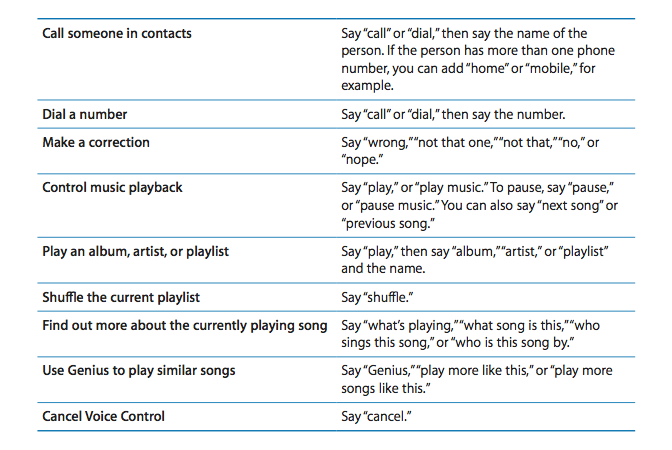
Let’s try to improve the Voice Command by listing all the actual commands. This outta help me and all the new iPhone 3GS owners out there.
Extra Voice Command tidbits:
– Saying “Help” – this will explain the features above
– Nicknames and abbreviations of contacts can be recognized. EG – “Daniel” can be recognized as “Dan”…try it out!
Big thanks to MacRumors for providing us with this relevant information!



Can you not ask it to play a specific song? Not sure why you can give it a comand for an album, artist, or playlist but not by song title.
Anyone get this to work?
how do you get it off because i cant scrool down to the bottom of the setings can some one plz email me teling me how to do this.
I haven't used the iPhone (yet), but I bet part of the reason for song titles is that they aren't always all in the same language. If you want to listen to “Herzeleid” one minute, “A Tout Le Monde” the next, then “To Mega Therion” and “Jaktens Tid”, the software will have trouble figuring out which transliteration to use. And there are some song titles (“Ænema” anyone?) whose pronunciation doesn't follow the rules for *any* language.
Voice command for the iPod functions seems next to useless because voice command stops the moment it recognizes an instruction. Are you really supposed to hold the Home button for two seconds for every time you want to say “Next song”? Voice command needs to keep running while the iPod is playing.
Voice command for the iPod functions seems next to useless because voice command stops the moment it recognizes an instruction. Are you really supposed to hold the Home button for two seconds for every time you want to say “Next song”? Voice command needs to keep running while the iPod is playing.
Can you not ask it to play a specific song? Not sure why you can give it a comand for an album, artist, or playlist but not by song title.
Anyone get this to work?
how do you get it off because i cant scrool down to the bottom of the setings can some one plz email me teling me how to do this.