You Can Now Jailbreak iOS 16.4.1 with Palera1n 2.0.0 Beta 6
Codenamed Bakepale, the latest v2.0.0 beta 6 update to jailbreak tool Palera1n has just been released, which fully supports iOS 16.4 - iOS 16.4.1 jailbreak.
Today I have another fantastic application from The MCleaner Team!
mAdvLock brings a new level of security to iPhones. From password protection to file encryption, mAdvLock seeks to secure your iPhone from prying eyes.
mAdvLock does require a jailbroken iPhone, so this is not an app you can find in the iTunes App Store. You can find it in Cydia however. You may check out my guide on jailbreaking your iPhone here.
mAdvLock is an application for jailbroken iPhones that allows you to password protect your App Store apps, stock iPhone applications and your Cydia applications. mAdvLock also provides file encryption and even has anti-theft functions for your SIM Card.
The password function allows you to password protect any application on your iPhone, whether jailbroken or not. You lock the apps through mAdvLock (which itself will require a password to open) and once password protected, none of the apps can be opened without the key. Any apps found in the Spotlight search also cannot be opened.
For example, if you lock your SMS app and a message comes in, tapping “View” prompts for the password. So it is not just apps, but notifications that lead to apps that are also protected.

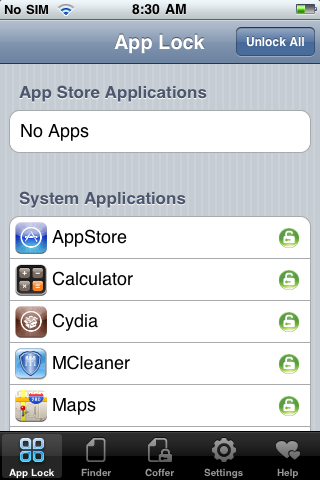
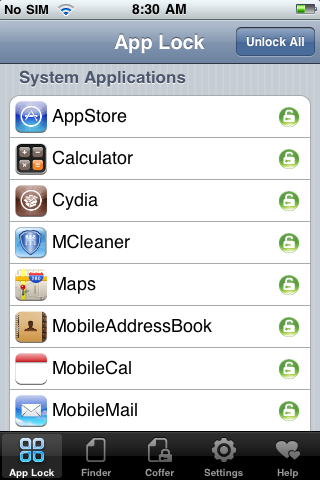
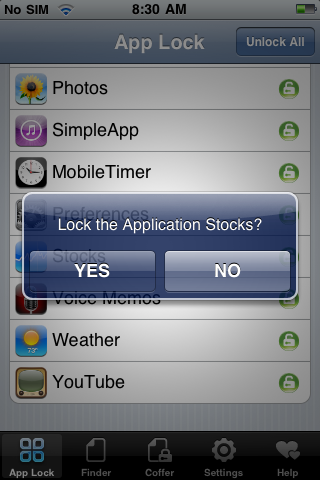
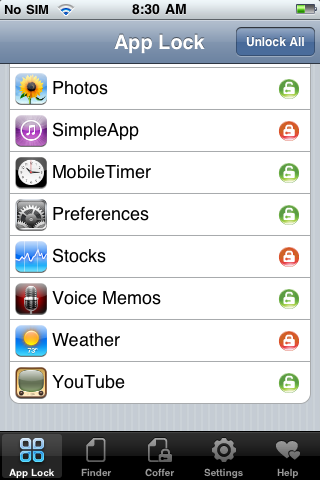
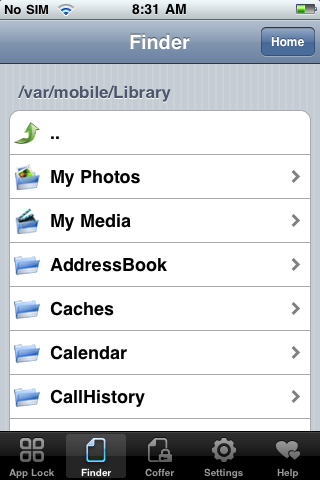


mAdvLock also provides file encryption that allows you to password protect and hide any file in your iPhone such as contacts, photos, SMS messages, songs, or other documents. Any encrypted files can be viewed and restored through an area called “Coffer” in mAdvLock. Of course, to access these files, one will need the password first.
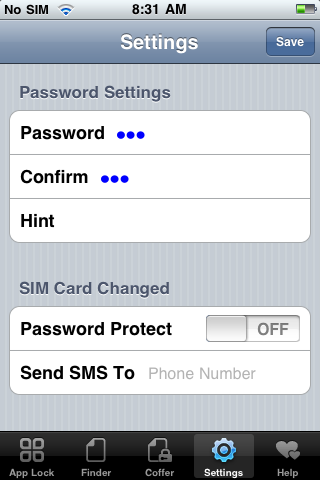
Lastly, mAdvLock provides a function that if your SIM Card in your iPhone is changed, it password protects the SIM using a password you define. Then, the app sends a SMS message to a predetermined phone number (that you define) which alerts you of the change.
Aside from the high price tag, mAdvLock provides great options for security for your iPhone. Being able to lock down all of your apps, the SIM Card and encrypt your files can be invaluable especially if you lose your device. As the app provides a high level of security, you also receive a high level of privacy, as no one can access your iPhone applications and/or media without your password. This also works well if you want to password protect some apps and leave others open for use.
mAdvLock is scored a 4.5 out of 5.
1.) Jailbreak your iPhone (See guide here)
2.) Launch Cydia and Choose the Utilities Category
3.) Choose mAdvLock and Install
mAdvLock is available on Cydia for $14.99 and there is a free 7-day trial upon download of the app.
Hot on the heels from yesterdays giveaway, we have another giveaway! What a great week!!
For those jailbroken iPhones, I am going to giveaway two (2) copies of mAdvLock today! To win, just comment below on the following trivia:
1.) What is the default password when you first start using mAdvLock?
————
Contest Rules:
1.) Make sure to include your email in the comment entry form or I cannot contact you!
2.) You may enter even if you have won something before. You can win again and again and again! There is no limit on the amount of times that you can win!
3.) One Contest Entry Per Person. Do NOT attempt to post multiple contest entries under different emails and/or user names during the same contest.
————
Want to see more of our stories on Google?

P.S. Want to keep this site truly independent? Support us by buying us a beer, treating us to a coffee, or shopping through Amazon here. Links in this post are affiliate links, so we earn a tiny commission at no charge to you. Thanks for supporting independent Canadian media!


Reminds me of LockDown, which was cool to use but after a few days it got annoying having passwords and crap. So deleted lol
These type of apps work good though.
What is the default password when you first start using mAdvLock?
It is 123
I love your daily reviews, thank you for your efforts. Is there any chance that you could review Copilot Live for iPhone
The default password is 123. Keep up the great work man!
default password is 123 🙂
123 yay!
Great app! Keeps prying eyes away from my apps!
The answer is 123!!
The Default password is 123, i have been looking for a security solution for my iphone for a while and i tried out the seven day trial a few months ago and it was amazing..but the only thing was that it was a trial..so i started looking around to see if there was any other ones and i found an app called lockdown, it works similar but the only problem is that it doesn't stop people from hitting view and going to the message…it only stops when you actually open the app.. Thanks for the review man they have added a lot of new features and its really starting to make me consider buying it but $14.99 is kind of expensive for that app imo
lol – it's funny how instead of reading the info in cydia for mAdvLock to get the default password, you can just read the comments 🙂 Ahh well… pass is 123 🙂
Thanks!
ah but maybe the comments are wrong?
🙂
ahh yes. maybe they are! People will just have to launch Cydia and find out 😉
Default password when first launching mAdvLock is – 123
Winners:
– iPhoneHost
– reyt
Check your email inbox soon!
Thanks, iPhoneinCanada! 'Very excited about this app!
is 123!! give me the free mAdvlock!! it is good!!^^
is 123!! give me the free mAdvlock!! it is good!!^^
i need another app like madvlock since it cant work on my iphone 4 ios 4.0.1
any substitutes?