Hey, everyone. RoryPiper here. I’ve been away for a couple of weeks, but I’m back, with a quick, easy hack, that will change the “Slide to Unlock” text, on your lock screen. This will work on the iPhone or iPod Touch, but requires it to be jailbroken, with Winterboard installed.
Basically, we are creating a theme, for use in Winterboard. It is a simple text file, to create the string file the iPhone uses to know what text to display, in a cascade of 4 folders. On a Mac, I’m using Text Edit to create the string.
Open Text Edit. Then type the following string:
“AWAY_LOCK_LABEL” = “”;
Between the last 2 quotations, is where you want to type your own text. For our purposes here, I’ll use iPhoneinCanada. The text can be upper or lower case, with spaces or without, but shouldn’t be too long. When your done, it should look something like this:
“AWAY_LOCK_LABEL” = “iPhoneinCanada”;
To save this file, we need to name it “SpringBoard.strings”. Just save it to your desktop, for now.
Next, we need to create our folder cascade. Create a new folder on your desktop and name it what ever your want this theme to be called. I’ll name this one “iPhoneCDNLockText”. Within that folder, create the next folder and name it “Bundles”. In the Bundles folder, create your third folder, and name it “com.apple.springboard”. Then within that folder, create the last folder, and name it “en.lproj”. These folders must be named exactly as I have laid out here. They are all case sensitive. This is what the cascade should look like:

Finally, put the “SpringBoard.string” file in the “en.lproj” folder.
Now we need to get the theme on your device. We have gone over this before, so I’ll just refer you our past posts. Basically, the theme needs to go in the root folder, in Library > Themes. You can either use OpenSSH (go here for a tutorial), or use Disk Aid (go here for a tutorial).
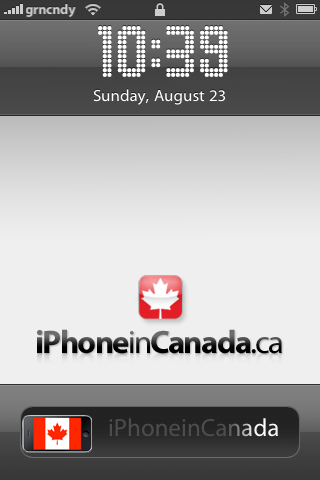
Once your theme is installed, open up Winterboard and apply it. You can also combine this with other themes, if you like. I’ve combined this with the iPhone in Canada lockscreen we made a few weeks ago:

There you go. Have fun with it. If you have any questions, just post below. Don’t forget to check out my blog: Green Candy, and you can also follow me on Twitter: @rorypiper.



Thats awesome! Thanks for the tip!
Nice one dude!
Love the post, now the above is what you call an awesome looking homescreen 😉
I'm guessing that this doesn't work with 3.0.1 'cause I've tried everything and it won't change. Anyone else having this problem? I noticed en.lproj folder is now called English.lproj. I tried changing that too but it didn't work.
Tried it many times. Still doesn't work. Any ideas ?
It works great and simple instructions. Thanks!
I changed the text and also the slide bar knop as you instructed.
Thanks.
no curly brackets! just put the following text,
“AWAY_LOCK_LABEL” = “Your Text Here”;
I tried it without the curly brackets and for some reason it would not work.
The only way it would work for me is with the curly brackets.
It works great and simple instructions. Thanks!
I changed the text and also the slide bar knop as you instructed.
Thanks.
I tried it without the curly brackets and for some reason it would not work.
The only way it would work for me is with the curly brackets.
Tried it many times. Still doesn't work. Any ideas ?
Got it. I changed SpringBoard.strings file to:
{
“AWAY_LOCK_LABEL” = “Your Text Here”;
}
no curly brackets! just put the following text,
“AWAY_LOCK_LABEL” = “Your Text Here”;
I'm guessing that this doesn't work with 3.0.1 'cause I've tried everything and it won't change. Anyone else having this problem? I noticed en.lproj folder is now called English.lproj. I tried changing that too but it didn't work.
it doesnt’ work…..this is a let down.
How do you combine it with another theme?
great post, easy enough to do as well. As a note, if you’ve got iFile then you can edit the root driectly from the iphone, including adding your directories, so I did mine 100% on the iphone without any need for SSH etc 😀
Use
{
“AWAY_LOCK_LABEL” = ”new slide to unlock here”;
}
It works.