For readers who have have a US iTunes account, you’re going to love the following review. Every now and then, iPhone owners stumble across one of those “I can’t believe this is free because I’d pay for it!” type of apps. The app I’m elated about is called Dragon Dictation–an extremely easy to use voice recognition app for the iPhone. It’s powered by the makers of Dragon NaturallySpeaking, so you know it’s going to be great!
Dragon Dictation: Simple, Easy to Use, and It Works!
Features:
- Voice to text transcriptions that can be sent as SMS, Mail, or copied to the Clipboard
- Convenient editing feature that provides a list of suggested keywords
- Voice driven correction interface
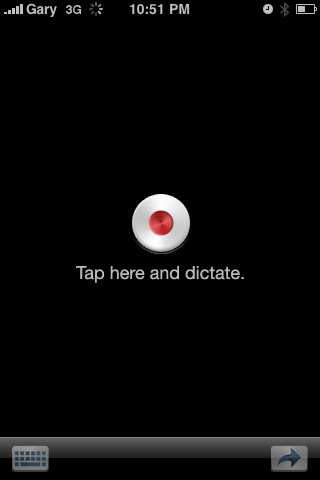
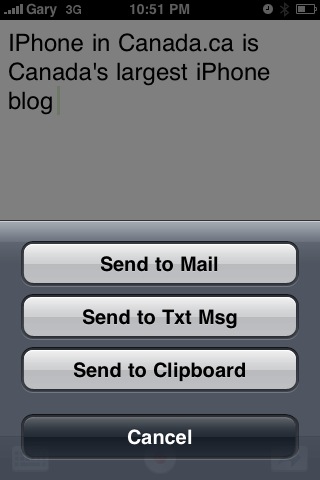
Using Dragon Dictation is dead easy. Launch the app, tap the record button and dictate away. Tap the massive DONE button, and your text will be transcribed onto the screen. From here, a menu pops up with options to send to your Mail, SMS, or Clipboard. After, Mail and SMS apps will auto launch and it’s already there, ready to be sent (SMS requires you to paste).
With my first two dictations, Dragon Dictation was eerily accurate. With this app you can now dictate when you’re at a red light in the car (they claim the dictation is 5 times faster than typing) and then easily paste your message into SMS or update your twitter stream. What about punctuation? Just say ‘period’, ‘question mark’, or ‘new paragraph,’ and it will do the rest.
Dragon Dictation requires a data connection (3G or WiFi) since your message is sent over the internet and then relayed back. There could be some privacy concerns if you’re the paranoid type, but considering an app of this calibre is FREE, I have no issues at all. This is seriously one of the best iPhone apps I’ve used to date, aside from SimplyTweet.
Dear Nuance: Bring this App to Canada Please!
Here’s one major downfall of this app–it’s not available in Canada! At the present moment, it’s only available in US iTunes. However, here are two tutorials that you can try to get your hands on a US iTunes account (of course, you would only do this if you’re preparing to move to the USA, *cough cough*):
Let me know what you think of Dragon Dictation in the comments! 🙂
[TUAW]




Downloaded! Excellent!
The program does quite well – even with my accent!!
Im going to check this out! 🙂
I watched a video clip a few days back, this app looked well made.
Definitely one of the most useful iPhone apps ever! Hopefully they don't take the free version and turn it into a “Lite” version which tends to happen a lot when the app gets popular.
This is serious sh*t. It works very well- I gave the app a person, place and thing- all of which registered properly. Thanks for the workaround as well- silly how this app not available in canada. Oh well.
Love it. Don't even get me started on SimplyTweet… apparently I missed the “free”as in beer date by one day.. Anyone know anything about that?
Works ,, great … had forgot my US acct info .. but found it and all is well … its damn quick and accurate ~
Your advice on opening a “U.S. based” account worked perfectly. I was looking for a way to get the Dragon Dictation app and I stumbled on to your site. The only additional piece of info is that the secondary email address that you suggest using cannot be an alias of the existing email address you have registered with your Canadian iTunes account….it has to be a totally unrelated email address. Thanks and needless to say your site is going in my bookmarks now.
Easy to get US iTunes, just get a $10 itunes USA gift card on eBay, which I did. Tried the app, works VERY well, but I think it uploads a mp3 for conversion, That is, it does not work locally(w/o wifi or data plan active).
I downloaded the new Dragon Naturally Speaking iPhone application and have found it useful. Some things that need to occur for it to be more widely accepted and used would be some means of saving a memo for later retrieval or modification (just like the DNS regular version) as well as a website icon with faq's.
I'm wondering what the limitations are for the dictation? How many words, how much time, how much storage/retrieval memory is allotted for the files generated? Does it follow the same conventions as the full version of DNS?
Overall – I like the app and look forward to its future improvements, and like many others, I too have been looking forward to DNS joining the iPhone market – I was just a little disappointed at its first showing.
If you download this app with a US account, do all the previous apps downloaded through the Canadian account stay in iTunes?
yes
I am running a jailbroken iphone on 3.0 software, and when I try to download Dragon Dictation from the app store it says I need to upgrade to the 3.1 software update in order to use DD. Any idea how to work around this? Thanks!
I am running a jailbroken iphone on 3.0 software, and when I try to download Dragon Dictation from the app store it says I need to upgrade to the 3.1 software update in order to use DD. Any idea how to work around this? Thanks!