You Can Now Jailbreak iOS 16.4.1 with Palera1n 2.0.0 Beta 6
Codenamed Bakepale, the latest v2.0.0 beta 6 update to jailbreak tool Palera1n has just been released, which fully supports iOS 16.4 - iOS 16.4.1 jailbreak.
Looking to jailbreak iPhone 2G, iPhone 3G, iPhone 3GS, or iPod Touch? You have come to the right place!
NOTE: THIS GUIDE WILL NOT UNLOCK YOUR iPHONE
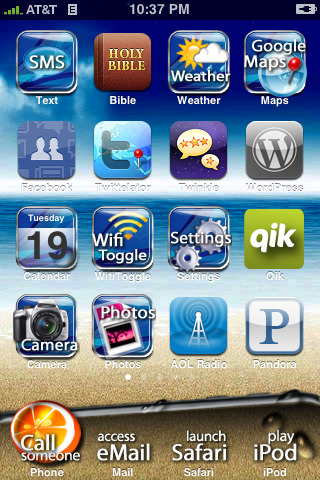
Jailbreaking is a term used that refers to modifying the software on your iPhone/iPod Touch. These modifications essentially “free†your device from the device constraints and allow you to do functions such as applying custom wallpapers, changing the way the icons look, modifying text message tones, changing the device sounds, and about 1 million other things. The list is endless. The image below is an example of what you can do with a jailbroken iPhone/iPod Touch:
Jailbreaking is accomplished by using programs such as ‘Spirit’ (listed below). Once you do jailbreak however, it is not permanent. At any time you can restore your iPhone/iPod Touch to factory defaults and return the device back to ‘normal’. However until you do the restore, your device will stay jailbroken. Also, it goes without saying that this voids your warranty, but when you restore to factory defaults, the traces of jailbreaking are usually cleaned up.
If you want to know more about Jailbreaking, you can read all about it here.
The wireless carriers in Canada, such as Rogers and Fido, put “carrier locks†on their devices. What this does is prevent you from using the device on another wireless network. For example, you cannot take a Rogers device and put a Fido SIM card into it and vice versa.
Using similar methods to jailbreaking, one can unlock their iPhone. This allows you to “free†your device and allows the user to put any SIM card into the device. For example, if you unlock your Rogers iPhone, you can now put a Fido SIM in, or AT&T or O2 or whoever.
Unlocking is accomplished by using programs such as ‘ultrasn0w’. Once you do the unlock however, it is not permanent. At any time you can restore your iPhone to factory defaults and return the device back to ‘normal’. However until you do the restore, your device will stay unlocked. Also, it goes without saying that this voids your warranty, but when you restore to factory defaults, the traces of the unlock are usually cleaned up.
If you want to know more about Unlocking, you can read all about it here.
NOTE: THIS GUIDE WILL NOT UNLOCK YOUR iPHONE
Before we begin, please take some time to review the notes below as they are very important:
– The methods listed below can be followed on BOTH a PC or a Mac
– Your iPhone/iPod Touch must be updated to firmware 3.1.3 via iTunes before beginning this process.
– Ensure your iTunes is the latest version
– Your iPhone/iPod Touch must be activated and NOT in the Connect to iTunes screen or Emergency Call screen
– For users that already have a jailbroken device and want to keep their jailbroken apps, before you begin the process below, download “AptBackup†from Cydia and back up your jailbroken apps. Now connect your device to iTunes and backup your device using the iTunes backup process. After you do the jailbreak process below, redownload AptBackup from Cydia and plug your device into your computer. Using AptBackup, restore your apps.
—————
Below you will find detailed guides (so you do not miss any steps) of how to jailbreak an iPhone or an iPod Touch. There are three sections:
1.) How To Jailbreak the iPhone 2G/3G/3GS on 3.1.3 Firmware
2.) How To Jailbreak the iPod Touch on 3.1.3 Firmware
3.) How To Revert Your iPhone 2G/3G/3GS or iPod Touch Back To “Normalâ€
—————
To jailbreak your iPhone 2G/3G/3GS on the 3.1.3 firmware, follow the steps below:
How to Jailbreak the iPhone 2G/3G/3GS
1.) Plug your iPhone into iTunes, do a backup and then click “Update†to install firmware 3.1.3. After the update, eject your iPhone from iTunes using the “eject†button and close iTunes. Disconnect your iPhone from your computer.
2.) Click on the PC or Mac links to download Spirit for PC or MAC. Save the file to your computer desktop.
3.) Locate the downloaded file “Spirit†and double-click on it. On a Mac, you may need to extract the file by double-clicking on the .ZIP Spirit file.
Note: If you are using Windows 7, you may need to run Spirit in compatibility mode for Windows 98. To do so, before launching Spirit, right click the Spirit.exe file and select Properties from the menu. Then from the Compatibility tab select Windows 98 from the Compatibility Mode dropdown. Click Apply then Ok.
4.) Connect your iPhone to the computer via the iPhone USB cable and click the “Jailbreak” button in the Spirit application.
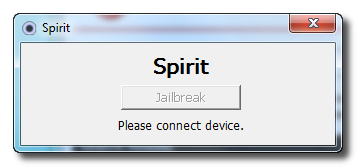
5.) After a brief time, the Spirit application will alert you that the Jailbreak succeeded.

6.) Your iPhone will now reboot and show a progress bar. After reboot, the Cydia app will be visible on your home screen.
—————
To jailbreak your iPod Touch on the 3.1.3 firmware, follow the steps below:
How to Jailbreak the iPod Touch
1.) Plug your iPod Touch into iTunes, do a backup and then click “Update†to install firmware 3.1.3. After the update, eject your iPod Touch from iTunes using the “eject†button and close iTunes. Disconnect your iPod Touch from your computer.
2.) Click on the PC or Mac links to download Spirit for PC or MAC. Save the file to your computer desktop.
3.) Locate the downloaded file “Spirit†and double-click on it. On a Mac, you may need to extract the file by double-clicking on the .ZIP Spirit file.
Note: If you are using Windows 7, you may need to run Spirit in compatibility mode for Windows 98. To do so, before launching Spirit, right click the Spirit.exe file and select Properties from the menu. Then from the Compatibility tab select Windows 98 from the Compatibility Mode dropdown. Click Apply then Ok.
4.) Connect your iPod Touch to the computer via the iPod Touch USB cable and click the “Jailbreak” button in the Spirit application.
5.) After a brief time, the Spirit application will alert you that the Jailbreak succeeded.
6.) Your iPod Touch will now reboot and show a progress bar. After reboot, the Cydia app will be visible on your home screen.
—————
So you have Jailbroken or Unlocked (or both) your iPhone 2G/3G/3GS or iPod Touch but now you want to revert to the factory fresh iPhone 2G/3G/3GS or iPod Touch. To do so, follow the steps below:
1.) Open iTunes and plug your iPhone 2G/3G/3GS or iPod Touch in via the USB. Backup your iPhone/iPod Touch if iTunes allows you to.
2.) When iTunes recognizes the iPhone/iPod Touch, click on the “Restore†button in iTunes. This will restore your iPhone/iPod Touch with fresh 3.1.2 firmware.
3.) After the restore is complete, iTunes will prompt you to Set up a New Device or Restore from Back Up from an existing backup (the backup from step 1). Choose which ever method you want and let iTunes process.
4.) After the processing is complete, your iPhone/iPod Touch will be loaded with the fresh 3.1.3 firmware or loaded with your back up that you may have chosen.
5.) Eject the iPhone/iPod Touch from iTunes using the “eject†button in iTunes and disconnect the USB cable from the iPhone/iPod Touch. Turn the iPhone/iPod Touch off and then turn the iPhone/iPod Touch back on.
—————

Want to see more of our stories on Google?

P.S. Want to keep this site truly independent? Support us by buying us a beer, treating us to a coffee, or shopping through Amazon here. Links in this post are affiliate links, so we earn a tiny commission at no charge to you. Thanks for supporting independent Canadian media!
it took me one Second to Jailbreak OMG i cat believe it.(I am using iPhone 3GS)
thanks
why does the title mention unlocking the iphone but then there's the note that says it won't unlock the Iphone?
This jailbreak is so incedibly fast! Literally, 1 second!
The title mentions unlocking?
Its been so long since I have jailbroken/ unlocked my phone (since my 2G) that I have forgotten some things.
When you jailbreak, do you lose any of the apps I have downloaded or any functions that are set up from Apple or in iTunes? Does everything stay exactly the same but you just have Cydia now on your phone?
Also when you restore do you only lose the Cydia apps and nothing else? Is there a tutorial or something on that part of what happens?
Thanks
what is the advantage of jailbreaking my iphone else to have more probleme updating when Apple release new update?
The problem I'm having is iTunes can't connect to App store after the jailbreak on my iPad. Anyone experiencing this with their iTunes after jailbreaking their iphone?
links are dead lol
Anyone else experiencing issues with grey text? I restored everything with PkgBackup after using the spirit jailbreak and everything went flawlessly with the exception of winterboard not turning the icon text white, making it very difficult to read…
Nevermind, I edited a plist file to force the color white
My antivirus tells me there is a trojan in the file while downloading. What gives?
Just did it… was looking good until my network got lost…. i now have no service and will probably have to restore the phone…. though i did get cydia to pop up..
oh well,
anybody else have this issue?
Nice job, Guys ! Jeanlbreaking as a breeze Easy and secure. I know, in previous messages, I wrote I was not a Jealbreak fan, but I decided to try this one and it was a real success. Like others I still trying to find a way to unlock the 3GS, but in return, I can use MyWi, a cracked version, and actualy I am sending this message well conneced via MyWi. Thanks again and hope someone will find a way to unlock the last baseband on 3GS.
Denis Boisvert
Gatineau, Québec
same issue but also here we have a nice snow storm… will restore and see
iphone restore still runing problems… Fido says Calgary area is affected badly
worked Flawlessly for me using Macbook Pro , iPhone 3Gs 3.1.3 on Rogers
I have that error in my MAC :
FATAL(__LINE__): Assertion failed (dl.c:197): 0 = = (AMDeviceStartService(dev, service, &it, NULL) (but it was -402653091)
same here! i couldnt hear ppl and ppl couldnt hear me! phone kept freezing in simple factory apps like SMS and Email! cydia worked fine for me… was able to add a couple of programs… but this was the last time i jailbreak! its such an unreliable platform!! i dont get how ppl put up with the constant crashes… maybe because my 3G isnt capable?? who knows… but will restore to factory, and thats gonna be the end of that!
Suggestion: I think best to not to link directly to the Spirit files and just bring people to it's main page http://spiritjb.com/ because if you still want to unlock your phone and didn't do a backup (read the page before downloading files) you'll be out of luck (from my understanding).
jailbreak worked for me also and was only like few seconds,i have cydia but is there any way i can find rock????
If you search for it within Cydia, it's there. I just did it last night.
Constant crashes? You must be doing something wrong…lol Mine was jailbroken since BlackRa1n was released… So a few months and no issues. Just had to do a restore yesterday due to some issue with backgrounding of the Phone and Mail apps…
No, you don't lost any apps you've downloaded nor functions. It does everything the same, except you can install unsigned apps from Cydia and Rock.
When you do a restore, you lose anything you installed from Cydia or Rock.
Btw, when you get Cydia, I'd recommend installing Rock, it's a MUCH better installer.
Hey my ipod touch is stuck at the loading bar… Does this happen to everybody or is my ipod broken? The bar is loadead but this swirly think keeps going around to load. Reply back please and thanks.
After clicking on the jailbreak button it gives me the following message.
“The ordinal 2760 could not be located in the dynamic link library LEBEAY32.dll”
I am using Windows XP, I updated the latest i tunes 9.1, and my i phone 3GS with firmware 3.1.3 with new bootrom
HI Erik, I had the same problem. Tr y this: Hold down the Power button for 3 seconds, without letting off the power, push down the home button for 10 seconds (both buttons should be pressed now), then let go of the power button, but hold the home button. DFU Mode doesn't have any screen, it's a blank screen.
You will see the apple, then press the home button again, the cynthia screen appears again but this time it should work. It worked for me. Good Luck.
Just did the jailbreak last night, worked like a charm. it was the simplest and quickest jailbreak I've ever done.
The problem Im having is that after I install a theme, only my background changes but my icons stay original. I'd tried several themes but with same results. I have a 3GS with 3.1.3. Anyone knows why this is happening?
Thanks.
I've just completed the spirit jailbreak. Wow, that was easy!
Did you install Winterboard? If not, you need to in order to install and use any themes without actually reprogramming the iphone.
very unstable Iphone once Jailbreak .. tried it a few times ,,, battery does not last 8 hours ,,, very slow ,,, takes forever to boot …. with prrevious jailbreak software (winpwn-blkrain, etc..) Iphone was perfect …
i tried 3 times this software ,,, operation when perfect ,,, but Iphone very unstable ,,,
will look for other software
i followed the instructions directly and when i press jailbreak it gives me an error…what to do??
yea, i've the same problem. What to do??
I have to say I just ran the program and am totally amazed at how fast and easy this was
I have to say I just ran the program and am totally amazed at how fast and easy this was
yea, i've the same problem. What to do??
i was lucky if the battery lasted 4 hours and it was so slow to boot up or even to just change screens. i just removed the jailbreak and will wait for something better to come along
It won't let me jailbreak my 8G iPod touch it says version 2.1.2 is not supported what do I do????
When I try to search winterboard it doesn't show up?
I tried tounloack my Iphone after jailbreak, but i my screan stay all time on appl logo,,,,, what I have to do…….
Anybody have any success Unlocking with ultrasn0w after jailbreaking a 3GS on 3.1.3 with Spirit?
I've read guides that say it's impossible, but have also read comments on forums from users who've succeeded…
any success here?
Will this jailbreak work with 4.0.1?
Mirror for Mac users:
http://www.mediafire.com/?ogod2gvdhyv
Mirror for Windows users:
http://www.mediafire.com/?g3kouqddynk
I hope everyone does this anyway, but I will mention it anyway: backup your phone. Some people are reporting that their photos are getting deleted after the jailbreak process.
Also, if you’re having problems running Spirit.exe in Windows, run it in Windows 98 compatability mode. That should do the trick.
Good but can crash ur iPod
INFO: Now listening for devices…
INFO: read igor/map.plist
INFO: Connected to the AppleMobileDevice.
INFO: Version iPhone1,1_3.1.3
INFO: Connecting to mobilebackup…
INFO: Sending files via AFC.
FATAL(__LINE__): Assertion failed (dl.c:198): 0 == (AMDeviceStartService(dev, service, &it, NULL)) (but it was -402653091
m gettin this type of error plz help me out
i followed all instructions and when i get to spirit it says that my itouch is not supported
what do i do??