

BioWare Is Shutting Down, and Edmonton Is Losing More Than a Studio
Electronic Arts is shutting down BioWare, the Edmonton studio behind Mass Effect, Dragon Age and Star Wars: Knights of the Old Republic, and the next Mass Effect game is cancelled with it. That's according to a report that says EA is cutting about 400 jobs, including about 50 at BioWare. It's the publisher's biggest move...
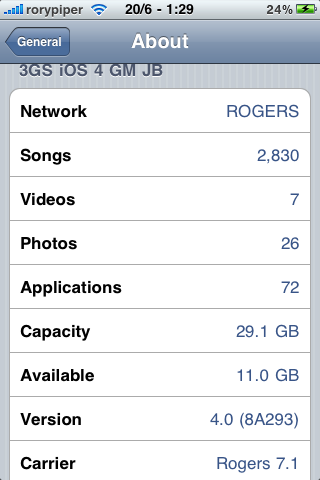
Just updated my iPhone 3g from 7.0 to 7.1
Took me 2 seconds
hahaha
cool
how did u do that?
😀
So is there a JB for iOs 4 yet? What about for iPad?
Oh and what's the name of the app in cydia to back up all your apps?
Yes, I don't know to update the carrier either, please advise.
What does updating the carrier settings actually do? M iPhone 2g is still at Rogers 5.0.
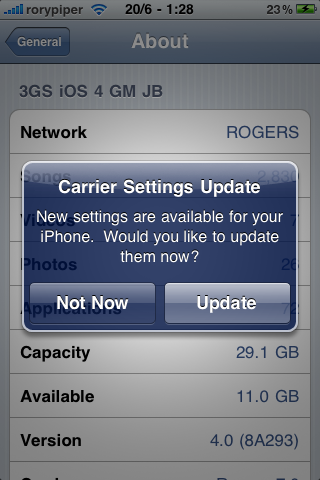
For iOS 4 users, go to SETTINGS – GENERAL – ABOUT and you should get the pop up
My carrier settings updated too this morning over the air. Really wonder what it does.
Yes and yes. The app I use to back up my Cydia stuff is AptBackup
Exactly. If you're not on iOS4 yet, just plug your iPhone into iTunes, and you'll get the update over USB.
i tried that but its says your current os is up to date how do i get 4.0
fido seems to have the same update available.
I was wondering what that was last week…I'm running iOS4 GM and had never heard of a ''Carrier upgrade''.
i found out about this last night by mistake, just went through all my settings and it popped up.
i havent noticed anything different, but i also know its not meant to provide new features lol
but some how i hope it provides a stronger signal strength 😛
So is it publicly available anywhere yet? iOS 4 is released tomorrow right?
does this just show up if you have iOS 4 installed because I just checked my 3gs and mine shows Rogers 5.0.
There are some sites that had iOS 4.0 GM for download free since Apple didn't check to see if you are a registered developer when updating. Many (including myself) was able to grab it and install it using a Mac or just a few days ago when the Windows version of iTunes 9.2 came out =)
But since it comes out tomorrow for everyone… Just wait for the update and as roypiper said, plug your phone into iTunes and it should prompt to update. If you haven't already done so make sure your iTunes is updated to 9.2 to save yourself some download time tomorrow.
As for the carrier settings message, I was puzzled on what to do, so I just clicked Update… Not totally sure on what these settings do but I guess its good?
Looks like it, because my 3G only shows Rogers 5.0 as well.
It releases tomorrow.
It releases tomorrow.
Do you have iOS 4 GM?
Yes iOS4 only.
Looks like alot of people will get this message tomorrow when they update 😉
yes I do, iOS 4GM, i tried to to “About” several times but nothing popped up :-/
iOS4 isn't released until tomorrow.
I personally prefer Rock App for installing things than Cydia. And it does automatic backups… Just search for “Rock” within Cydia and install that. After that, go through the breeze that is Rock for installing all your apps. 😀
See message above.
Anytime I have installed Rock, I had major crashes and reboots. Haven't used it in a while though.
Personally, I've had nothing but amazing success with Rock. It makes restoring and re-jailbreaking your iPhone a breeze. And it'll back up a list of all the Rock apps you have installed whenever you open the Rock app to a server. To access them after, all you have to do it log in with your Rock ID and it'll give you access to those backups.
Can someone point me in the right direction of a messageboard where I can get help with jailbreaking my iphone… this site sucks now.
Who bought this site anyway? Rogers?
Jailbreaking is not available just yet. Real soon though. If this site
sucks feel free to take your opinion elsewhere 😉 we are not stoping
you from leaving 🙂
Jailbreaking is not available just yet. Real soon though. If this site
sucks feel free to take your opinion elsewhere 😉 we are not stoping
you from leaving 🙂
Are you on drugs? There's a link on the main page. Don't take out your frustrations on this blog because of your inability to use Google effectively.
I've always refused Carrier Updates… can someone please explain what they are, if they are necessary, and if they can somehow block jailbraking or unlocking.
So the carrier update is safe? I got the pop-up this morning but didn't accept as I wasn't sure it would be safe for my jailbroken 3G (to get multitasking), and also didn't know if Rogers would try to remove tethering thru a carrier update or something.
ok so i click update right and it says update successful. but now i cannot connect to my cellular data. 3G. wth… and whenever i sync with itunes it keeps asking me to update when i already updated. what is wrong
Same problem here!
same here, when I restore firmware and not restore from backup the cell data works and lets me update to 7.1 carrier update but the second i restore from backup cell data stops working.
Try resetting your network settings through your settings on your phone.
Settings > General > reset > reset network settings. This worked for
network issues in the past. Oh and FYI you will have to log in to your
wifi again afterwords.
Still broken for me – tried restoring as new iPhone, and nothing!
Hmm. Perhaps you should call rogers, or who ever you are with to see
if they are having network issues.
me too!! so annoying, can't connect to cellular data service, can't make/receive call browse internet. Tried everything and no luck
That's very weird. I updated (3Gs) my wife too (3G) so I got both
devices with out any problems on Rogers. I wonder why only some people
are having issues. I wonder if it's a network issue in specific
locations.
My updated carrier settings that is being pushed via over the air is not taking. I checked the carrier settings after the update is still at 7.0. I even shut off the phone, with the same results. Currently, I noticed that tethering is no longer available after I updated to iOS4. It was availabe with 3.1.2. The Rogers tech told me to restore the iphone, and it will supposedly give me the option of “restore with update”. I also tried to manually add the ipcc file vai itunes with the ” /setPrefInt carrier-testing 1″ switch… it seems like it was updating but no confirmation afterwards.
Using the apple configuration utility was a hairy experience. Didn't work either. I'll try a restore later and see if it changes anything. BTW, my phone is already JB'd.
I have the exact same problem here! What can I do? it is so annoying : /
I had to restore and I got my tethering back in iOS4. I also applied the carrier update via itunes. Now, will try to jailbreak and see if it removes it.
carrier update for Rogers with iSO4 has major issues. Rogers pushes carrier updates as is iTunes and they do not work. No data, 3rd party apps, email, internet etc. Even Rogers app does not work. Both Rogers and Apple aware of issue but do not know how to fix. Complete restore has not worked.
Same for me with Fido.
That's so weird. Both my wife and I updated to Rogers 7.1 with not a
single problem on 3G and 3GS. I wonder why only some are having
issues.
Sent from my iPad
*** SOLUTION! ***
I had the same problem as the commenters. Update won't take no matter how many times I try, either through iTunes or the one pushed by Fido. I called Fido technical support and was able to resolve the problem. The key is to let Fido push the update to your phone AFTER a restore instead of using the carrier update from iTunes. Here are the steps I took:
1) backup your phone
2) restore your phone by connecting to iTunes and press the Restore button (you should have at least iTunes version 9.2
3) The iPhone will restart after the restore. iTunes should be asking if you want to setup your phone using the backup. Do NOT set it up yet. On the iPhone, go to Settings > General > About that we have become so familiar with by now.
4) Wait for the carrier to push the update to you. It should happen in less than 3 minutes.
5) The iPhone will appear to have done nothing like before, but after less than 2 minutes, if you check the About page again, it will say Fido 7.1
6) Now you can surf using 3G
7) use iTunes to restore your data.
Note that you do not need Wi-Fi connection throughout this process for the iPhone.
Right now I am restoring data back to my iPhone. Hopefully when everything is done all will be well. Post to this thread if my instructions don't work.
i updated to 4.0 iphone 3g on rogers and unlocked and jailbroke but cant connect to 3g or edge but wifi calling and sms works? anyone know any soultions
Check your carrier setting to see if it's Roger's 7.1, if it's only 7.0, you are experiencing the same issues as people on this page. See the solution below. Fido is owned by Rogers, so whatever works for Fido should work for Rogers too.