
OnePlus to Reportedly Leave US and European Markets
A formal announcement is reported to arrive in the "coming days," as OnePlus prepares a US and European retreat.
After iOS 4.1 was released on Tuesday of this week, reports started to come in that the new firmware has restored the ability to get into Field Test mode on iPhone.
For those wondering, Field Test mode allows users to get a numerical display for the antenna strength instead of the current signal bars. This allows device testers to properly gauge signal strength.
To get into Field Test mode on your iOS 4.1 iPhone, do the following:
1.) On your Home Screen, tap Phone
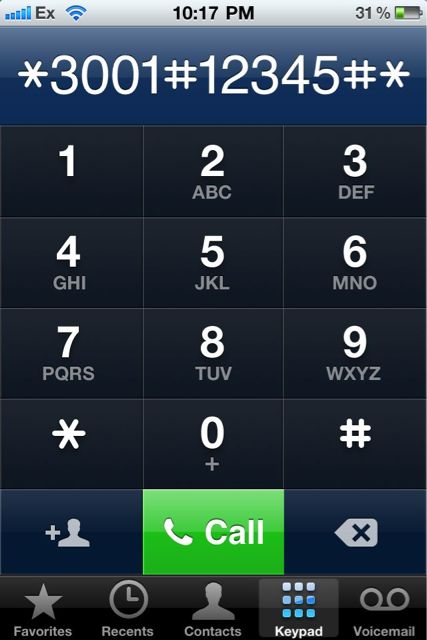
2.) In the Phone app, tap on Keypad and dial the following:
Then tap Call.
3.) To exit, press the Home Button.
As a quick note, more negative numbers indicate worse signal strength.
Want to see more of our stories on Google?

P.S. Want to keep this site truly independent? Support us by buying us a beer, treating us to a coffee, or shopping through Amazon here. Links in this post are affiliate links, so we earn a tiny commission at no charge to you. Thanks for supporting independent Canadian media!


is there any way to keep the numbers on the status bar rather then the bars ?
once in field test, go into multi-tasking and press any app… problem now is i can’t get it back to the bars and reboot didn’t change it back… HELP!!!!
Yes. Install SBSettings and activate it. SBSettings -> System Options -> Numeric GSM -> Set ON
I have -66. What does it mean ?
SBSettings rock!
The sample photo has a numerical % for the battery as well. Does anyone know how to turn this on? Thanks.
its under the usage menu under settings. its on the top, a toggle that lets you select percentage.
Good signal
i closed out of the Field Test App and now they display the # all the time. I tap the corner (signal icon) and it will change to the bars but when i go to another app it will change to the # again? How do i make it so that the signal strength permanently remains signal bars… and don’t reply with “restore” lol…
touch the number upper left corner, and it will be back bar mode
My results varies : sometimes I lose 10 db, sometimes 20 db (even with bumper).
Right now : worse signal (with bumper) : -76 to -82 db, worse signal (without bumper) : -74 to -103.
What are your results (even those who report “no problem at all”) ?
so i tried this and i am -80. this means that i have worse signal strength right? what would be a good signal strength?
so i tried this and i am -80. this means that i have worse signal strength right? what would be a good signal strength?
Wow mine is -95 with a case on…eek.
1. Enable field test mode.
2. Hold down the power button TILL you see “Slide to power off” option
3. Release the power button and hold down the Home button till you are taken back to the home screen (takes about 30 seconds).
4. You can then toggle between bars and numbers by tapping on it in the top left corner
Thank you so much for that tip. Now I never have to enter the code again to go in field test! It is always there And it remains even if you power off you phone and power it back on! Sweet! How do you revert it back though? Cause for some reason, when you open an app, it is always showing the numbers and you have to tap to get the bars back (try doing that in the ipod app in portrait mode without touching the left arrow button that takes you to the menu!)
I get 118- db when I hold the death grip, and -92 when I don’t hold
Wow! Great tip! Know any other great treats like that? 🙂
I got – 95 is that any good?
There is not enough results here. Gary , Ex Would you mind post yours ?
It is ok if indoors. You can still make calls at -110 so you should not worry. If you do a deathgrip, it should go down a bit ?
Settings -> General -> Reset -> Reset All should reverse the changes using the above process and just show bars all the time.
Actually, an easier way to do this is to just tap the upper left corner and it should toggle between bars and numbers. I’ve been doing this all day. I have an iPhone 4. I’m not sure if this toggling works on other generations.