OCZ Vertex 2 SSD; One of the fastest SSDs on the market
Ever since posting about my SSD upgrade ambitions on twitter, many people wanted to hear about my experience. I decided to blog about the process for those that are curious about the magical world of SSD.
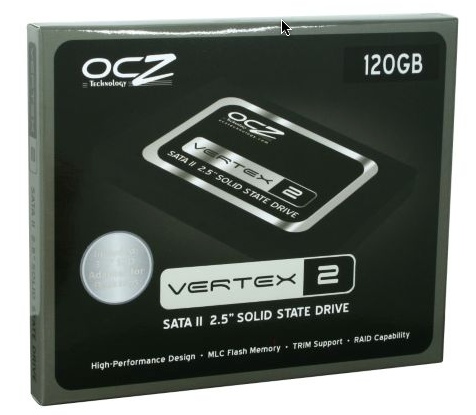
My current 13″ MacBook Pro came with a 160GB hard drive. I eventually upgraded the hard drive to 500GB. Then, the lure of solid state drives took me over and I pulled the trigger on a 120GB OCZ Vertex 2 SSD.
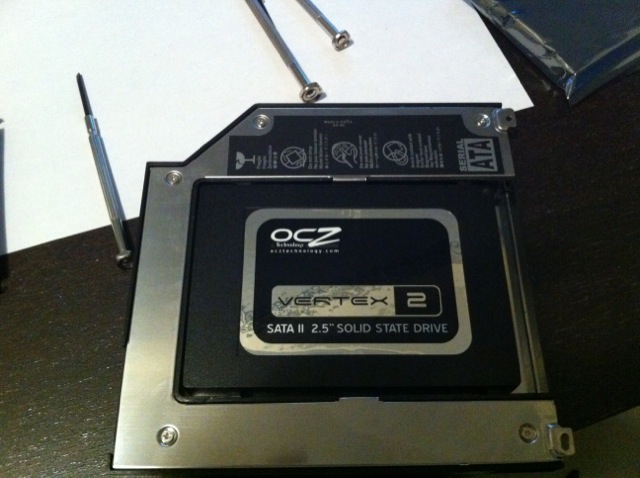
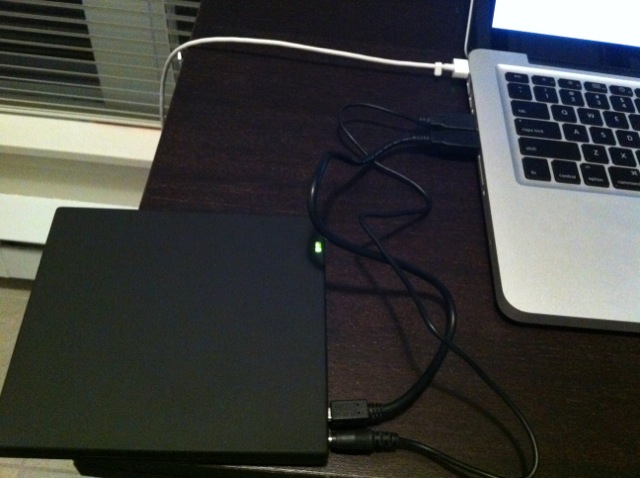
The plan was to have the SSD as my primary drive with OS X, and the 500GB as the secondary storage drive–inside my SuperDrive bay. How? Easy–a cheap SuperDrive hard drive enclosure off eBay. The removed SuperDrive became went external with an additional purchase of a USB SuperDrive enclosure.
This blog post will go over my experience with installing an SSD drive into my 13″ MacBook Pro (mid 2009).
Items Needed to Proceed with the Solid State Drive Install in my 13″ MacBook Pro:
SuperDrive hard drive enclosure + external USB SuperDrive (FYI I used eBay seller smk312; item I bought was “2nd HDD caddy Apple OptiBay SuperDrive Replacement SATA”; I emailed for combined shipping/cost to include the external usb enclosure)
Snow Leopard OS X install DVD
Phillips screwdriver
A clean workstation
If you’re not familiar with opening up your MacBook Pro, the folks at OWC have an awesome tutorial on how to install a SSD as a second hard drive. Here’s the video you should check out first or follow along as you proceed with your install:
The first thing you should do is back up your existing hard drive. There are many ways to do this. One of the easiest is just to use Time Machine. Other methods include using Super Duper for an easy bootable backup.
The process to add a secondary hard drive would be as follows…
Take off the back lid of my 13″ MacBook Pro
Remove the SuperDrive and install it into the USB enclosure (we’ll need the SuperDrive to install Snow Leopard on the SSD)
Insert SSD into the SuperDrive hard drive enclosure. Install enclosure back into the MacBook Pro. Put the lid back on.
Plug my new USB SuperDrive into my MacBook Pro. Turn on and insert Snow Leopard DVD.
Hold “option” on the keyboard while booting up. Let Snow Leopard get setup. Choose Disk Utility from the menu and format the SSD (Mac OS X Extended – Journaled).
Install Snow Leopard onto SSD. Restore HD from Time Machine.
Done.
The plan was to have the OCZ Vertex 2 SSD inside the SuperDrive hard drive enclosure. However, for some unknown reason my MacBook Pro would not recognize the drive inside the SuperDrive. I thought because I did not format the drive beforehand, it wouldn’t read. I proceeded to remove the SSD, put it into the external USB enclosure and formatted. I reinstalled it and still no luck!
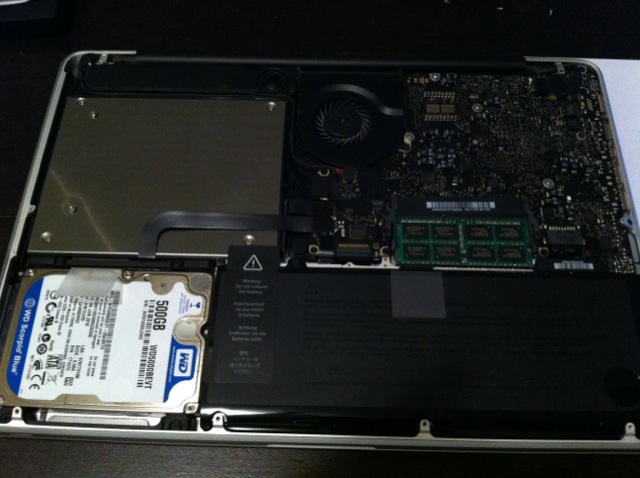
After some Googl’ing and help from twitter, turns out some MacBook Pros have issues with OCZ Vertex 2 drives. Of course I was doing a double face palm hoping this wouldn’t apply to me. Last on my troubleshooting list was to swap the drives–put the SSD into the primary HD slot, and my 500GB into the SuperDrive bay. Eureka–it worked!
The SuperDrive bay hard drive enclosure from eBay
Snow Leopard installed like a charm. I used Migration Assistant to move over my Applications and more from my old hard drive. Immediately I was blown away at the sheer speed that SSDs offer. Every application loaded quickly without beachballs (Firefox now works again) and booting up only took about 13-14 seconds.
SuperDrive inside an external USB enclosure
The most enjoyable part of having an SSD as your primary hard drive is that you can a tonne of your applications and nothing stalls. The drastic performance enhancement is unreal, and has made me enjoy my MacBook Pro even more. Adobe CS4, iMovie, iPhoto, and iTunes can be launched simultaneously with barely one icon “bounce” in the dock. It’s really impressive.
Should you make the move to a SSD? Prices have been dropping in terms of the $/GB ratio (I paid around $1.67/GB; regular hard drives currently sit at around $0.15/GB or less) but I still think it’s worth it as productivity will increase. No more wasted time waiting for things to happen. Now, everything just works like magic.
Upgrading to SSD is the single biggest improvement you can make right now to speed up any computer. I can’t wait to see prices drop even more. Have you made the switch to SSD, or have been thinking about it?
P.S. Want to keep this site truly independent? Support us by buying us a beer, treating us to a coffee, or shopping through Amazon here. Links in this post are affiliate links, so we earn a tiny commission at no charge to you. Thanks for supporting independent Canadian media!
Subscribe
17 Comments
Oldest
NewestMost Voted
Ryan
15 years ago
“Click here to check out the OCZ Vertex 2 12GB SSD at NewEgg.ca on sale for $244.99, plus a $20 mail in rebate (expires Dec 15, 2010).”
Yup–thx. Actually, a 12GB SSD would be REALLY living on the edge! There’s no need for apps anymore! 😉
Anonymous
15 years ago
I love SSD’s, and they’ve come down significantly in price. I have an 80g intel in my gaming rig, load times are wonderful.
Dfgdfg
15 years ago
What about the limited amount of ‘writes’ you can make on an ssd #hasnolongtermappeal
Anonymous
15 years ago
Mid-2009 Macbook Pros have problems with faster than SATA 1.5Gbps hard drives, leading to severe slow downs and data corruption over time. It’s because for some stupid reason, Apple decided to not enable the full SATA 3.0 Gbps capability on the controller (despite the hardware being capable). This problem is heavily documented in the Apple support forums ad nauseum.
The Vertex is a SATA 3.0 Gbps device and cannot be throttled down to compensate. It pushes data faster than the machine can handle. The Sandforce controller in the drive has also had some issues and the “garbage collection” which prevents your drive from “wearing out” is very slow, but required as OSX does not support TRIM, which is native to Windows 7. OCZ actually makes a “Mac Version” that is already throttled down in speeds.
Since I know you’re taking off to Asia, shove your original drive back in there, or go for the Seagate Momentus XT which is a hybrid SSD/platter offering similar SSD performance where it matters and up to 500GBs of storage. It also doesn’t have these weird problems, is nearly HALF the price and three times the storage.
Food for thought…
Beavisaur
15 years ago
i wonder why you didnt just use super duper to clone your 500gb over to the ssd. it will adjust the partition size to fit the smaller drive. Then you wouldnt have had to reinstall osx and restore from your backup.
You could have just put the ssd in the superdrive adapter and away you go.
malone46844
15 years ago
I did this to my 15″ i5 MacBook pro about 6 weeks ago. I agree, the best upgrade as far as bang for your dollar. Responsiveness is incredible.
malone46844
15 years ago
Also, I have the 640GB drive in 2 partitions – 140GB for Linux and 500GB for OSX, which is mounted @ /Users for a very seamless user experience.
I just did this about a week ago on a new 15″ Macbook Pro. Best investment ever. I can’t wait until the larger capacities come down in price though. I have turned my HDD that came with it into a 500GB portable as well. Speed is amazing. Even Bootcamp. Booting into Windows7 is super fast. Love it. Highly recommended.
Anonymous
15 years ago
There’s nothing “fresher” or “cleaner” about using Time Machine vs Super Duper. Benchmarks say it’s identical. It just takes way longer using Time Machine.
Hyperextension
15 years ago
Spend a Saturday? The whole procedure took me about 15 minutes. Hardly a whole day.
Hyperextension
15 years ago
Spend a Saturday? The whole procedure took me about 15 minutes. Hardly a whole day.
Issacdickinson
14 years ago
Not true, installing a fresh Mac OS will always clear out any issues. Speed is not everything, especially if it crashes!
Planning to pre-order an iPhone 18 Pro or iPhone 18 Pro Max, or Apple’s new iPhone Duo in Canada? Apple is using two different pre-order dates this year, so the first thing to know is when you actually need to wake up. The iPhone 18 Pro starts at $1,749 CAD, the iPhone 18 Pro Max...
Apple's iOS 27 beta has been pretty smooth overall, but it's still beta software, which means odd bugs are bound to happen. The one that's been bugging us in iOS 27 beta 4 is widgets vanishing or going blank, on both the lock screen and the home screen. At first we thought we were going...
The biggest rivalry in international soccer is set to write its latest chapter today as Argentina and England face off in a highly anticipated 2026 FIFA World Cup semifinal. With a spot in the final on the line, Canadian soccer fans can catch all the action live as the tournament reaches its thrilling climax. This...




“Click here to check out the OCZ Vertex 2 12GB SSD at NewEgg.ca on sale for $244.99, plus a $20 mail in rebate (expires Dec 15, 2010).”
You mean 120GB right?
🙂
Yup–thx. Actually, a 12GB SSD would be REALLY living on the edge! There’s no need for apps anymore! 😉
I love SSD’s, and they’ve come down significantly in price. I have an 80g intel in my gaming rig, load times are wonderful.
What about the limited amount of ‘writes’ you can make on an ssd #hasnolongtermappeal
Mid-2009 Macbook Pros have problems with faster than SATA 1.5Gbps hard drives, leading to severe slow downs and data corruption over time. It’s because for some stupid reason, Apple decided to not enable the full SATA 3.0 Gbps capability on the controller (despite the hardware being capable). This problem is heavily documented in the Apple support forums ad nauseum.
The Vertex is a SATA 3.0 Gbps device and cannot be throttled down to compensate. It pushes data faster than the machine can handle. The Sandforce controller in the drive has also had some issues and the “garbage collection” which prevents your drive from “wearing out” is very slow, but required as OSX does not support TRIM, which is native to Windows 7. OCZ actually makes a “Mac Version” that is already throttled down in speeds.
Since I know you’re taking off to Asia, shove your original drive back in there, or go for the Seagate Momentus XT which is a hybrid SSD/platter offering similar SSD performance where it matters and up to 500GBs of storage. It also doesn’t have these weird problems, is nearly HALF the price and three times the storage.
Food for thought…
i wonder why you didnt just use super duper to clone your 500gb over to the ssd. it will adjust the partition size to fit the smaller drive. Then you wouldnt have had to reinstall osx and restore from your backup.
You could have just put the ssd in the superdrive adapter and away you go.
I did this to my 15″ i5 MacBook pro about 6 weeks ago. I agree, the best upgrade as far as bang for your dollar. Responsiveness is incredible.
Also, I have the 640GB drive in 2 partitions – 140GB for Linux and 500GB for OSX, which is mounted @ /Users for a very seamless user experience.
I wanted a fresh start for the SSD. I used Super Duper to clone my 160GB to my 500GB the first time around.
Thanks for this Stephen–I’ll look into it!
yes this is how i want to spend my saturday! LOL
I just did this about a week ago on a new 15″ Macbook Pro. Best investment ever. I can’t wait until the larger capacities come down in price though. I have turned my HDD that came with it into a 500GB portable as well. Speed is amazing. Even Bootcamp. Booting into Windows7 is super fast. Love it. Highly recommended.
There’s nothing “fresher” or “cleaner” about using Time Machine vs Super Duper. Benchmarks say it’s identical. It just takes way longer using Time Machine.
Spend a Saturday? The whole procedure took me about 15 minutes. Hardly a whole day.
Spend a Saturday? The whole procedure took me about 15 minutes. Hardly a whole day.
Not true, installing a fresh Mac OS will always clear out any issues. Speed is not everything, especially if it crashes!