Tutorial: How to jailbreak Apple TV 2G 4.2.1 on Windows – by Invalidx
The Chronic Dev Team updated their jailbreak tool Greenpois0n to RC6, which also included support for an untethered jailbreak for the Apple TV second generation (ATV2).
To jailbreak your Apple TV2 on iOS firmware 4.2.1 (shown as 4.1.1 on the ATV2) with GreenPois0n, follow the steps below:
As always with jailbreaking, please proceed at your own risk. We are not responsible if anything goes wrong.
1. Download GreenPois0n RC6 (or this direct link)
2. Extract and run GreenPois0n RC6
3. It will ask if you are jailbreaking an Apple TV, click Yes.
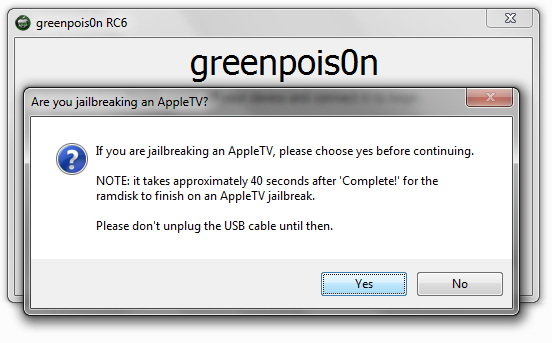
4. Follow the on screen directions to put the device into DFU mode.
Notes:
- I had issues doing it the way GP suggests, an easier way is as follows
- plug power and USB cables into Apple TV
- plug USB cable into your computer
- hold down the MENU and DOWN buttons on your Apple TV Remote for about 7 seconds, until the light flashes quickly.
- hold down the MENU and PLAY buttons for 7 seconds until the light flashes quickly.
5. Press Jailbreak Now in GreenPois0n
6. GreenPois0n will complete the jailbreak process.
7. Press Quit.
IMPORTANT – do not unplug Apple TV for at least 40 seconds to a minute after the Jailbreaking process is complete.
8. Remove USB Cable, and plug in HDMI Cable
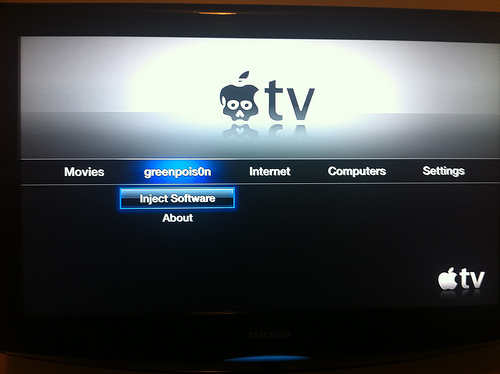
9. On your Apple TV, browse to the Inject Software option under GreenPois0n heading.

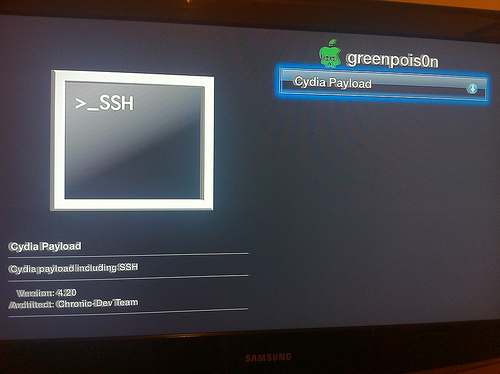
10. Select Install Cydia+SSH
11. Allow process to complete, and restart AppleTV when prompted.
—
How To Install XBMC or other add-ons
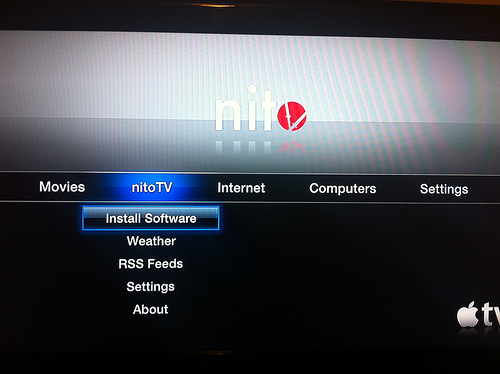
1. Browse to NitoTV heading, and select Install Software, then choose the package you would like to install.
- I recommend XBMC, OverFlow and Groovy. (Groovy is not as easy to install, as you must first add the source)
—
How To add Groovy (A GrooveShark app)
1. Download PuTTY
2. On your Apple TV, go to Settings > General > Network, and make note of your IP address.
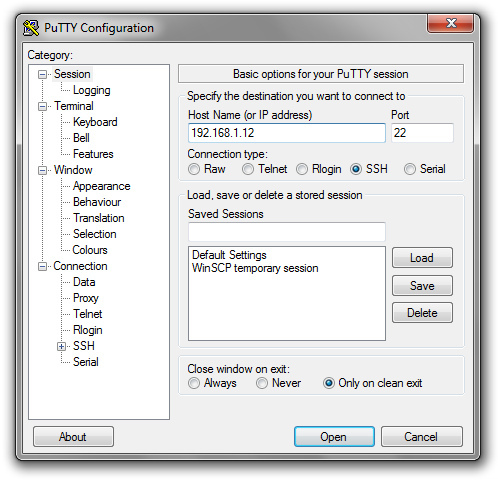
3. Open PuTTY.exe and SSH into your Apple TV using these settings
- Enter the Host Name – IP Address of your Apple TV (192.168.1.xxx in most cases.) and click open
- login as – root
- password – alpine (unless you changed it, and if you haven’t you should use the command ‘passwd’ after logging in)

4. Copy and paste(right click in PuTTY) this command, then press enter.
echo “deb http://apt.weasel-project.com ./” > /etc/apt/sources.list.d/weasel.list
5. Type ‘apt-get update’ (without quotes) and press enter.

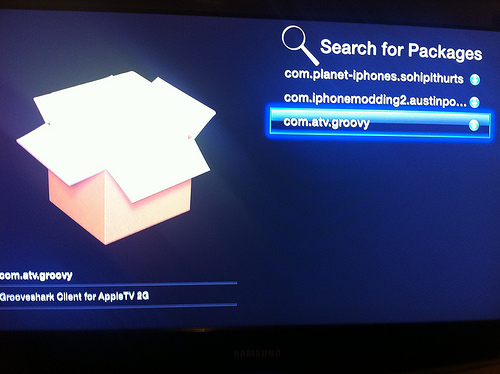
6. Groovy is now available to install under NitoTV > Install Applications
Please let us know how the following guide works out for you. Thanks to Invalidx for sending in this excellent guide! Pics from Flickr.
Update 1: Did WiFi fail after the first reboot of your Apple TV after jailbreaking? Here’s how to fix it:
ssh in:
Type apt-get update
Type apt-get remove com.nito.nitotv
Type apt-get install com.nito.nitotv
Type killall AppleTV





What is the advantage of jailbreaking an Apple TV? I haven’t heard much about that yet.
In my opinion the biggest advantage is XBMC (www.xbmc.org) It will stream any file type, from a variety of share locations. It takes a little bit of effort to get it set up, but once you do, it’s great!
I have an external hard drive on my network, with avi’s of TV shows and movies, and I can easily stream them without the need to convert them or have them in my itunes folder.
Finally I am seeing articles about what can be done with a jail broken 2nd gen Apple TV…
I have the original with the 160 Gb hard drive and mostly use it for XBMC streaming…
Now that I see that you can add XBMC to the new one its time to craigslist this ad boy!!! =)
Doh! Damn iPad… =P
s/ad/bad/
Damn you Auto Correct! 😉
i have no greenpoison option, but it boots untehterd. i already had xbmc installed whats up?
Does XMBC support RMVB streaming?
i have the same situation!!! any help???
None so far, i am going to start from a fresh non hacked firmware then try this method again.
Followed instructions for groovy. It doesn’t showup as an option after reboot…I go in and do it again and it tells me that the package is already installed. Shouldn’t groovy just show up on my atv homescreen?
The Groovy install seems to be broken. Having issues with it showing up on the homescreen. If I find a fix I’ll let you guys know.
That worked. Do a fresh install from apple itunes then install this on top.
i thought it came with a micro usb
Nope. Only a power cable. No HDMI either.
Excellent, thanks for putting this together. I tried to install with my MBP and it kept on failing. I tried with my Windows 7 laptop and it worked the first time lol.
getting this mistake evertime:
E: Type ‘.deb’ is not known on line 1 in source list /etc/apt/sources.list.d/weasel.list
in terminal or putty (when i try to do step 4. I can’t install any apps in software install???
Please Help
Is there some read me available that tells you what each of the installed programs are? I’d like to know more about some of the options before installing them.
I’ve performed the Jailbreak successfully 3 times now (using this guide… getting the Apple TV into DFU mode was impossible before I read this guide). It completes, I wait a few minutes before disconnecting just to be safe, I boot it up… and there’s no greenpois0n menu option. Just the stock menus. Any ideas?
I tried greenpois0n RC 6.1 with my fingers crossed, but same result. Is there most recent iOS version immune to the Jailbreak on the Apple TV I wonder?
Ah, looks like the problem is indeed the iOS 4.3 update. Shit.
Looks like it’s possible to revert to previous firmware in iTunes. Did so and I’m now installing the Cydia Payload. Success!