
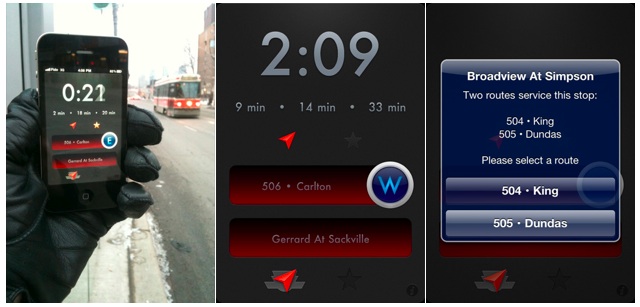
A fresh, new app from the aptly named “The App Boutique” for my peeps in Toronto: Next Streetcar.
While I personally don’t ride the Red Rocket, I know many iPhone riders that do (well…one anyway!) and this app will definitely come in handy. Using the built-in GPS, the app finds your closest TTC streetcar stop and advises upcoming arrival times at that location. You can also manually choose your stop if you’re heading to a stop not close by your actual location, so you know how long you can stand in line at Starbucks before taking off.
The coolest feature is VoiceOver – while it is advertised for visually impaired riders – I think it simply rocks that you can be listening to music and be advised as to when the next streetcar will be arriving. Saves having to dig out your trusty device from your pocket with fully mittened hands!
On sale for what appears to be a limited time at only $0.99!
**Update**
I’m the developer of the app. I just wanted to clarify how VoiceOver works. It is part of the OS, but requires an app to actively use it (if enabled) and for it to en enabled in Settings (Accessibility). Unfortunately it’s not possible for an app to announce anything with VoiceOver in the background. It does in fact require the user to select an object on the screen, and VoiceOver then announces it’s content (or whatever the developer sets for it). It’s meant for visually impaired users.
I optimized the app to make use of VoiceOver, and added proper sentences for the device to speak, instead of the default words it can speak.
Hope that clears it up
[MobileSyrup]



I’m the developer of the app. I just wanted to clarify how VoiceOver works. It is part of the OS, but requires an app to actively use it (if enabled) and for it to en enabled in Settings (Accessibility). Unfortunately it’s not possible for an app to announce anything with VoiceOver in the background. It does in fact require the user to select an object on the screen, and VoiceOver then announces it’s content (or whatever the developer sets for it). It’s meant for visually impaired users.
I optimized the app to make use of VoiceOver, and added proper sentences for the device to speak, instead of the default words it can speak.
Hope that clears it up.
make your own APPShttp://4a2f43yatl5cxob1hp57ifni74.hop.clickbank.net/
looks good. but too bad i live in Vancouver. I wish there’s an app has a similar function for translink. apparently, all the bus service app of GVA suck.!! there was one good called iBusVan and all of the sudden it disappeared…. 🙁