Air Video has been a favourite of ours since RoryPiper reviewed it back in late 2009. The beauty lies that you can stream .AVI videos from your computer to your iPhone, via live conversion over the air. It’s brilliant, and works even better on the iPad. Air Video was updated yesterday to include AirPlay support (requires iOS 4.3, possibly coming tomorrow). Now, Apple TV just got that much more powerful.
Previously, we documented how to jailbreak Apple TV and stream .AVIs from your computer via the installation of XBMC. Now that Air Video supports Air Play, for people on the fence about jailbreaking Apple TV you can just use Air Video instead.
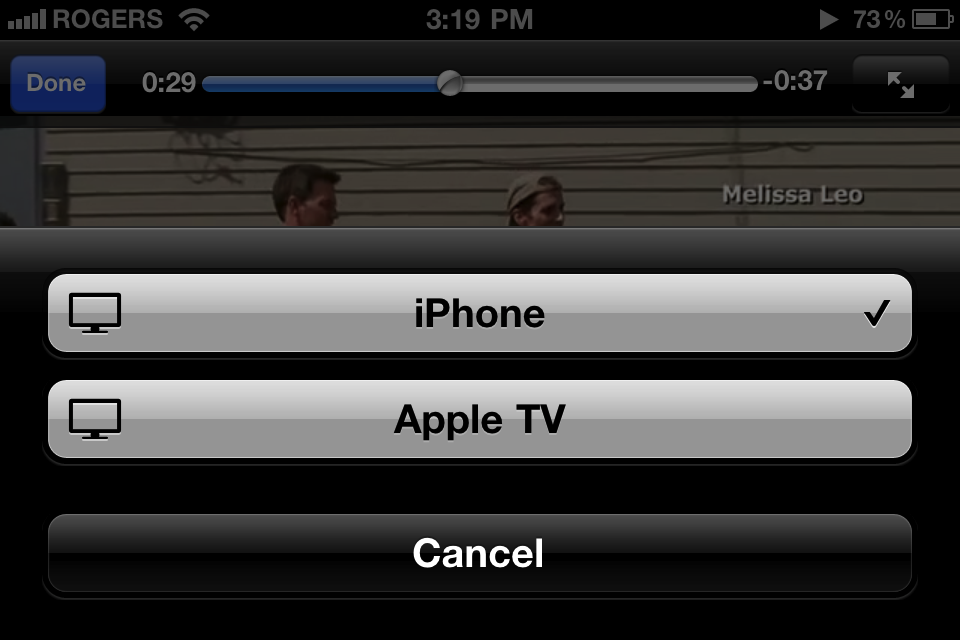
How does Air Video work? Easy. First, you need to install the Air Video server on your Mac/PC. Then, you configure the folders you want to share, and then you can watch videos within those folders on either your iPhone or iPad. With AirPlay, you’ll be able to one-tap to share to your Apple TV2.
What’s New In Version 2.4.5
Bugfix release
Air Play support (requires iOS 4.3 and Air Video Server 2.4.5-beta3 or newer)
Do you use Air Video? How do you like it?



Is air video only by jailbreak? I’m confused.
No, he was talking about another method of streaming avi’s to the Apple TV using a jailbreak of the Apple TV. AirVideo however will convert the files over the air from your computer to your iOS device and then your iOS device will AirPlay them to your Apple TV. A bit of a run around but hopefully it will work.
I run 4.3 GM on Ipad, I guess Atv has to be 4.3 as well – 4.2 streams only audio. If it works – no more jb. Apple is getting really cool.
AppleTV doesn’t have to be 4.3, but you need to be running Air Video Server 2.4.5-beta3 or newer, and you have to use your iPad/iPhone to start the video playing and then direct it to the AppleTV.
Does it stream to the iPhone and after that to the apple tv or once you select your apple tv in air video, it will go directly from the computer to the apple tv?
i just downloaded beta and the message on Ipad “cannot play videoon Apple Tv”
i just downloaded beta and the message on Ipad “cannot play videoon Apple Tv”
Once you select AppleTV to output, it will play directly to the AppleTV from your computer.
The iPad is just a method of selecting the video to play.
It’s not the ultimate system, but it works around having to install custom software on the AppleTV for every video player.
You will need OS 4.3 on your iPad. Other than that, you could check the forums on the AirVideo support site if you are having problems. It is still in beta testing at this stage, plus OS 4.3 isn’t out until later this week, so there may be other issues at play.
Does it play on your side? Maybe I’m doing something wrong, before I got just audio now nothing.
so you have to have an iPhone and an Apple TV to watch .avi files :O !!!
One jailbreaking opens many doors. Two, xbmc allows native playing of .avi and .mkv and three, a WDtv player or one of the other dozen CHEAPER media players is much better than the apple tv….
oh….and you don’t need a third app like air player.
xbmc and/or wdtv do a much better job too..you can add metadata to your files…check out media center master 😉
I can see people using this but i’d rather just take the little time to convert and airplay it directly, especially since I rarely use AVI.
I can see people using this but i’d rather just take the little time to convert and airplay it directly, especially since I rarely use AVI.
I have the 4.3 GM build, 2.4.3 version of Air Video Server and the new AirVideo app for iPhone 4, but I keep on getting this:
http://twitpic.com/47nkmk
Haven’t used Air Video for almost 2 years.
StreamToMe does a better job.
Haven’t used Air Video for almost 2 years.
StreamToMe does a better job.
I’m inching closer to an ATV, but I have been using Air Video for some time and it is fantastic.
I use an Apple Component AV cable which connects my iPhone to my plasma, and steam my videos this way. No need for airplay, other than I guess the convenience of sitting on your couch to control the pause / play.
Does using Airplay to transfer both audio/video from iPhone to Apple tv drain battery a lot?
Have not seen anyone using GM build post these results, Steve Jobs had not mentioned on this topic as well!!
If anyone is aware, please post results…
Once the video is playing on the AppleTV, it doesn’t use the iPhone/iPad anymore or affect the battery at all, as far as I understand.
I would have to disagree with the quality assessment. From what I’ve seen, the AppleTV picture quality blows away everything else I’ve seen.
And, you can buy and rent movies directly, AND use NetFlix.
That being said, the WD does have some benefits which I don’t need. If you have a PS3, it will do all of that and more.
I would have to disagree with the quality assessment. From what I’ve seen, the AppleTV picture quality blows away everything else I’ve seen.
And, you can buy and rent movies directly, AND use NetFlix.
That being said, the WD does have some benefits which I don’t need. If you have a PS3, it will do all of that and more.
I’ve had AirPlay installed on my phone for a year now, and I use it hardly enough to merit the little space it takes…. it works flawlessly, so long as I’m in the same local network as my computer, but as soon as I try to stream over 3G or a second, internet-connected wifi network, It becomes unwatchably slow. Still worth keeping just for the aforementioned AVI compatibility!
Wow, that’s awesome of true… thanks Ron!
I wouldn’t say not at all, but it is minimal.
Agreed, I am having this issue with this app as well as the vevo app
I was right, Atv has to run 4.3. It wrks great now!
Doesn’t work. New 4.3 with new Air Video still get audio only 🙁
Doesn’t work. New 4.3 with new Air Video still get audio only 🙁
It appears you need AppleTV version 4.2 (2060) for this to work properly.
Apple hasn’t been too obvious with this fact, or mentioned it anywhere I can see.
My either. Loaded 4.3 on my iPhone, my Apple TV updated to 4.2 and loaded the latest version of Air Video from their website and I get audio only.
Audio only here, too!
Any suggestions for helping us out?
This is great news. However, don’t get discouraged if it doesn’t work at first. I had to uninstall Air Video from my iPad 2 and reinstall AND add the beta Air Video Server and THEN it worked fine with avi’s, mkv’s…all. Working great now.
Can anyone confirm that you can’t use air video to stream to atv2 on a 3g iphone? That sucks.
how come I only see the Airplay speaker sign on my iPad. I got a combi of Apple TV 2 and iPad iOs 4.2.1 and an iphone running iOs 4.3.4. None of the device show the TV-icon?Â
Hope someone can help me out?
how come I only see the Airplay speaker sign on my iPad. I got a combi of Apple TV 2 and iPad iOs 4.2.1 and an iphone running iOs 4.3.4. None of the device show the TV-icon?Â
Hope someone can help me out?
how come I only see the Airplay speaker sign on my iPad. I got a combi of Apple TV 2 and iPad iOs 4.2.1 and an iphone running iOs 4.3.4. None of the device show the TV-icon?Â
Hope someone can help me out?
how come I only see the Airplay speaker sign on my iPad. I got a combi of Apple TV 2 and iPad iOs 4.2.1 and an iphone running iOs 4.3.4. None of the device show the TV-icon?Â
Hope someone can help me out?
how come I only see the Airplay speaker sign on my iPad. I got a combi of Apple TV 2 and iPad iOs 4.2.1 and an iphone running iOs 4.3.4. None of the device show the TV-icon?Â
Hope someone can help me out?
how come I only see the Airplay speaker sign on my iPad. I got a combi of Apple TV 2 and iPad iOs 4.2.1 and an iphone running iOs 4.3.4. None of the device show the TV-icon?Â
Hope someone can help me out?
how come I only see the Airplay speaker sign on my iPad. I got a combi of Apple TV 2 and iPad iOs 4.2.1 and an iphone running iOs 4.3.4. None of the device show the TV-icon?Â
Hope someone can help me out?
I have been using AirPlay for months and it is FANTASTIC to my iPAD 2. Cannot wait to get an AppleTV and try this now. Fantastic!
Just google search Step by Step Guide on How to Successfully AirPlay AVI, MKV, WMV, DivX, MP4, MOV Movie Files to Apple TV?
you will find a simple solution
I use Air Video on my iPhone 4 all the time, I absolutely love the app