Lately we’ve been giving away some promo codes to get new apps into the hands of iPhoneinCanada.ca readers. Promo codes are great: we get to try out apps for free and appreciate the work of developers. However, some people have never redeemed codes before, and I’ve been asked lots on how to do this.
The following will be a quick tutorial on how to redeem a promo code. Lots of you already know how to do this, so move on if you do. 😉
1. Launch the App store. Tap on ‘Featured’ and scroll all the way to the bottom.

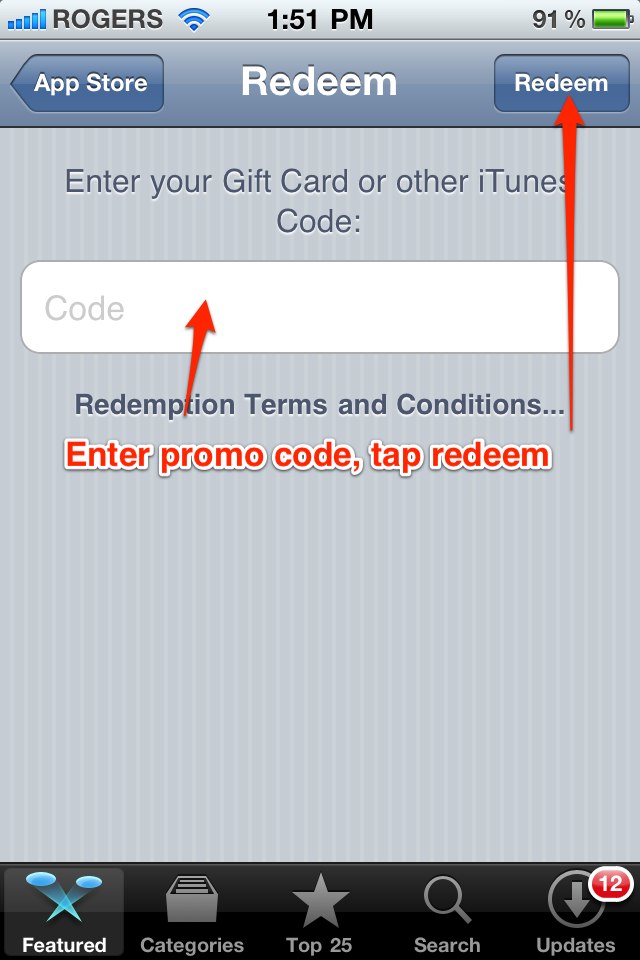
2. Tap ‘Redeem’, and enter your promo code. Tap redeem in the top right corner, done. Your app will now be downloading.

That’s it, plain and simple. Now keep your eyes and ears peeled for more promo codes coming your way!




do you have any promo codes that I can test out this tutorial with? ; p