
Code Reveals Apple is Bringing Siri AI to HomePod
Leaked Apple code confirms Siri AI is heading to HomePod, but older hardware might force users to buy new models to try it.
Yesterday Google introduced an update to their mobile search page. Today they have announced on their mobile blog three new updates to Google Sync for the iPhone and iPad. Google Sync will keep your Gmail, Calendar, and Contacts in sync. It’s what I use and love for my email and calendar.
Here are three new updates:
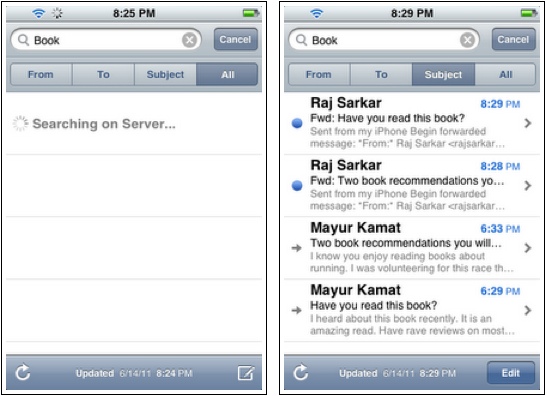
– Search all your emails in Gmail, not just the emails stored locally by the iOS mail app.
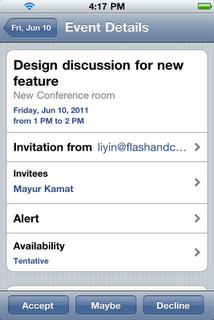
– Accept, decline or edit calendar events from the iOS calendar app.
– Send email from the address you want. We recognize that some of you manage multiple email addresses from a single Gmail account. Gmail’s “Send Mail as†feature lets you send messages with another email address listed as the sender instead of your Gmail address, e.g. jo*@*******at.com instead of jo*@***il.com. Now the iOS mail app will respect these settings.
I highly welcome these new features as I’m a power Gmail user. Being able to search the server for emails on iOS has been an issue in the past, but that is no longer. I’m still waiting for a native Gmail app…one day, right?
Want to see more of our stories on Google?

P.S. Want to keep this site truly independent? Support us by buying us a beer, treating us to a coffee, or shopping through Amazon here. Links in this post are affiliate links, so we earn a tiny commission at no charge to you. Thanks for supporting independent Canadian media!


Just tried it out. Suddenly my inbox has 98 new messages listed where there were 0 before. Killing the Mail.app and restarting had no effect. Using iOS 4.3.2, not jailbroken.
Just tried it out. Suddenly my inbox has 98 new messages listed where there were 0 before. Killing the Mail.app and restarting had no effect. Using iOS 4.3.2, not jailbroken.
I should add, I just tried the search on the server feature.
I should add, I just tried the search on the server feature.
Maybe they could fix Sent Mail. Â I have to open the web app if I want to check a mail I sent already.
What do you mean exactly?
I can see my sent emails in my iPhone in the mail app without any problem…
What do you mean exactly?
I can see my sent emails in my iPhone in the mail app without any problem…
What do you mean exactly?
I can see my sent emails in my iPhone in the mail app without any problem…
I noticed this too, any positive searches from server side appear in the iOS mail app as new messages, even if they are years old an have ready been read on the server. Looks like it’s a bug but I wonder how long we’ll need to wait for a fix. How long has it taken for server side searches, 3 yrs?
I noticed this too, any positive searches from server side appear in the iOS mail app as new messages, even if they are years old an have ready been read on the server. Looks like it’s a bug but I wonder how long we’ll need to wait for a fix. How long has it taken for server side searches, 3 yrs?
Try this if you haven’t already: https://www.iphoneincanada.ca/tips-tricks/google-sync-gmail-bug-fix-for-missing-emails-on-iphone/
Try this if you haven’t already: https://www.iphoneincanada.ca/tips-tricks/google-sync-gmail-bug-fix-for-missing-emails-on-iphone/
Weird, I didn’t experience this. Using iOS 5 Beta, non JB.
Weird, I didn’t experience this. Using iOS 5 Beta, non JB.
Weird, I didn’t experience this. Using iOS 5 Beta, non JB.
Items 2 and 3 have been around for a LONG time. I don’t see why this is listed as new?
Item 1 started working about a month ago IIRC.