If you’re a private person, or simply don’t like prying eyes, a new app called “Safety Photo+” enables you to quickly and easily password protect your iPhone photos.
Upon first start-up of the app, you are presented with a combination lock where you create your four digit password. You will then require this password to enter the app and view your photos every time, even after using multitasking.
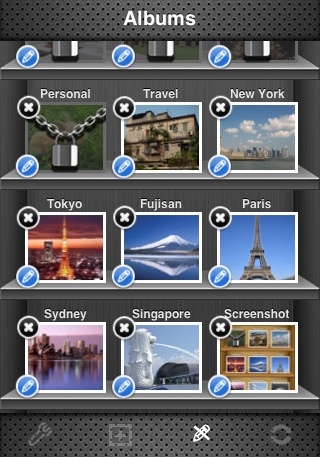
Once inside, you can organize your photos and create albums to store them, each with individual passwords if you want. You can even take photos from within the app and the photos are automatically stored in Safety Photo+ instead of the iPhone camera roll.

Using the app, you can also import your existing iPhone Photos.app photos into Safety Photo+, export photos from the app or share photos between two iOS devices via Bluetooth/Wi-Fi.
Overall, Safety Photo+ delivers a fantastic photo security app with customizable themes, a very friendly user interface and a good set of available features.
Safety Photo+ is available in the App Store for $3.99. However this week, the app has a discounted schedule, with it being free today:
- August 24: Free
- August 25: $0.99
- August 26: $1.99
- August 27: $2.99
- August 28: $3.99



Just downloaded it for my iPhone 5 (when I get it). Thanks for the tip+!
Just downloaded it for my iPhone 5 (when I get it). Thanks for the tip+!
Just downloaded it for my iPhone 5 (when I get it). Thanks for the tip+!
Great app so far. I always wanted to create folders for pics and now I finally can. Just wondering if I can now delete
Pics in camera roll? Is it safe or should I keep both sets of pics just in case?
Great app so far. I always wanted to create folders for pics and now I finally can. Just wondering if I can now delete
Pics in camera roll? Is it safe or should I keep both sets of pics just in case?
Great app so far. I always wanted to create folders for pics and now I finally can. Just wondering if I can now delete
Pics in camera roll? Is it safe or should I keep both sets of pics just in case?
Great app so far. I always wanted to create folders for pics and now I finally can. Just wondering if I can now delete
Pics in camera roll? Is it safe or should I keep both sets of pics just in case?