
Apple’s AirPort Utility App is Being Removed From the App Store
Apple warns that "functionality is not guaranteed" when using AirPort Utility on iOS 27 or later.
PhotoSync is a cool media sharing app developed for iOS by touch byte GmbH. It allows wireless transfer of your favorite photos and videos from an iOS device to a computer, a computer to an iOS device or between any two iPhones, iPods or iPad devices over a WiFi connection. As an added plus, transfer between two iOS devices is also supported over Bluetooth. Moreover, the app even lets you upload media directly to a Dropbox, Facebook, Picasa, Flickr, SmugMug or an FTP server.

PhotoSync is available in the AppStore for just $1.99 and best of all, it comes as a universal binary meaning the app has been optimized for iPhone / iPod as well as the iPad which eliminates the need of buying a separate app for each platform like most other media sharing applications. Also, a PhotoSync Companion software for Macs and PCs is available as a completely free download!
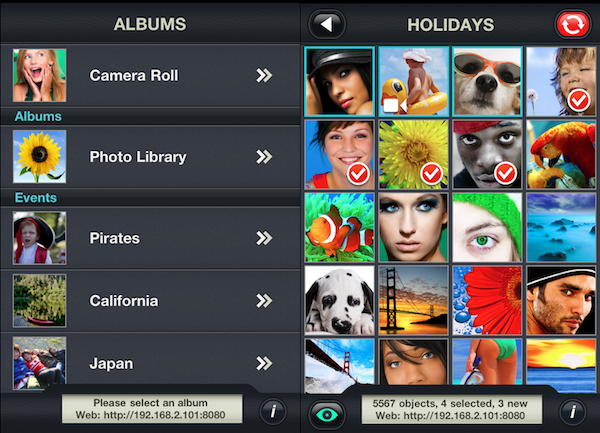
Once you are up and running PhotoSync on all your iPhones and iPads as well as on your Mac or PC, you’ll never wanna go back to having to use wires again. The app has a pretty nice UI. It is very simple to use and is blazing fast in performance allowing you to transfer hundred of photos seamlessly over WiFi with just a few taps. All you need to do is tap to select the photos you want to send, choose a target device and thats it. The app supports multitasking which means the transfers will continue in the background. There is also no limit to the number or size of photos that can be transferred in a single instant.
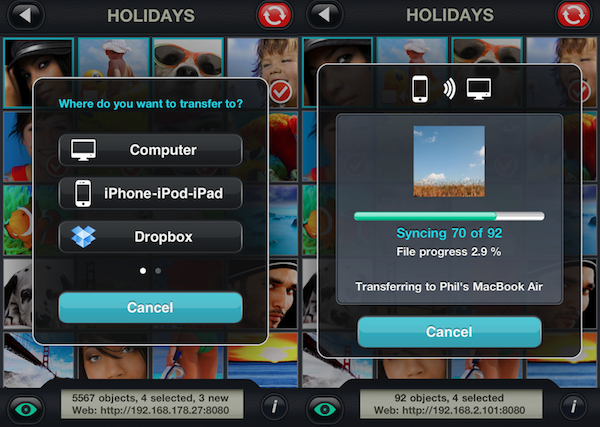
Another great feature of PhotoSync is the “Quick Transfer” option that allows you to set a default computer, an iOS device or an online social network in the settings and then transfer all the new/selected pictures to this default device or service by simply pressing and holding the sync button. Don’t worry, “Smart Sync” makes sure not to upload any duplicates by keeping track of any photos or videos that have already been transferred before. With PhotoSync, transfer of photos or videos preserves all Exif data, GPS data as well as the file date. You can even import any RAW images obtained with an iPad Camera Connector.

Transferring media from a computer with PhotoSync Companion to any iOS device running PhotoSync app is also as easy as it could possibly be. Simply drag and drop the images onto the PhotoSync Companion icon which is located in your toolbar, and the transfer will begin immediately to the target device.

If you think all this is not enough, then watch out for the upcoming PhotoSync Version 1.3 update. It will bring a handful of new features including SFTP (SSH) and WebDAV transfers, on-the-go Folder creation for supported online services such as Facebook or Google+ and tap / hold to change target album or folder when using “Quick Transfer” feature.
To summarize, PhotoSync is a super easy way to wirelessly share your photos and videos across multiple iOS devices, personal computers and social websites. Highly recommended!
Free Promo Codes Giveaway:
We have 3 App Store promo codes for PhotoSync to give away. You can enter the contest via Twitter for free in just two easy steps:
NOTE: If you also leave a comment below, this will increase your chances of winning. Don’t forget to leave your Twitter ID with it.
We will announce the winners by the end of the day!
[UPDATE] Giveaway Winners Announcement:
Here are the Twitter IDs of our 3 winners:
Congratulations to our lucky winners and many thanks to everyone who participated.
Those who didn’t win, please don’t lose heart as there are tons of other giveaways coming your way, right here on your favorite iPhone blog. Stay tuned !
Want to see more of our stories on Google?

P.S. Want to keep this site truly independent? Support us by buying us a beer, treating us to a coffee, or shopping through Amazon here. Links in this post are affiliate links, so we earn a tiny commission at no charge to you. Thanks for supporting independent Canadian media!


This looks like a really neat app. Hope to win it. @MikeJenkinson:disqus
enter me 🙂
enter me 🙂
This app looks great. I would love to win as it would be very useful. @chicoquente
This app looks great. I would love to win as it would be very useful. @chicoquente
Please submit my entry! Thanks 🙂
Please submit my entry! Thanks 🙂
Very useful looking app @bob_connelly:twitter
This is a great little app. Had no idea it was available for the Mac as well. Plus you pointed out some benefits to thus App that I wasn’t fully aware of! Thank you.
@granniethegeek – I forgot to add my Twitter account. I am already following you. 🙂
This is a great little app. Had no idea it was available for the Mac as well. Plus you pointed out some benefits to thus App that I wasn’t fully aware of! Thank you.
The app seems to be great … hope I win !!!
Twitter @hjdoody
Thanks!
i dont have a twitter account!!!…y cant we just post something here like usual to get the promo code??!! 🙁
Reads like a nice app to have but also seems to have a lot of overlap with iCloud features. Is it just me, or are there a lot of app writers rushing stuff out before the iOS5 and iCloud launch, after which it will be much harder to sell their product? @donaldpwalker:twitter
Yes, with iCloud’s photostream, all photos taken within the past 30 days are kept in sync between all your devices and even get saved to iPhoto for good from what I understand.
I’ve been looking for an app like this. Looks awesome! @timfraser83
I’ve been looking for an app like this. Looks awesome! @timfraser83
Sounds exactly like what I need. @MamaLikeMyMama I’m following @iphoneincanada
Sounds exactly like what I need. @MamaLikeMyMama I’m following @iphoneincanada
Sounds exactly like what I need. @MamaLikeMyMama I’m following @iphoneincanada
Sounds exactly like what I need. @MamaLikeMyMama I’m following @iphoneincanada
Look like a cool app. Definitely add that to my collection. @matt_coleman7:twitter
Sounds awesome!
@scuzzynav:twitter
Does this app’s computer companion software works with iPhoto directly?
@wygboys:disqus
Cool stuff @DavidDesjardins:disqus
I’d like to have this app… It looks cool