
Xbox Announces XP Division to Expand Gaming Franchises Into Movies, TV and More
Xbox XP is a new division focused on expanding its biggest franchises into movies, television, merch and live experiences.
Update 2: Turning Airplane Mode ON/OFF will also fix the issue, and save you from a reboot. Thanks @ShevCharko.
Update 1: A reboot will fix the DST issue. Thanks @cdeleeuw84!
We’ve heard from multiple readers out there about iPhone issues with reverting away from daylight saving time today in Canada, which could be related to a network issue, but other users are also experiencing this bug in the USA.
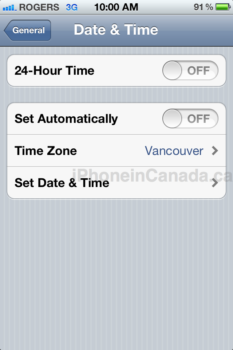
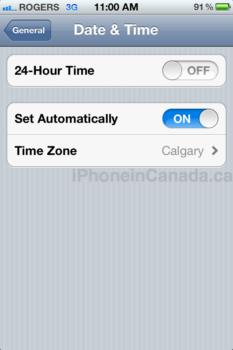
Under time zone within Date & Time settings, users are experiencing a different time zone being selected when Set Automatically is turned on.
On my iPhone 4S when Set Automatically is toggled ON (Rogers network), my time zone changes to Calgary, and the time is pushed forward an hour. Once turned off, and my manual selection of Vancouver remains. Check out the images below:
This is not the first time we’ve seen bugs on the iPhone related to daylight saving time. Back in 2009, Rogers customers experienced Date & Time errors on 3G.
Are you affected by the time zone bug as described above? What carrier are you on?
Thanks for the email Pete!
Want to see more of our stories on Google?

P.S. Want to keep this site truly independent? Support us by buying us a beer, treating us to a coffee, or shopping through Amazon here. Links in this post are affiliate links, so we earn a tiny commission at no charge to you. Thanks for supporting independent Canadian media!


Exactly te same problem here. But it wasn’t like that till after 6:30am then cannot go automatic.
No problem with my iPhone 4 running iOS 5 on Rogers in Ottawa.
This happened to me. All I did was reset my iPhone 4s and it fixed itself.
Yeah, happened to me, it showed the correct time, then gained 2 hours.
it was with Telus
I had that problem this morning too (I’m with Fido). I’m in Edmonton (Calgary time zone) and got switched to Winnipeg. Turning airplane mode on and back off fixed the issue.
My time on my iPhone hasn’t changed out of DST even though I’ve turned Set Automatically off and on. I’ve tried rebooting the phone unsuccessfully too.
In Saskatoon on Telus, on automatic it swaths to Calgary and thing will set it back unless I turn automatic off.
Had same problem with iPhone 3GS and OS 4.3.3. The Airplane mode on/off switch fixed it for me, now I’m set on “set automatically” and showing the proper time and timezone. I’m with Fido in Toronto.
**
On Rogers here, it actual swaps back to Cupertino. Also seldom use bluetooth but it was on and not showing the symbol in the bar, anybody know if
this might be the battery drain for iOS5?
**
The battery drain is supposed to be due to bugs in the new location based reminders.
I’ve had this exact same issue in Toronto and was just out with a bunch of Roger iphone users and we are all having the same issues. Still can’t get on internet but can use text now. Annoying!
Dunno….I am in Barrie, north of Toronto and using Rogers. No issue at all. I got up this morning and the time on the phone was correct. Must be a bug somewhere but not here.
I’m in Barrie aswell and I had the problem
i’m rogers customer, and actually i experience this issue a few months ago (suddenly one hour behind), so that i have to turn off set automatic; but i turn it on again last week, was ok changing the time last night, weird.
I had the problem. I’m in Toronto on Fido and my time zone switched to Halifax. The scary thing was all of my calendar entries switched forward by one hour. Thankfully the airplane mode trick fixed the calendar entries too so no major problems here.
Thanks iphoneincanada for letting me know about this issue and how to fix it. You guys are always the first source I check to find out how to fix these issues.
I had this problem too. I’m located in Toronto on the Koodo network. My iPhone automatically set my time to Halifax, which delayed my roll back. Putting my phone on airplane mode and using wifi to set my time automatically finally gave me the correct location. Afterwards I turned off airplane mode and it stayed with the correct location.
Never had a problem withy iPhone 4 on Bell’s network, but then again I’m not with Robbers, worst company ever gOd there customer service is garbage.
I never trust the auto time zone thing so I manually set the clock back 1hr before bed. But I didnt know the aeroplane mode will auto adjust so when I woke up and turn off the aeroplane mode, i was 2 hrs behind, haha.
My iPhone went back an hour perfectly fine. I have it set on “Set Automatically” and the time zone is Toronto. It never changed to Halifax or anything else I’m seeing on here and I’m on Rogers too.
All fine on automatic with Rogers here in Newmarket. I’ve never had a problem on my 3G or my 4 no matter what version of iOS. Always been on automatic.
Automatic wifi syncing – now that’s another story. I had to turn on the “open iTunes when this device connects” and try multiple syncs before it stopped telling me that my phone didn’t have room to sync 17GB of information (which it certainly did not have that much needing to sync – didn’t need anything in fact).
No issues with my 4S in Vancouver. Before I went to bed, I turned automatic on, woke up this morning and it was the right time with the proper time zone. I then turned automatic back off to save power…again..
Oh and I with Fido.
Mine showed Halifax, and I’m from Ontario
We are in the Yukonmand have two 4S phones in our house on the Bell network. My husband’s phone switched to Calgary and My phone had the correct time, but I lost my cellular service and had to re-boot?
I had the problem. I’m in Montreal with Koodo. After turning my iPhone 4s off then on again it was fine.
yes, in Ontario. Bell.
reboot just fixed it.
No problems on my iPhone 4, Telus, Vancouver
No problem. Rogers iPhone 4 Ottawa
I was… iPhone 3GS, Fido Montreal.
I am in Winnipeg with telus, iPhone 4.
My time did not auto adjust as this was not turned on. When I turn it on I get Ottawa as a time zone and time is 1 hour ahead.
When I turn it off I manually set Winnipeg as my time zone.
I cannot resolve the issue. Reset, airplane mode, etc doesn’t do a thing
Same here! I’m also in Winnipeg but my time zone which was set automatically chnaged to ottawa!! Good thing i woke up eary today!!
Even since I bought my factory unlocked 16GB iPhone 4 from launch, I’ve NEVER had any “bugs” or any of the “issues” posted on the internet about the iPhone 4.
My network was Fido but now I’m with Telus.
I thought I was going crazy since I NEVER have any of the issues people have.
Im with Fido
Do you suppose that _anyone_ at Apple tests _anything_ to do with the calendar fuction on the iPhone or iOS? So much of the iPhone rocks, but so often the calendar/timezone/time change portion of it sucks.
coop
I’ve had this problem for a week now. I don’t think it is tied to daylight savings time. I’m in Edmonton and the auto time changed me to Vancouver. Reboots didn’t help and airplane mode for one hour only worked for about a day. Now I’m just waiting for Apple to send out an iOS update. My battery also drained super fast when it started. Turning off the auto time stopped the battery drain.
Changing time zone support in Mail, Contacts, Calendars fixed the problem for me as well as correcting all the times for my appointments
I have the 4s and it was set to automatically change and it all went like clockwork (sorry :P). I am in Nanaimo which is Pacific.
Mine showed ottawa and since I’m in Toronto no automatic change…
Just curious what to people experiencing the bug have listed under their world clock section of the clock app? Reply please for personal interest!
I”m in montreal and have a 4s on telus, when the switch happened my phone said halifax which caused it to be an hour later. The fix worked however 🙂
The fixes have only been temporary when I do either one of them. It then glitches back.
Changing the date and time to set automatically off and then on worked for me
I’m in saskatoon, my time zone switches to winnipeg and it screwed up my iCloud calendar times and airplane mode and rebooting have done nothing. As soon as I turn automatic on it switches to winnipeg, turn it off and back to saskatoon…..frustrating
Same problem with iPhone/Verizon and doing the suggested “Airplane Mode ON/OFF” fixed the problem.