
Apple’s AirPort Utility App is Being Removed From the App Store
Apple warns that "functionality is not guaranteed" when using AirPort Utility on iOS 27 or later.
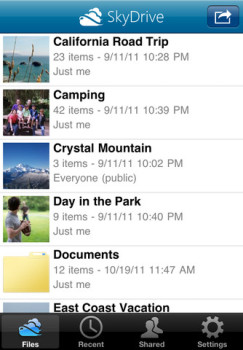
Microsoft has released their SkyDrive for iPhone app, as noted on their Inside Windows Live blog. This app allows all Windows Live users to take advantage of free cloud storage, similar to DropBox, and also features from iCloud:
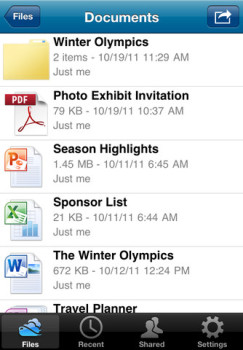
On the iPhone, we’ve taken the next step by making the new SkyDrive app for iPhone available in 32 languages worldwide. In addition to their OneNote notebooks, iPhone customers can now access all of their files in SkyDrive, create folders, delete files, and share links to folders and files directly using the Mail app.
iTunes description:
SkyDrive from Microsoft is the place to store your files so you can access them from virtually any device. With SkyDrive for the iPhone, you can now easily access, manage and share files on the go. You can also upload photos or videos from your iPhone to SkyDrive.
Features:
•Access all of your SkyDrive content including files shared with you
•View recently used documents
•Upload photos or videos from your phone
•Share a link to any file using email
•Create folders. Delete files or folders
Here’s a video demo of the app:
Back in June, Microsoft released an update for the OneNote iPhone app to make it available to Canadians (the US release was back in January).
Click here to download SkyDrive–it’s free.
Thanks @DjDATZ
Want to see more of our stories on Google?

P.S. Want to keep this site truly independent? Support us by buying us a beer, treating us to a coffee, or shopping through Amazon here. Links in this post are affiliate links, so we earn a tiny commission at no charge to you. Thanks for supporting independent Canadian media!


Storage? Nice reporting
25 gb
Most likely 2GB or whatever your hotmail account uses.
Never mind. I just checked and confirmed it’s a wooping 25GB.
Ya pretty surprised that neither the post nor the video mentioned that its 25GB free.
No matter, Dropbox is still better. Give me unlimited GB free, it doesn’t make a difference if I have a 25-100MB file upload limit.
I have 50GB free on Box, wohooo! It’ll only take me 2048 uploads of 25MB to fill that!
Says 5GB of free storage on their website.
This ap ONLY connects to the windows live photo skydrive not the windows live mesh skydrive so you can’t sync files from your pc or Mac to it.
Massive Microsoft FAIL.
25GB, but only a puny 100MB per file limit. Epic FAIL!
iUnarchive (not Lite) also connects to SkyDrive and adds the following features:
– native iPad UI
– upload multiple files at once
– preview of a lot more file types
– the option to open a file with another App- many more Cloud services (including DropBox)