
You Can Now Jailbreak iOS 16.4.1 with Palera1n 2.0.0 Beta 6
Codenamed Bakepale, the latest v2.0.0 beta 6 update to jailbreak tool Palera1n has just been released, which fully supports iOS 16.4 - iOS 16.4.1 jailbreak.
If you have a jailbroken iDevice, you have probably heard of a tweak called Zeppelin. It allows you to quickly change your carrier logo in the status bar, without Winterboard or respringing your device. Since it’s release, Cydia has been flooded with lots of different logos. We thought there should be at least one more. ;P Introducing the iPhoneinCanada logo for Zeppelin. These will work on retina and non-retina devices.

So, you’re probably asking where can I get this? Well, there’s good news and bad news. Good news is, you can get it right here! The bad news is, you have to install in yourself. The iPhoneinCanada logo for Zeppelin isn’t available in Cydia, yet. You can only get it right here! We’ll show you how to install it.
Download the package here: iPhoneinCanada Logo for Zeppelin Then unzip to your desktop, so you can easily find it later.
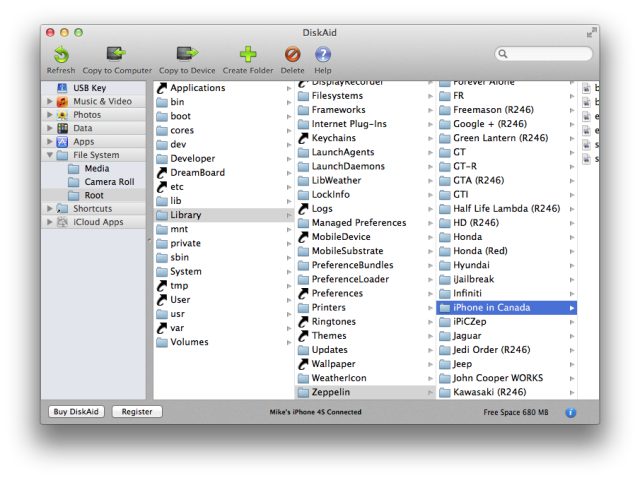
To install this logo, you must have Zeppelin installed. You can find it in Cydia, for free. You will also need access to the root file system of your device. You can use your home WiFi network with OpenSSH or Netatalk, or you can use a USB solution, like DiskAid. There is a free version of DiskAid that works perfectly for what we want to do. Download DiskAid and install. Open DiskAid and connect your device. DiskAid will automatically detect your device. Now, navigate to File System > Root > Library > Zeppelin. Click on “Copy to Device” at the top and navigate to the folder you downloaded and unzipped. Click “Save”. That’s it!
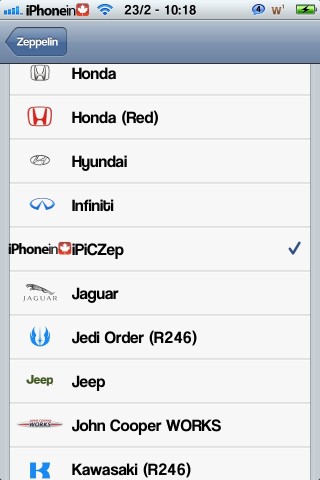
Now, on your device go to Settings > Zeppelin, and select the logo you just installed. There ya go! the iPhoneinCanada logo is now set as your carrier logo.
Our logo may be available in Cydia at a later date, but we wanted you guys to have access to it now. Enjoy! Comment below if you’re having trouble installing and we’ll do our best to help you out.
Want to see more of our stories on Google?

P.S. Want to keep this site truly independent? Support us by buying us a beer, treating us to a coffee, or shopping through Amazon here. Links in this post are affiliate links, so we earn a tiny commission at no charge to you. Thanks for supporting independent Canadian media!


Epic work mate!!!
This is great guys,but I guess i’ll just have to wait until is reaches Cydia,i downloaded DiskAid,i followed the steps that was needed and still no luck :(i’am running Mountain Lion 10.8,i’am not sure if that was the problem?