
Mastering depth-of-field can really make your photos stand out. You can blur out the background of your pictures by changing the aperture. However, when using your iPhone’s camera, there is no way to set or change the aperture.
The Big Lens app helps solve this problem. You can blur out the background in any picture you’ve taken, thus creating a fake depth of field.
It’s really simple to use. You can use your finger to paint over what you want to keep in focus, tap a button and voila. You now have a blurred background similar to what you’d see with a DSLR. You can even change the amount of background blur you’d like to use, thus making it look more natural.
Here are a couple of before and after pictures.


Big Lens also offers some filters and lens flare effects.
Check out my video for the full review and demonstration of everything Big Lens is capable of.
For only $0.99 this app is worth every penny. It can really make your pictures pop. It’s especially nice for portraits and product shots. Let me know what you think.
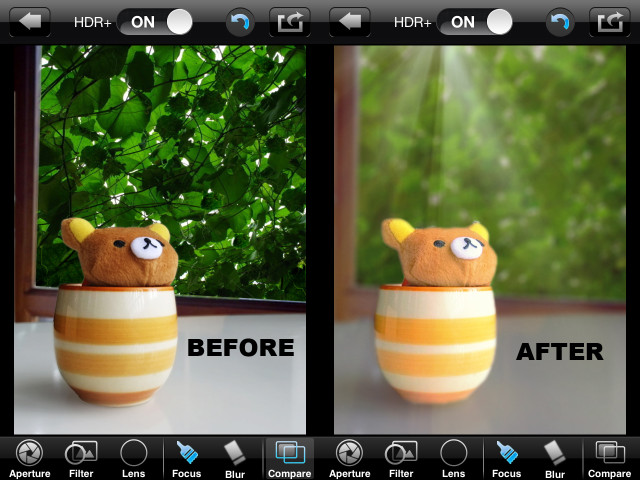




Looks like one of those cases where you really need to know how to use it. The first photo looks good, but the second one looks really fake. The reason is that only part of the object in the foreground is in focus, while the rest of the area that would also be in focus with a real camera lens is blurry (the rest of the object and the table it’s sitting on)
yea if this is just a blur app,
the yellow jacket looks a lot clearer
and the second picture, theres rays of light that arent in the before picture