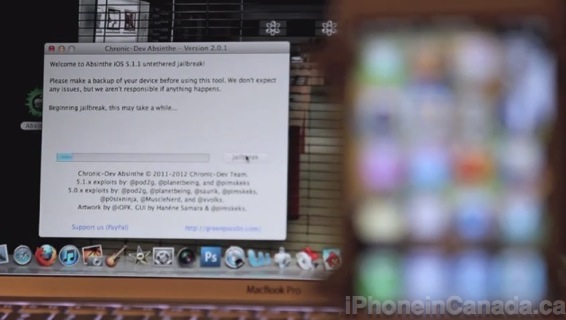
Absinthe 2.0 was released to the world the other day to jailbreak iOS 5.1.1 untethered, thanks to the incredible work of @pod2g, the Chronic Dev Team, @planetbeing, @pimskeks and more. Updated versions 2.0.1 and 2.0.2 (updated for the newest iOS 5.1.1 firmware for the iPhone 4) have been released, but the jailbreak process is more or less the exact same.
Here’s a quick video tutorial created by our @meadorsmusings on the entire Absinthe 2.0 jailbreak process for iOS 5.1.1 from start to finish on a Mac:
I backed up my iPhone 4S to iCloud, restored to a fresh iOS 5.1.1 via iTunes, restored from my iCloud backup (this took a long time), then used Absinthe 2.0.1 to jailbreak (also had to be patient with this). This is what worked perfectly for me on the first try so share what has worked for you in the comments.
Want to see more of our stories on Google?
P.S. Want to keep this site truly independent? Support us by buying us a beer, treating us to a coffee, or shopping through Amazon here. Links in this post are affiliate links, so we earn a tiny commission at no charge to you. Thanks for supporting independent Canadian media!
Subscribe
25 Comments
Oldest
NewestMost Voted
Weebsurfer
14 years ago
I highly recommend staying away from APTBackup fr a week or two. It is pretty much hopeless using it during the release week. Too many server timeouts for Cydia app installs.
Interesting. I just did the PKGBackup and it almost worked perfectly. Almost.
There were a couple of tweaks it didn’t add. But that’s better than having to instal all of them again.
az
14 years ago
Almost all the tutorials I’ve seen fail to mention that you have to upgrade to 5.1.1 first.
I know it’s implied, since it says “This jailbreak supports firmware 5.1.1 ONLY”, but it would have been nice to have that as the initial step of the instructions. Most people who are interested in this JB, are jailbroken on FW 5.0.1, and there have been many JB tools in the past where upgrading the FW was part of the JB process itself, as opposed to upgrading beforehand.
Actually that’s a very good point. I’ll make sure to take that into account for the next Jailbreak.
Thanks for the heads up.
K3
14 years ago
**********
Complete tenderfoot question- for Cydia app purchases is it essential to have Facebook? Also if you buy an app then upgrade from stone age iPhone to the one that’s jetting a leg out behind the corner; is it required to repurchase the app already bought??
& Btw; thank you for posting this JB how to.
my buddy’s sister-in-law made $18108 a month ago. she worrks on the internet and bought a $525400 condo. All she did was get blessed and put into action the instructions given on this website ===>> ?????? Job2Seek.blogspot.com
Wuju007
14 years ago
Would like to know what Cydia softwares are working with this new jailbreak. e.g. SBSettings, Installous, Display recorder, MyWi, Message2PDF, 3G Unresictor, etc?
So far all the ones I’ve tried (had installed previously) work fine.
They are ….
SBSettings
Display Recorder
PKGBackup
BlurriedNCBackground
Cascade
Infinidock
Forecast
SlideMyName
Winterboard
Zephyr
Nick
14 years ago
My iPhone worked fine, but my iPad 2 isn’t working.. I’ve updated it with the restore function, erased, and then when I ran Absithe it got only as far as the waiting for reboot step, and the iPad never rebooted.. So I reboot it manually and Absinthe says error. Going to try restarting my comp and restoring the iPad again to see if that helps but I thought I’d post this first while I’m doing all that.. Anyone else have this happen?
Tried a bunch of times and the only way I could make it work was with another laptop. Not sure why – they were both macs and my laptop worked fine on my 4S
Malink
14 years ago
i get an error says could not connect to lockdownd and shuts down
Tom
14 years ago
What about update on unlocking devices that were jailbroken with Absinthe? Thanks.
my friend’s aunt made $17398 the previous week. she is making income on the internet and bought a $578000 house. All she did was get lucky and try the steps written on this website===>> ?????? Goo.gl/QfrNG
I know it’s probably a stupid question and I SHOULD know this already, but my iPhone 4s is already jailbroken on 5.0.1. What steps do I take to update a jailbroken version of 5.1.1 without losing any apps or their data?
Cheers guys,
Thanks.
malink
14 years ago
Anyone else get an error when it goes to the next step sending initial jailbreak data…… 3 minutes later is stops (absinthe.exe has stopped working ) says a problem caused the program to stop working correctly.
I tired it 3 times, all 3 times i restored the phone and reinstalled absinthe.
my roomate’s mom got paid $ 14828 past week. she is making an incom e on the internet and bought a $481700 house. All she did was get fortunate and put into use the guide exposed on this web site ===>> ?????? Enternet-Job.Blogspot.Com
do you really think your going to get any bites for this blatant spam trip from a jailbreak community? serious, get your grandmothers mailing list and leave us alone, please. This is not a collection place for internet spam scams, it’s a technical support blog.
my roomate’s st ep-mot her brought ho me $1 3342 the previous mo nth. s he g ets pa id on the computer and bought a $369300 condo. All she did was get lucky and profit by the advice uncove red on this web page
?????? (Click On My Name For Link)
2
Achille
14 years ago
wondering abaout 5.1.1 on 3GS phones… have read some posts online indicating that iOS is very demanding on the older hardware and in particular battery use. Any feedback from out there in the community?
iP 4 running 5.1.1 – followed instructions to the letter….readme.txt says it’ll restore the apps and photos and music etc….never happened….only things ‘restored’ were the Cameraroll, email, calenders, contacts, wifi settings….all non-stock apps were gone as was all music, ringtones etc…will have to set that all up again…and re-sync all apps again…what a friggin pain!
Planning to pre-order an iPhone 18 Pro or iPhone 18 Pro Max, or Apple’s new iPhone Duo in Canada? Apple is using two different pre-order dates this year, so the first thing to know is when you actually need to wake up. The iPhone 18 Pro starts at $1,749 CAD, the iPhone 18 Pro Max...
Apple's iOS 27 beta has been pretty smooth overall, but it's still beta software, which means odd bugs are bound to happen. The one that's been bugging us in iOS 27 beta 4 is widgets vanishing or going blank, on both the lock screen and the home screen. At first we thought we were going...
The biggest rivalry in international soccer is set to write its latest chapter today as Argentina and England face off in a highly anticipated 2026 FIFA World Cup semifinal. With a spot in the final on the line, Canadian soccer fans can catch all the action live as the tournament reaches its thrilling climax. This...



I highly recommend staying away from APTBackup fr a week or two. It is pretty much hopeless using it during the release week. Too many server timeouts for Cydia app installs.
Good to know, thanks!
Interesting. I just did the PKGBackup and it almost worked perfectly. Almost.
There were a couple of tweaks it didn’t add. But that’s better than having to instal all of them again.
Almost all the tutorials I’ve seen fail to mention that you have to upgrade to 5.1.1 first.
I know it’s implied, since it says “This jailbreak supports firmware 5.1.1 ONLY”, but it would have been nice to have that as the initial step of the instructions. Most people who are interested in this JB, are jailbroken on FW 5.0.1, and there have been many JB tools in the past where upgrading the FW was part of the JB process itself, as opposed to upgrading beforehand.
Actually that’s a very good point. I’ll make sure to take that into account for the next Jailbreak.
Thanks for the heads up.
**********
Complete tenderfoot question- for Cydia app purchases is it essential to have Facebook? Also if you buy an app then upgrade from stone age iPhone to the one that’s jetting a leg out behind the corner; is it required to repurchase the app already bought??
& Btw; thank you for posting this JB how to.
If you login with Facebook when you buy on your old iPhone, it will remember your purchases for when you upgrade to a newer iPhone in the future.
thanks Gary
my buddy’s sister-in-law made $18108 a month ago. she worrks on the internet and bought a $525400 condo. All she did was get blessed and put into action the instructions given on this website ===>> ?????? Job2Seek.blogspot.com
Would like to know what Cydia softwares are working with this new jailbreak. e.g. SBSettings, Installous, Display recorder, MyWi, Message2PDF, 3G Unresictor, etc?
Do we have a list?
So far all the ones I’ve tried (had installed previously) work fine.
They are ….
SBSettings
Display Recorder
PKGBackup
BlurriedNCBackground
Cascade
Infinidock
Forecast
SlideMyName
Winterboard
Zephyr
My iPhone worked fine, but my iPad 2 isn’t working.. I’ve updated it with the restore function, erased, and then when I ran Absithe it got only as far as the waiting for reboot step, and the iPad never rebooted.. So I reboot it manually and Absinthe says error. Going to try restarting my comp and restoring the iPad again to see if that helps but I thought I’d post this first while I’m doing all that.. Anyone else have this happen?
Tried a bunch of times and the only way I could make it work was with another laptop. Not sure why – they were both macs and my laptop worked fine on my 4S
i get an error says could not connect to lockdownd and shuts down
What about update on unlocking devices that were jailbroken with Absinthe? Thanks.
my friend’s aunt made $17398 the previous week. she is making income on the internet and bought a $578000 house. All she did was get lucky and try the steps written on this website===>> ?????? Goo.gl/QfrNG
don’t waste our time w your spam scam
I know it’s probably a stupid question and I SHOULD know this already, but my iPhone 4s is already jailbroken on 5.0.1. What steps do I take to update a jailbroken version of 5.1.1 without losing any apps or their data?
Cheers guys,
Thanks.
Anyone else get an error when it goes to the next step sending initial jailbreak data…… 3 minutes later is stops (absinthe.exe has stopped working ) says a problem caused the program to stop working correctly.
I tired it 3 times, all 3 times i restored the phone and reinstalled absinthe.
same here. any solution?
my roomate’s mom got paid $ 14828 past week. she is making an incom e on the internet and bought a $481700 house. All she did was get fortunate and put into use the guide exposed on this web site ===>> ?????? Enternet-Job.Blogspot.Com
do you really think your going to get any bites for this blatant spam trip from a jailbreak community? serious, get your grandmothers mailing list and leave us alone, please. This is not a collection place for internet spam scams, it’s a technical support blog.
my roomate’s st ep-mot her brought ho me $1 3342 the previous mo nth. s he g ets pa id on the computer and bought a $369300 condo. All she did was get lucky and profit by the advice uncove red on this web page
?????? (Click On My Name For Link)
2
wondering abaout 5.1.1 on 3GS phones… have read some posts online indicating that iOS is very demanding on the older hardware and in particular battery use. Any feedback from out there in the community?
cheers
iP 4 running 5.1.1 – followed instructions to the letter….readme.txt says it’ll restore the apps and photos and music etc….never happened….only things ‘restored’ were the Cameraroll, email, calenders, contacts, wifi settings….all non-stock apps were gone as was all music, ringtones etc…will have to set that all up again…and re-sync all apps again…what a friggin pain!