
You Can Now Jailbreak iOS 16.4.1 with Palera1n 2.0.0 Beta 6
Codenamed Bakepale, the latest v2.0.0 beta 6 update to jailbreak tool Palera1n has just been released, which fully supports iOS 16.4 - iOS 16.4.1 jailbreak.
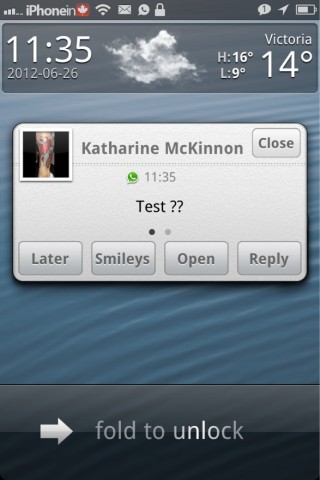
The jailbreak community is always coming up with great new ways to use our iPhones, iPod Toucches, and iPads. If you jailbreak your iDevice, you may be familiar the SMS app, biteSMS. This app can replace the default iMessage app to bring much more functionality. One of the great features of biteSMS is the “Quick Reply” feature. This feature allows you to reply to your text messages from anywhere in iOS, without leaving your current app. Depending on how your notifications are set up, you can quickly reply to a text right from the pop up notification. If you just have your notifications set to “Banners”, then tapping the banner will invoke to pop up, and you can reply right there.
The creators of biteSMS have now brought this quick reply functionality to the poplar messaging app “WhatsApp“. This has been in beta for a while, but “Quick Reply for WhatsApp” has been officially released. It works exactly the same as biteSMS’ quick reply and is seamless, feeling native to iOS. This is no icon installed, but you can adjust your settings in the Settings app.
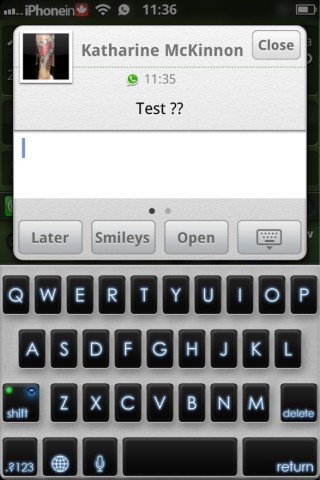

WhatsApp Messenger is an App Store app that has over 50 million users across multiple smartphone platforms. Quick Reply for WhatsApp is a tweak that allows you to quickly reply to incoming WhatsApp messages.
Simply install and when you receive a WhatsApp message you can reply from anywhere (lock screen, home screen etc) using the Quick Reply pop-up window.
It works seamlessly, it’s convenient and quick. Give it a try today!
There is no app icon, so please refer to the Quick Reply for WhatsApp section in Apple Settings.
It’s FREE for the first 7 days, so try it out and if you like it, support us and buy a copy!
Note: iOS 5 only.
Quick Reply for WhatsApp is available in Cydia now, in the Big Boss repo. It comes with a 7 day free trial, and then it is just $1.99 to purchase a full license. You can purchase a license right from the settings.
Want to see more of our stories on Google?

P.S. Want to keep this site truly independent? Support us by buying us a beer, treating us to a coffee, or shopping through Amazon here. Links in this post are affiliate links, so we earn a tiny commission at no charge to you. Thanks for supporting independent Canadian media!


Hi, how did u get this keyboard theme ?
Color Keyboard tweak. Then add the PhatbookAir theme.
For 1.99$ for one year per device and the devs offer superb support. (contacted them minutes ago and i had prompt replies) these guys can take my money 🙂
Can’t seem to find it in the Cydia Store???
Great Tweak, only thing that sucks is that the $1.99 is only for a 1-year license……. Not too sure why they can’t just give us the full licence…..the app itself it only 0.99 😛
what font is this you’re using?