Instagram Tests 90-Minute Horizontal Videos in Push Against YouTube
Instagram is testing 90-minute horizontal videos and a new 'Features' option to help creators share long-form content on the platform.
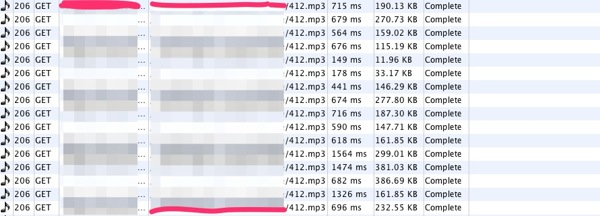
Remember all those mysterious cases of data overages caused by a bug with iOS 6? Turns out some concrete evidence has determined one victim causing the data leak is Apple’s Podcast iOS app (which many users suspected), which is affected by a bug in iOS 6’s AV Foundation framework, as detailed in tests by PRX Labs (via The Next Web):
What you can see is that the first 2 bytes of the file (in most cases, this will be ID, as in ID3) are downloaded in one request and then what appears to be the file being downloaded multiple times on iOS 6 and only once on iOS 5. (This appears to be an artifact of the way that Apache logs range requests, and we have reason to believe that the file was not downloaded many complete times, but there are still clearly problems.)
Following this, we set up a proxy so that we could watch requests as they were coming from the app. The player appears to get into a state where it makes multiple requests per second and closes them rapidly. Because the ranges of these requests seem to overlap and the requests themselves each carry some overhead, this causes a single download of an MP3 to use significantly more bandwidth than in iOS 5. In one case, the playback of a single 30MB episode caused the transfer of over 100MB of data.
Boom.
How to fix this data over Wi-Fi bug? PRX Labs notes they were unable to see the bug in iOS 6.0.1, which was released last week. So if you are suffering from the data leak over Wi-Fi, update to iOS 6.0.1 if you haven’t already. Or, just delete the Podcast app.
Anyone out there still dealing with data over Wi-Fi issues in iOS 6?
Want to see more of our stories on Google?

P.S. Want to keep this site truly independent? Support us by buying us a beer, treating us to a coffee, or shopping through Amazon here. Links in this post are affiliate links, so we earn a tiny commission at no charge to you. Thanks for supporting independent Canadian media!

While Apple somewhat fixed it, they didn’t fix it completely. After this update I had one day of no issues, but the next day I started a download for a 35 MB podcast and it stopped at 30 MB and failed. There was no resume button at all so I would of had to download the full 35 MB again.
I now use Downcast and it was worth it. Full control over automatic downloads, how many episodes to keep, etc. These settings can be global or specific to each subscription. The best part though is you can resume paused downloads so you won’t run into the issue of downloading 30 MB and having to re-download the entire podcast.
I updated to 6.0.1 when it was first available, then had the issue. since then i have deleted the podcast app and turned off cell data (about 2 weeks now). I haven’t lost any more data since then, but my iPhone 4 keeps asking me to re-enable cellular data to get emails even when I am on wifi.
I’ve noticed since jumping to 6.0.1 that the Podcast app has been MUCH lighter on my data plan, though I’ve been using it less over 3G for fear of hitting my cap. So far so good though.
The podcast app cost me $100 in overages from Rogers. I have a 6 gig plan and went over in August & September. Since I have deleted the app, I havent gone over 1 gig. I am now using downcast and am very happy.
I just talked to Rogers, it cost me $35 in overage charges. I average 3-4 GB a month and last month I went over by 175 MB. Really disappointing that Apple’s mistakes keep getting more costly.
My wifi will not stay connected. Other devices no problem.
What a bloody mess.
Wi-Fi on iPhone 5 w/ iOS6/6.0.1 has molasses slow speed as documented by thousands of posts in Apple’s support forums or MacRumors support forums. I have an appointment at the genius bar on Friday afternoon, going on my 3rd iPhone in less than two weeks. Apple hasn’t publicly acknowledged the problem, apparently if you keep changing out the iPhone eventually you get one with good WiFi components. Unknown if this is hardware and/or firmware related. Apple support knows about the slow WiFi problem, now Apple has to publicly acknowledge ‘WiFi-gate’ and correct the problem. Following on the heels of ‘Scratch-gate’ the iPhone 5 is turning out to be one heck of a bad release.
got a refund from Rogers for data roaming data leak..
If it was under 50$ I can understand as it seems to be their limit.. I’m still fighting as my data usage was more than 100$ due to that specific issue (which I reported on Oct. 3)
I’m calling back today but will now talk to retention as talking to the manager didn’t improve my satisfaction at all.. next step is to complaint to the Office of the President, CRTC, CCTS and more..
There is more people now complaining on their own forum (the community forum) which is good;
http://communityforums.rogers.com/t5/forums/forumpage/board-id/Apple_Devices
But they still argue they are not aware of any issue.. they told me it would need to be a national issue for them to receive any information on a specific issue etc.
What did you say to get your refund? Are Rogers reps now aware of this data leak issue? Last time I spoke with a rep about a known physical issue with new iPhone 5’s they told me they didn’t go off Internet rumours and could not do anything unless they received notice from Apple.
I figured the same would happen if I called in about the data, so interested in seeing what people are saying to get a refund.
WORSE WIFI EVER!!! I just got my iphone 5, updated to iOS 6.0.1…WIFI is STILL CRAP!
I downloaded and used Podcast App for the 1st time on November 3rd,
I downloaded 4 audio file (350MB) over 3G.
The next morning I noticed my phone was dead battery died overnight, when I
plug it in to my laptop I had the following messages from Rogers (sent to me
overnight):
1.
Your 6G data plan has reached 80%
2.
Your 6G data plan has reached 100%
3.
You have now incurred $50 in overage charges.
4.
You have now incurred $100 in overage charges.
For the past 3 years my 6Gig plan has never hit more than 2G’s in one month.
I immediately called Rogers and talked to at least 5 different people trying to
find the source of the issue.
When I spoke to the Technical Support rep he stated that he saw a pattern of
multiple data packets being sent to my phone during the hours of 12:00am and
6:00am all with 2.5 – 3 Gigs worth of data.
While talking to him I received yet another text message from Rogers this
time stating that I’ve no incurred $500 worth of overage charges. From 12:00am
until 3pm my data plan went from 1.1G’s used to 28.8Gigs.
I ended up talking to a supervisor that put me on an unlimited plan for the
month to avoid getting the $500 charge. If you see this call rogers right
away!!
I removed Ipodcast and I haven’t seen a spike in my data usage since. To this
day I’m still not sure what really caused that much data to be pushed to my
phone.
Wow. That’s crazy.
The key is to NOT subscribe to any podcasts.
I noticed the podcast app was draining my data right away, as it ate up 100MB the first day despite having downloaded the podcast episodes over Wifi and turned off the “use 3G” option in the Podcast app. Once I unsubscribed from all podcasts and downloaded them manually from within the Podcast app, everything was fine. A little more work, yes, but I can still use Apple’s Podcast app and not have to purchase a third-party app.
Funny, I can’t even get that far with the app. All it ever does is crash whenever I open it. Too bad too because it was great when it worked.
I believe I started experiencing this problem over the weekend with AT&T as my provider here in the US. I have an iPhone 4, with the latest iOS (6.1.3).
I would love people to add to this thread on Apple’s support community:
https://discussions.apple.com/message/21945460?ac_cid=tw123456#21945460
I am curious to know if there are enough complainants to compose a class action.