Twitter added an option for login verification to user accounts yesterday, to further increase security. What this means is once activated, every time you login to Twitter a secondary check will be performed to ensure it’s really you.
You will be asked to enter in a six digit code sent to you via text message to verify your login, essentially a form of two-step authentication we’ve previously seen from Google, Dropbox and Apple for iCloud users.
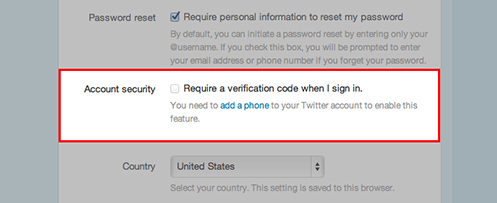
How to activate login verification? Go to your account settings page and tick off the box in the Account Security section beside “Require a verification code when I sign in.”
Check out the video below:
If only Twitter had used a native app like Google Authenticator to integrate this. If you in an area without cell coverage and need to login to Twitter on the web, you’ll be out of luck in receiving your text message code.
Twitter for Mac updated with Notification Center Support
Guess what? Looks like Twitter for Mac isn’t dead just yet. An update was released yesterday to bring Notification Center support for @ replies and direct messages. You can find this update in the Mac App Store.
Let us know if you’ve enabled two-step authentication for Twitter.




Maybe in a years time this will be standard procedure, seems to be a excessive amount of account hijacking lately…. so what happens with the data base of phone numbers they’re about to grow though? Does it say anywhere kept confidential?
I’m assuming phone numbers would be also held private according to Twitter’s privacy policy, but you never know when you release your number to any organization.