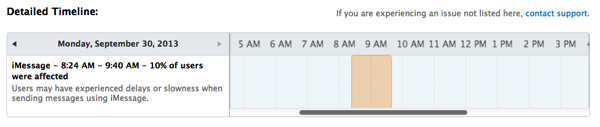
Despite Apple’s iCloud System Status page showing an issue with iMessage earlier this morning related to delays or slowness of messages being sent, the problem has persisted throughout the day for many people including yours truly.
The problem actually has been this way since late yesterday. Sending messages from my iPhone 5 has been a total fail. But replying to messages on my Mac has worked.
How to fix this issue of iMessages not sending in iOS 7? According to some troubleshooting by other people within Apple Support Communities, resetting your network settings on your iPhone can fix this bug.
We just tried it and it has solved our iMessage woes. We can now send messages over Wi-Fi and the Fido network. This may work for you too–here’s how to do it:
Update: before attempting this, try a quick reboot of your iPhone first to see if that fixes the iMessage bug.
Warning: resetting network settings means you’ll lose all your saved Wi-Fi hotspots.
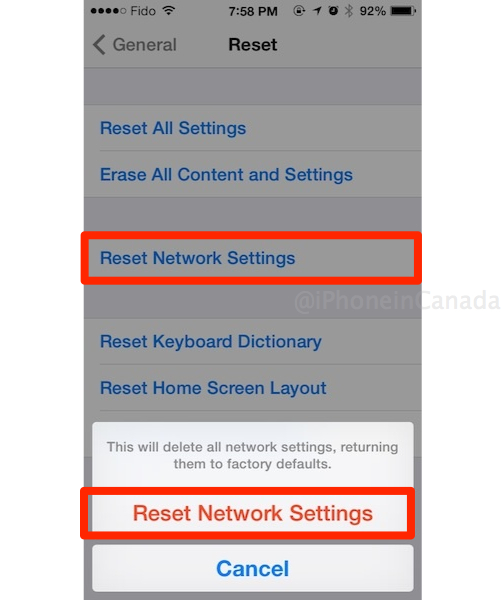
Step 1. On your iPhone or iPad, go to:
Settings > General > Reset > Reset Network Settings

Enter your passcode and agree (if applicable). Your phone will quickly reset network settings (Apple logo, progress bar).
Step 2. Go back to iMessage and test out the results. Your messages should now send.
If that didn’t work for you, try toggling iMessage on/off and re-signing back into your iMessage account. Try a phone reboot too.
Did this quick fix work for you? Share your other solutions in the comments!



I just did a hard reset of my phone. It works fine now. Fingers crossed.
I restarted my phone, and it worked again.
Restarting my phone worked but then it happened again 24hrs later
I’ve had to reboot the 4S twice.
Turning off iMessage, waiting a bit, then turning it back on (no Reset Network Settings necessary) worked for me.
Tried resetting the network settings and rebooting the phone. The problem still persists.
Had the same problem Sunday evening with only one of my contacts. Rebooting my phone solved it and haven’t had problems since. I noticed in my settings that send as SMS if iMessage fails was disabled, I can’t recall if this was a setting in iOS 6 but it’s a good idea to enable it as backup.
All I did was a hard reboot & it seems to work ok…. I had to do it 2 days in a row; however, small price to pay compared to reseting all of the network settings.
All I did to my phone and friend/family’s with same issue is turn off iMessage and FaceTime. Reboot phone. Went back to settings and iM/FT were “waiting for activation”. A few moments later, it was activated and the problem is solved.
I had the same problem. I thought it was due to the fact that I switched sim cards (i.e. Fido-TMobile-Fido) over the weekend. Usually have the problem during those scenarios. But seems there indeed was a problem this time. I tried network reset, did not work. For some reason, single reboot didn’t fix it. The second time, it did. Working a okay for now.
I was having this issue on my iPad. Did a reboot and it’s working again.
i just turned off iMessage or did a force send. Texts are unlimited anyways on most plans.
It only happen to me on fido. Wifi was fine
Just restarted and now working
Nothing for me at all. I tried changing the DNS, restoring, wiping the network, turning iMessage on and off, nothing :/ it’s been a couple days now