The introduction of the $99 US Amazon Fire this week came with a voice search feature built into the device’s remote control, allowing users to search without typing.
Apple TV users can actually already do this—not by using their remote, but rather the Remote iOS app, which many of us already use to type easily instead of pecking away with the directional buttons.
Kirk McElhearn reminds us of a cool tip: voice search on Apple TV is already available by tapping the dictation button on your keyboard with the Remote iOS app. This allows any user (with an iOS device of course) to use voice search on their Apple TV easily:
But you can already do this with the Apple TV; not with its own remote, but with the iOS Remote app. Open the Remote app, tap on your Apple TV, and you will be able to control it. If you go to a search field, you can dictate into your iPhone, iPad or iPod touch, instead of typing.
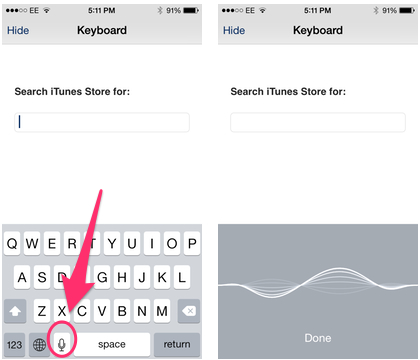
Of course, Apple’s voice search method for their Apple TV isn’t widely publicized as a ‘feature’, but for those who haven’t tried this yet, it will work most of the time as long as you are speaking clearly into your iOS device.
It would be handy to have Siri’s dictation feature built into the remote instead of always grabbing your iOS device. Let’s hope this comes in the next Apple TV update, right? We can already setup an Apple TV easily by ‘touching it’ with your iOS device.
Apple CEO Tim Cook revealed in February their ‘hobby’ had over $1 billion in sales in 2013.



The microphone icon doesn’t appear in Remote on my iPhone 4 with iOS7.
That’s because Siri is only available on the iPhone 4S or newer.
Ah, thanks for clearing that up. I have dictation search capabilities through other apps – e.g., Google search. Wasn’t entirely clear from the article that this work-around required Siri.
No problem 🙂
I see no “IOS Remote” app in the app store. The only one I see is an app called “remote” and it gets horrible reviews.