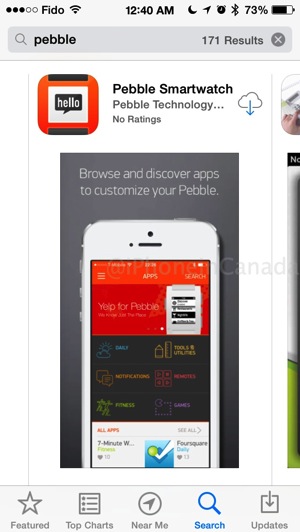
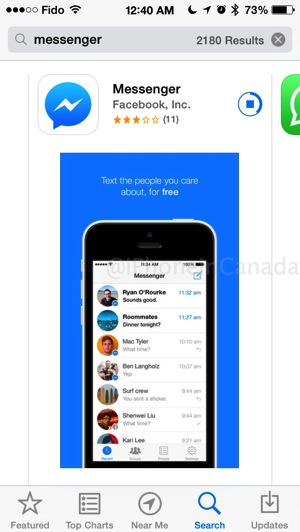
After a recent iCloud restore to iOS 7.1.1 on my iPhone 5s (err, I may have downgraded from iOS _ beta 1), all my apps re-downloaded and everything looked fine as usual. Well, that was until some of my regularly used apps couldn’t be found when I tried to look for them, such as the Pebble and Facebook Messenger apps.
No problem, I’ll just reinstall them via the App Store. But even after that, they wouldn’t open, despite showing installed. Deleting them wasn’t an option since they couldn’t be found on any screen or folder. How to fix the problem of installed apps that won’t open and can’t be deleted?

The problem:
- Apps you frequently use are no longer found on your iPhone, not available even in Spotlight searches
- After re-downloading them from the App Store, they still aren’t shown and can’t be launched, even though there’s an ‘Open’ link in the App Store
The solution:
You can still delete these apps via the Settings menu on your iPhone.
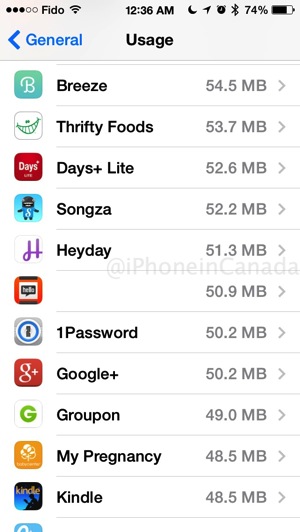
Just go to Settings > General > Usage, then wait for the list of installed apps to appear (this may take a while)
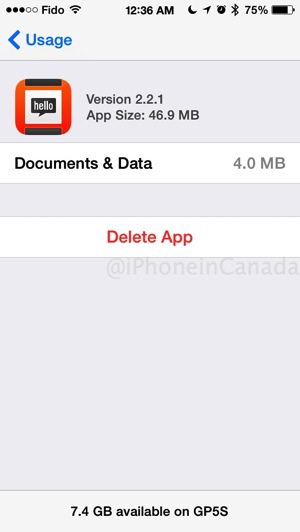
Once the list populates, find your app, tap on it and then choose ‘Delete App’. Note in the screenshots below, something was definitely wrong as the Pebble app’s title wasn’t showing up properly in the apps list.
I rinsed and repeated these steps for the Facebook Messenger app, then proceeded to reinstall them again via the App Store. Voila, these apps returned and were able to open as normal.
It appears during the iCloud restore, some sort of hiccup occurred and the apps did not completely finish installing on my iPhone 5s. If you’ve run into this problem before with apps gone ‘missing’ on your iPhone, let me know if this solution worked for you.



Thank you! FB messenger had gone missing on my new iphone5 c! This worked so thanks for the help 🙂
Cheers 🙂
Very useful and valuable tip. Thanks.
For whatever reason, this still didn’t work for me =/ Any other suggestions?
AWESOME! In iPhone 6 you just have to go one more step: Settings>General>Usage>Manage Storage and then select your app and delete it!
I have tried the following
Settings>General>Usage>Manage Storage
However I do not get the option for delete!!! i am getting Documents & Data!!!
Any other way of doing this??
Have the same problem in my iphone5. Tried to do the same ie. delete it from the iCloud Usage Storage. But I went to check it again the Facebook app is still there. Done this many times to no avail.
this didn’t work for me.. any other way to do it?
What if the app doesn’t even show up in the usage page? What then?
My Instagram app doesn’t even show up when I go to Settings>General>Usage>Manage Storage so I can’t delete from there either 🙁
my apps are still in settings but only app on homescreen is facbook
Even though I deleted the app that went missing for me, I couldn’t download it again off the App Store. The little cloud with the blue arrow was dimmer than usually indicating i could download normally showing up due to incompatibility with my phone. The app that disappeared is like my life and I have to use the website now and I don’t now how to fix it..
I deleted the app but then the app store wouldn’t let me redownload it…
What do I do now??