
Apple’s AirPort Utility App is Being Removed From the App Store
Apple warns that "functionality is not guaranteed" when using AirPort Utility on iOS 27 or later.
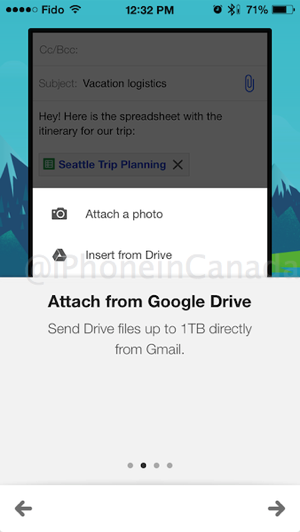
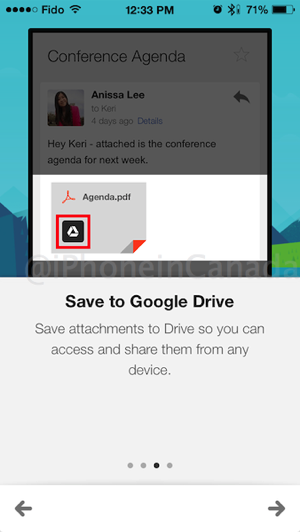
Gmail for iOS has received a significant update today to allow Google Drive integration and better account management. You can now save files to Google Drive directly and also send files up to 1TB in size.
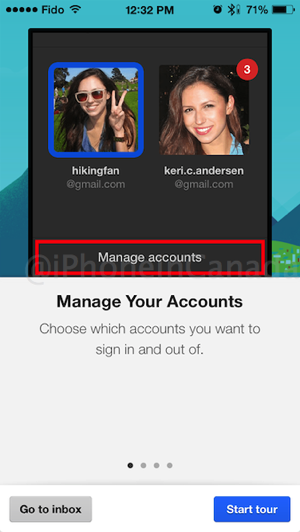
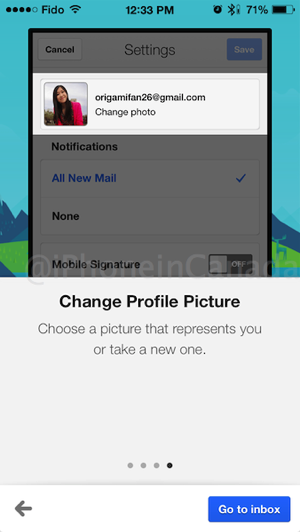
Also new is easier account management, which now lets you toggle accounts on and off, plus you can now change your profile picture in Settings. The toggle feature for accounts is brilliant when you don’t want to receive notifications for certain accounts.
What’s New in Version 3.14159
• Save attachments directly to Google Drive so you can access them anywhere while saving space and bandwidth on your device
• Insert Google Drive files directly into messages
• New account management options to choose which accounts you want to have visible in Gmail without removing accounts from your device.
• Change your profile picture (in Settings)
Below are screenshots from the Gmail app after the update, showing you exactly how to take advantage of these new features:
Back in March, Gmail for iOS version 3.0 added background mail refresh and integrated simplified sign-in. Gmail for iOS continues to get better and this integration with Google Drive now makes it even more powerful to save and send files on the go.
Click here to download Gmail for iOS—it’s free.
Want to see more of our stories on Google?

P.S. Want to keep this site truly independent? Support us by buying us a beer, treating us to a coffee, or shopping through Amazon here. Links in this post are affiliate links, so we earn a tiny commission at no charge to you. Thanks for supporting independent Canadian media!

