
iPhone Duo Faces Benchmark Challenges from Android Foldables
Network testing data shows Apple’s new iPhone Duo faces steep benchmark challenges as Android foldables run hot and push hardware limits.
So what did you think of Rogers’ NHL debut last night? It was definitely a throwback seeing and hearing former longtime TSN broadcaster Paul Romanuk call the Canucks game (he was smart to delete his Twitter account).
Anyways, the NHL app on Apple TV was updated yesterday to enable Rogers customers to sign-in to access GameCentre LIVE. After opening the NHL app, navigate to the settings page where the sign-in will prompt you for your My Rogers Username or email address to access GameCentre LIVE:
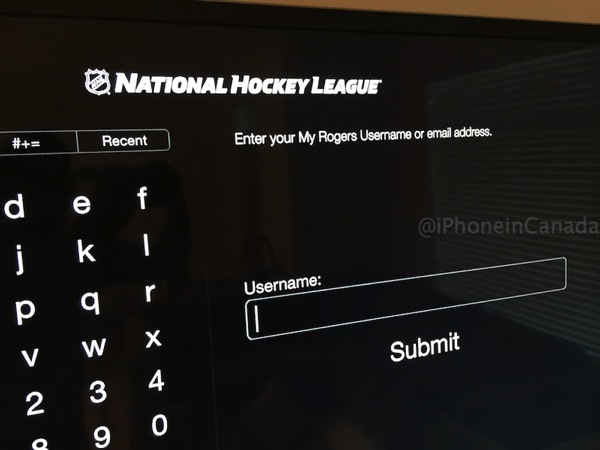
@iPhoneinCanada Just signed into the NHL app on my Apple TV using my Rogers login. Taking advantage of the free promo until Dec 31.
— Murvin George (@swerve99) October 8, 2014
To access Rogers GameCenter on iOS devices, users need to download the official NHL iOS app, as the sign in for customers is found deep within the settings page.
Last night also saw the on-air debut of the new $4.5 million Sportsnet studio and a barrage of smiley Mark Messier promos getting customers to join GameCentre LIVE.
Here’s what Yahoo Sports columnist Chris Zelkovich thought of Rogers’ NHL debut yesterday:
To their credit, they gave fans a solid hockey broadcast with the occasional innovation thrown in. Some of it worked brilliantly, some of it not so much. But credit to Rogers for trying some new things and for not trying to reinvent the wheel. Fans can look forward to things getting even better as the season goes on.
No doubt the producer had to work hard to hold himself back from using the SkyCam, RefCam and POVCams every few minutes. They were used, but in moderation. The game looked like a hockey broadcast with a few tricks thrown in.
The new camera angles via ‘Game Plus’ shown sporadically throughout the game was pretty cool, particularly the RefCam (that is if it didn’t give you nausea on your big screen TV).
For those that signed into the NHL app on Apple TV, how did GameCentre work out for you?
Want to see more of our stories on Google?

P.S. Want to keep this site truly independent? Support us by buying us a beer, treating us to a coffee, or shopping through Amazon here. Links in this post are affiliate links, so we earn a tiny commission at no charge to you. Thanks for supporting independent Canadian media!


I used the US version using my US DNS server for $99.99 and it worked great. I could even access the ref cam which was suppose to be a Rogers exclusive. The iPhone app allowed to me access all the cams, the Apple TV app just streamed the game.
I would have used the Rogers one but I never got a promo code and apparently my corporate plan isn’t eligible for it… So it’s Rogers loss. NHL US gets my money.
Nice!
I got it cheaper than $99, connected to a Russian VPN and paid $75 USD, roughly $86 Canadian
Apple TV support isn’t working. Our Apple TV app was not updated to reflect Rogers involvement for the start of the new season, although it now does appear to have been updated overnight. That’s not to say that it works. It doesn’t. I purchased the new season a few week’s ago to take advantage of the $179 pricing. Now, when entering userid and password we receive a message that our NHL credentials are not found. The error is confusing since it seems like the NHL is rejecting the information but we are using Rogers’ information. After 30 minutes on hold trying to reach customer service/support. I gave up. I feel like Rogers just stole $179 out of my pocket!! Sad. Such a super product last year directly from the NHL as it worked flawlessly. Now Rogers has f*ucked it up completely!! Any suggestions??
Hmm…I checked our Apple TV and it showed the image above. Did you already try a reboot or updating the software?
I have the same screen as shown above. The problem is when I enter my userID/password it is rejected and the message just says NHL — that is no reference to Rogers.
I Can use my logon credentials on my laptop and that works fine. But, this was purchased for the Apple TV connection to our very large TV screen. Worked perfectly last year. Useless now.
As a last attempt try restoring your Apple TV?
Try changing your Rogers password to something without special characters (or with different ones). I’ve had issues with that with certain ones on the Apple TV before for some reason, but I don’t recall which characters were problematic. Worth a shot.
If you aren’t seeing the “Enter your My Rogers username” prompt shown above, check that you’re not using any third-party DNS. I had to remove the one I was using, revert to my ISP one, and reboot before it worked. You can put it back after you sign in if you want. It will stay signed in even if you reboot.
You’re right. I wasn’t seeing it either. I rebooted the Atv and that worked.
Definitely buggy. Some games are greyed out on AppleTV, but work fine through nhl.com -> Rogers. Sometimes they become available midway through the game, which is equally frustrating. AppleTV also drops out with an error quite a bit more than my laptop, but both have their ups and downs in terms of quality. Good when it works, and frustrating when it doesn’t.