
You Can Now Jailbreak iOS 16.4.1 with Palera1n 2.0.0 Beta 6
Codenamed Bakepale, the latest v2.0.0 beta 6 update to jailbreak tool Palera1n has just been released, which fully supports iOS 16.4 - iOS 16.4.1 jailbreak.
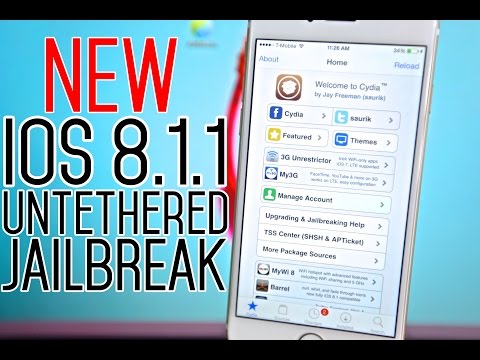
Today, a team of Chinese developers released a jailbreak that works with iOS 8.1.1. Musclenerd, a developer behind several jailbreak tools, has confirmed that this is a legitimate and safe jailbreak.
Looks like TaiG just released a jailbreak for 8.1.1 (and 8.0,8.1,8.2beta). Best to wait a few days just in case http://t.co/792Vx6cJhF
— MuscleNerd (@MuscleNerd) November 29, 2014
The new untethered jailbreak solution is called TaiG and supports any device running iOS 8.0, 8.0.1, 8.0.2, 8.1, 8.1.1, and the latest 8.2 beta. Currently the jailbreak solution only supports Windows, however, you can run it on a Mac using a virtual machine.
Before jailbreaking your device make sure you have backed up your device to iTunes, you are running iOS 8.1.1 (recommended), and you have removed any passcode (including Touch ID) from your device. In order to jailbreak your iOS device using TaiG, follow the step by step guide below.
Step 1: Download TaiG for Windows.
Step 2: Right-click the application on your Windows machine and select “Run as Administrator”.
Step 3: Plug in your iOS device and wait until the jailbreak tool recognizes it (this step may take a few minutes).
Step 4: Uncheck the box under Cydia to avoid the installation of TaiG’s app store.
Step 5: Click on the green button at the bottom of the application window.
Step 6: After the jailbreak completes, your device should reboot and the Cydia application should be added to your home screen.
Step 7: Launch the Cydia application. On the first launch the application may take a while to set up and your springboard will reboot (this is normal).
Step 8: Your iOS device is successfully jailbroken.
Even though this jailbreak currently works with iOS 8.2 beta, Apple will probably patch the exploit before iOS 8.2 is released to the public. Will you be jailbreaking your device running iOS 8.1.1? Let us know in the comments below.
Note: Jailbreak your device at your own discretion. Jailbreaking your iOS device will void any warranty you have with Apple. The jailbreak team along with some users who have tested the jailbreak claim it is safe, however, since the jailbreak is not open source your privacy and security may be compromised.
Want to see more of our stories on Google?

P.S. Want to keep this site truly independent? Support us by buying us a beer, treating us to a coffee, or shopping through Amazon here. Links in this post are affiliate links, so we earn a tiny commission at no charge to you. Thanks for supporting independent Canadian media!


Not sure how a Chinese hack is safe.. no thanks.
people said the same about Pangu
And I still don’t trust Pangu
And that’s yet another reason why you’ll be considered clueless from here on out. Lol
Been jailbreaking since the 3G, When seasoned developers do not trust a group, and then later say ” well if you don’t want to wait, then maybe” then I just stay away from said jb
MuscleNerd, a respected hacker in the jailbreak community, has confirmed that the TaiG iOS 8.1.1 jailbreak is safe. -iClarified
“Nothing
too unsettling with that TaiG JB…just some light device
fingerprinting. To see that, create an empty debuglog.cfg file next…”
None of the jailbreaking tool is safe in the beginning no matter what country it is from since they are all third parties. So I don’t see your point.
because since the only security issues that have come about in JB have been their third party apps stores and not Cydia. As well as the fact of the Chinese government actually trying to actively hack their citizens devices. Who knows what the motivation of these hackers are. There are dev teams with actually consistent track records, and a community that is trusted. These guys are not part of it.
So are you saying nobody can join the community? They are bringing a well developed tool to the public. If there is something embedded, it will be found. You’re looking at things from am pretty close-minded perspective.
That guy looks at everything with a no mind perspective. Is just ignore him.
Not sure what a no mind perspective is, I guess it was lost in translation.
of course people can join the community, I am just saying these guys aren’t part of it yet, and haven’t be “vetted” yet. They my be over time. Still, Pangu had lots of problems with it, and if they are using similar exploits there could be the same problems as well.
Community this and that. I think that’s just a bunch of fanboy’ish paranoid BS.
Any problems are always outed within the first week of release, bugs fixed, and several revisions released. So rule of thumb is always best to wait at least that long. With millions using, and devs ripping it apart daily, sniffer testing, any suspicious activity easily gets blasted out to the public, and fixed.
Because if it’s from China, it must automatically be bad and ‘not safe’. #ignoranceatitsfinest
MuscleNerd has already confirmed it’s safe. So Jailbreak away!
Well, the pangu jailbreak was pretty much a joke for iOS 7x. I would never trust these China hackers or whatever you want to call them….the same with the One Plus One Android device as well.
Well since China is communist and we hate comunism, this jailbreak is not safe. Sent from my iPhone made in China.