A neat little trick discovered by a reddit user today (via MacRumors) lets you use the Digital Crown on your Apple Watch to emulate the iPhone’s volume buttons, and use it as a remote shutter to take photographs with third party camera apps on your iPhone like Snapchat, Camera+ or Manual. To achieve this, here’s what you need to do:
Step 1:
Make sure your iPhone and Apple Watch are paired.
Step 2:
Open a compatible camera app on your iPhone, such as Camera+.
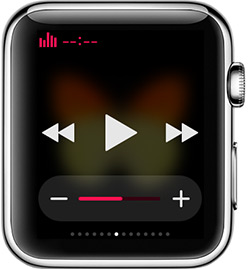
Step 3:
On your Apple Watch, open up the Music Glance by swiping up from the watch face view.
Step 4:
Now when you turn the Digital Crown, it will cause the camera to take a photograph, just like pressing on the iPhone’s volume button would do. The technique works within the Music app itself as well.
That’s it, you can now use your Digital Crown as a remote shutter for your favourite camera apps on your iPhone. Enjoy!



Great tip! Always want to remote control other non native photo app from the apple watch and this works.
You were just mentioning this the other day!
What other apps would this work with?
Camera+ for example. Any app that supports volume up as a shutter.
I thought it did this with the native camera anyway? Has anyone tried it?