
Twitch Facing Backlash as Amazon Uses its Content to Train AI
To opt out of allowing Amazon to use your content to train AI models, toggle the 'Training for Generative AI' option within your profile settings.
When you upgrade to iOS 9, one of the first few things you notice is that the keyboard now has all letters in lowercase when you’re typing in lowercase and only become uppercase when Shift or Caps Lock is engaged, as opposed to previous versions where the keys would remain in uppercase all the time. It seems that a number of people, including Daring Fireball’s John Gruber, find this change a but confusing. Luckily, there’s an easy fix for it.
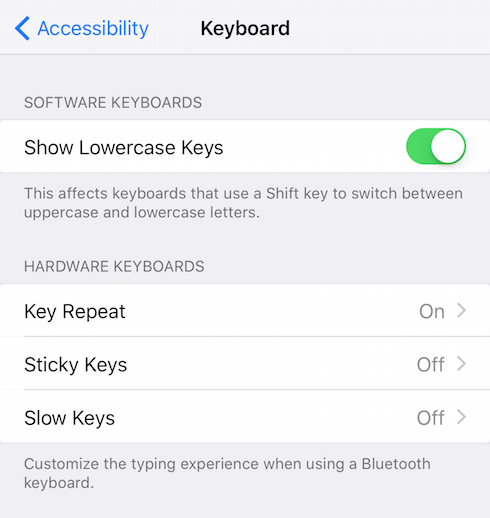
To turn off the lowercase formatting of the iOS 9 keyboard and go back to the way your keyboard was before the update, here’s what you need to do:
Step 1:
Go to Settings on your iPhone or iPad device running iOS 9.
Step 2:
Now instead of going to General > Keyboard, you need to go General > Accessibility > Keyboard.
Step 3:
Now simply toggle the “Show Lowercase Keys” option.
That’s it, enjoy!
Want to see more of our stories on Google?

P.S. Want to keep this site truly independent? Support us by buying us a beer, treating us to a coffee, or shopping through Amazon here. Links in this post are affiliate links, so we earn a tiny commission at no charge to you. Thanks for supporting independent Canadian media!


Who, in his right mind, would want to do that?
Not I
Thank God you are sane, or, to the least, not epileptic! LOL
I do. What’s wrong with that? I write in caps so I prefer it in caps.